84 • seca 651/650
17-10-07-653-100_01-2020B
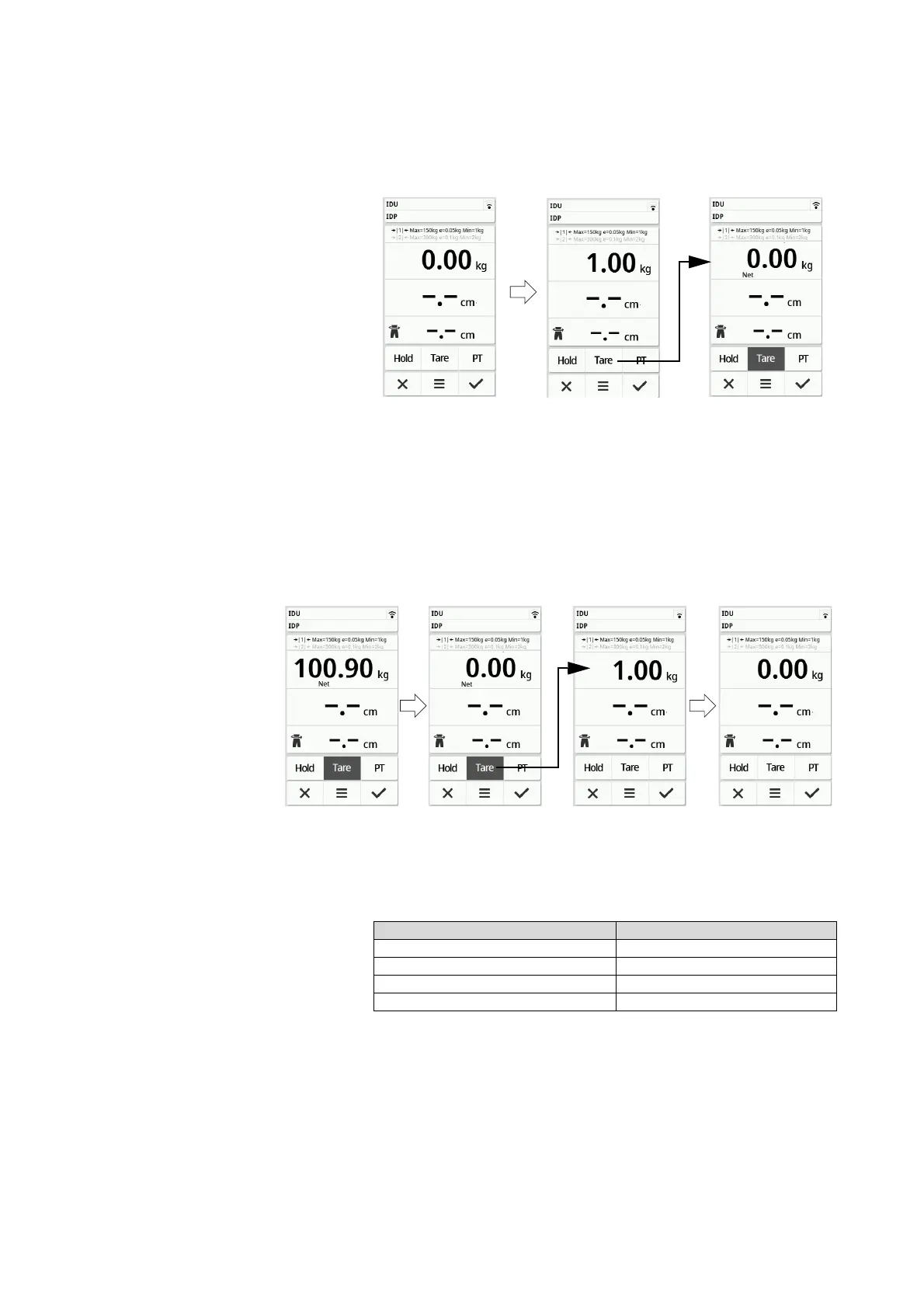
1. To activate the Tare function, proceed as follows:
a) Place an additional weight (here: 1 kg) onto the weighing platform.
b) Press the Tare key.
c) Wait until the value 0.00 and the message “NET” are displayed.
2. Weigh the patient ➔ Measuring weight, page 82.
3. Read off the measuring result.
The additional weight is deducted automatically.
4. To deactivate the function, proceed as follows:
a) Remove the weight from the weighing platform
b) Press the Tare key
c) Wait until the NET message goes off and the additional weight is
displayed
d) Remove the additional weight from the weighing platform
NOTE
The maximum weight which can be displayed is reduced by the
weight of the objects which have been tared.
Permanently displaying the weight
(Hold)
When the Hold function is activated, the weight is still displayed after the
weight has been removed from the scale. This enables you to attend to the
patient before recording the weight value.
1. Make sure that there is no load on the scale.
2. Ask the patient to step onto the scale.
3. Press the Hold key.
Device mode Function available
Basic –
Advanced •
Expert •
Service •



 To Next Page