86 • seca 651/650
17-10-07-653-100_01-2020B
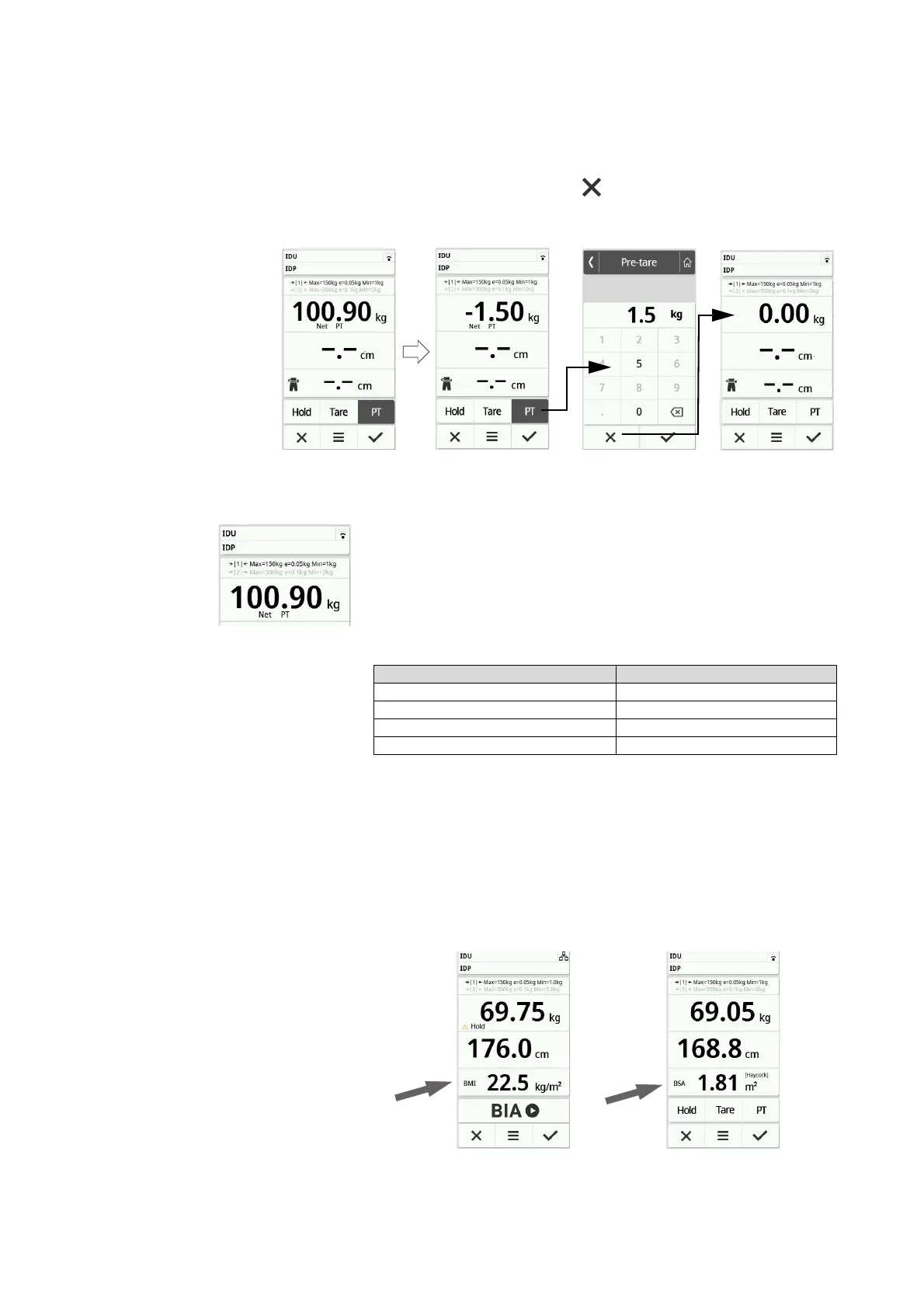
3. To deactivate the function, proceed as follows:
a) Remove the weight from the weighing platform
b) Press the PT key
c) Clear the value with the key
The set additional weight is no longer displayed.
The function is deactivated.
Automatic switchover of weighing
range
After the scale is switched on, weighing range 1 is active. If a particular weight
value is exceeded, the scale automatically switches to weighing range 2.
► To switch back to weighing range 1, completely remove the weight from
the scale.
Weighing range 1 is active again.
Automatic calculation of BMI or
BSA
The device automatically calculates the Body Mass Index (BMI) or the Body
Surface Area (BSA) according to its default setting ➔ Selecting BMI/BSA/
Waist circumf., page 91.
► Determine the weight and height of the patient.
►➔ Measuring weight, page 82
►➔ Entering the height manually, page 83
►➔ Using extended weighing functions, page 83
Either the BMI or the BSA is calculated automatically according to the
default setting.
Device mode Function available
Basic •
Advanced •
Expert •
Service •



 To Next Page