100 • seca 651/650
17-10-07-653-100_01-2020B
7.5 Factory settings
Overview of factory settings
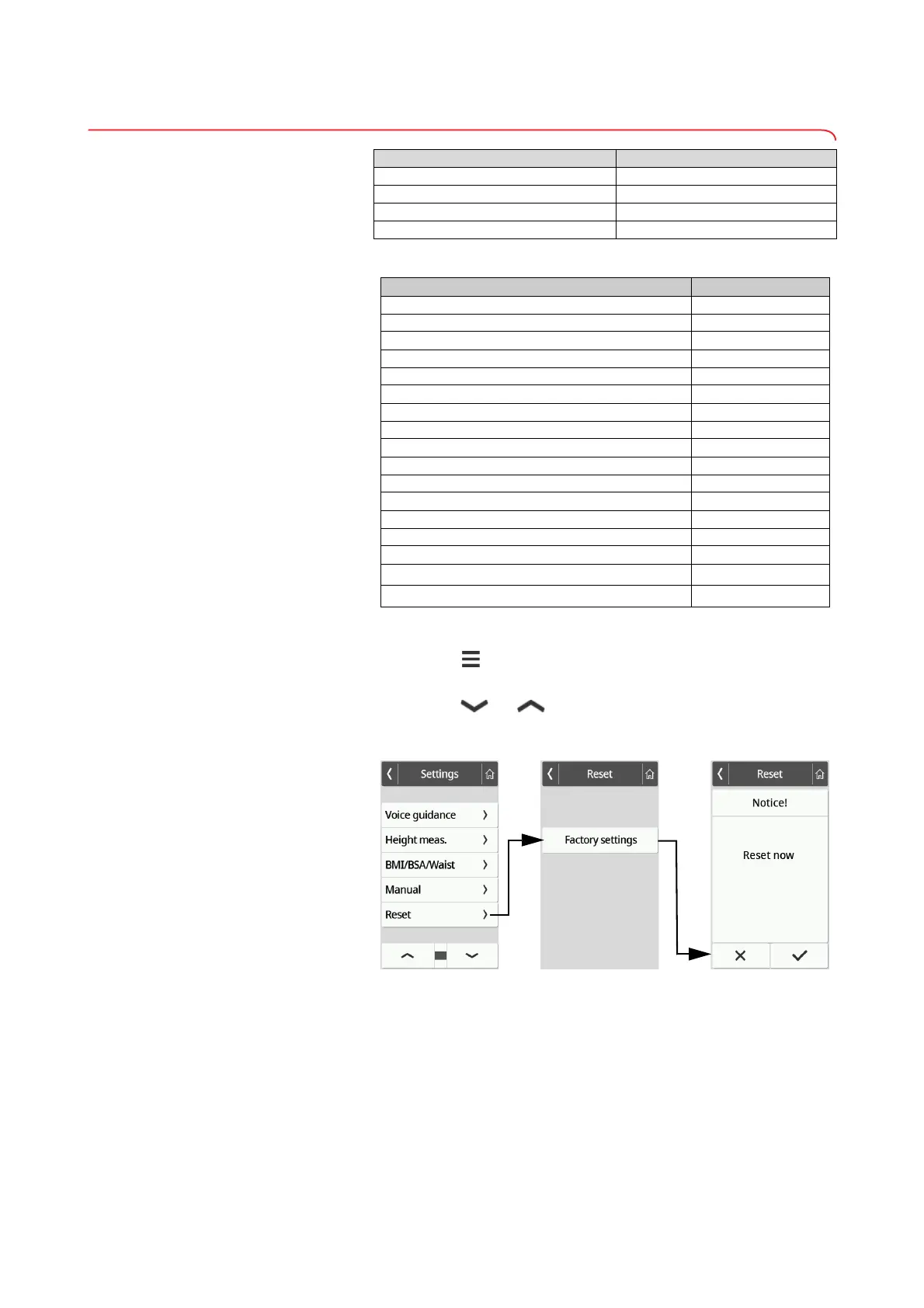
Restoring factory settings 1. Press the key.
The Settings menu is displayed.
2. Press the or key until the Voice guidance menu item is
displayed.
3. Press the Reset item.
4. Press the Factory settings key.
The device will be reset to factory settings.
The following network settings are not reset:
• Server address
•Server port
•WiFi
• Access point
5. Confirm your selection.
Device mode Function available
Basic –
Advanced –
Expert •
Service •
Function Factory setting
Hold Off
Tare 0 kg
Pre-tare 0 kg
Height 0 cm
Autohold Off
Device mode Expert
Autoclear 300 sec.
Filter Medium
Display: Language English
Display: Date format YYYY/MM/DD
Display: Standby Off
Display: Brightness Stage 7 of 9
BMI/BSA/Waist BMI
Units Metric (kg, cm)
Server address None
WiFi
a
a.Individual settings are not reset when factory settings are restored.
On
Access Point
a.
Off



 To Next Page