Troubleshooting • 103
17-10-07-653-100_01-2020B
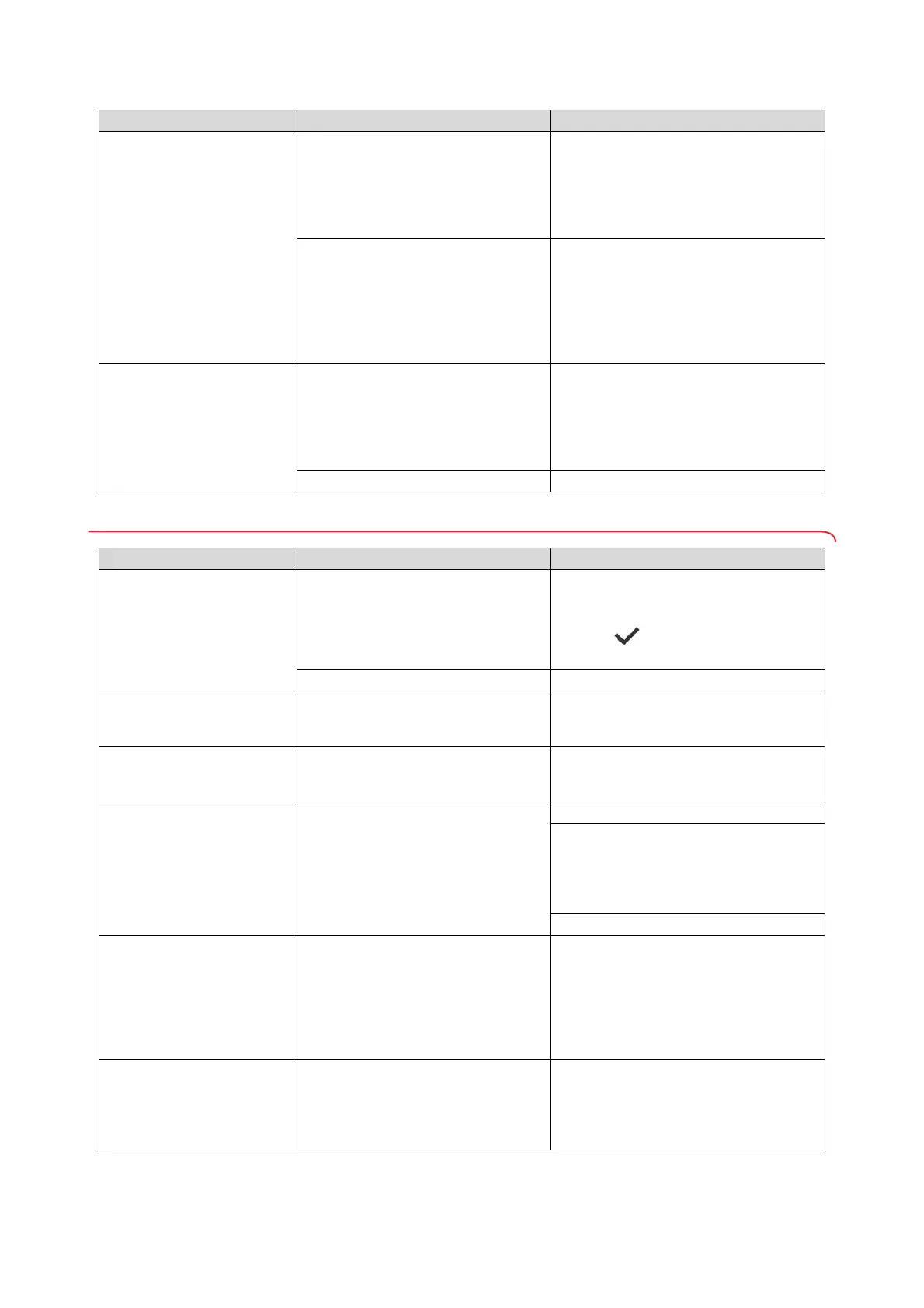
10.2 Measuring weight
Multifunctional display
does not react when keys
are pressed
Device is in an undefined state
following implausible inputs.
• Disconnect the plug-in power supply unit
from the socket
• Wait approx. 1 minute
• Plug the plug-in power supply unit into the
socket; the device and the multifunctional
display switch on automatically
With device combinations with a
standing aid and/or measuring rod:
Additional display connected
• Remove the second display
• Disconnect the plug-in power supply unit
from the socket
• Wait approx. 1 minute
• Plug the plug-in power supply unit into the
socket; the device and the multifunctional
display switch on automatically
Multifunctional display
remains dark after
pressing
Device is in an undefined state
following implausible inputs.
• Disconnect the plug-in power supply unit
from the socket
• Wait approx. 1 minute
• Plug the plug-in power supply unit into the
socket; the device and the multifunctional
display switch on automatically
Multifunctional display defective Inform seca Service
Fault/error code Cause Remedy
Displayed weight value is
implausible
Weighing electronics use outdated
zero point
• Remove the weight from the weighing
platform
• Press Weight display field
• Press key: Device restart
• Wait until main screen is displayed again
Weighing electronics defective Inform seca Service
Autohold
function cannot
be deactivated
Device is connected to a network
(intended behavior): Autohold function
is activated automatically.
If necessary, disconnect device from
network
001-272XX-XXX
to
008-272XX-XXX
Load cell or weight calculation module
defective
Inform seca Service
020-272XX-XXX
to
023-272XX-XXX
One corner of the scale has been
loaded excessively.
• Distribute weight evenly
• Disconnect the plug-in power supply unit
from the socket
• Plug the plug-in power supply unit into the
socket; the device and the multifunctional
display switch on automatically
• Inform seca Service
010-272XX-XXX
The scale has been switched on with
too high a load.
• Remove the weight from the weighing
platform
• Disconnect the plug-in power supply unit
from the socket
• Plug the plug-in power supply unit into the
socket; the device and the multifunctional
display switch on automatically
013-272XX-XXX
The scale was caused to oscillate and
was unable to determine the zero point.
• Disconnect the plug-in power supply unit
from the socket
• Plug the plug-in power supply unit into the
socket; the device and the multifunctional
display switch on automatically
Fault Cause Remedy


 To Next Page
 Loading...






