104 • seca 651/650
17-10-07-653-100_01-2020B
10.3 Data transmission
019-272XX-XXX
Ambient temperature too high or too
low.
• Observe ambient conditions for operation,
transport, and storage ➔ General
technical data, page 109
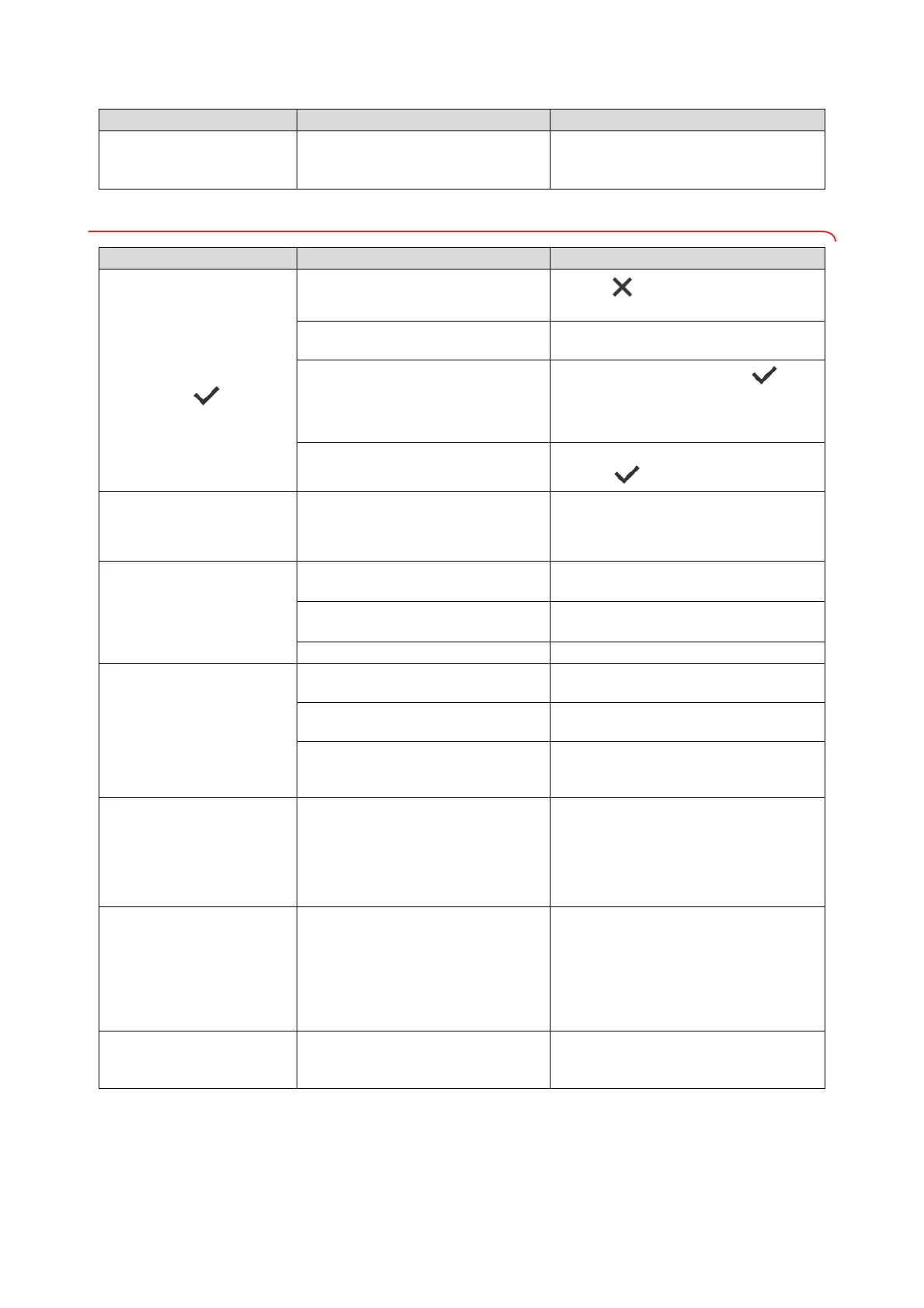
Fault/error code Cause Remedy
Fault/error code Cause Remedy
The “Date of birth” dialog
window appears after
pressing the key
Patient ID not scanned
• Press key
• Scan patient ID
ID scanning not set up
Check workflow settings for the device in
the
seca connect 103 software
Patient does not yet have a file in the
EMR System
• Enter date of birth and press key
again
• Create patient file in the EMR System and
assign measurement
Device is connected to the
seca analytics 125 software
• Enter date of birth
• Press key
Autoclear function: Entering
“0 seconds” is not accepted;
instead, the factory setting
(300 seconds) is suggested
Implausible input; switching off the
function is not intended in the factory
• Accept factory setting
• Manually enter value between 1 and 3600
seconds
Workflow LED does not
light up
No network connection
Set up network connection ➔ Setting up
network functions, page 95
WiFi function deactivated
Activate WiFi function ➔ Activating/
deactivating the WiFi function, page 97
Workflow LED is defective Inform seca Service
Workflow LED lights up red
ID was
not found in the EMR System or
the seca software
Create the ID in the EMR System or the
seca software
Device has not saved measuring
results to the clipboard.
Repeat measurement
The measuring results were not
submitted to an EMR System or
seca software.
• Repeat measurement
• Check WiFi connection
02-288XX-XXX No data transmission possible
Check network and workflow settings:
• Check network settings ➔ Setting up
network functions, page 95
• Check workflow settings:
seca connect 103 system instructions for
use
052-280XX-XXX Internal device communication error
• Disconnect the plug-in power supply unit
from the socket
• Wait approx. 1 minute
• Plug the plug-in power supply unit into the
socket; the device and the multifunctional
display switch on automatically
• Inform seca Service
420-280XX-XXX No connection to the server
•Check LAN cable
• Check network settings ➔ Setting up
network functions, page 95


 To Next Page
 Loading...






