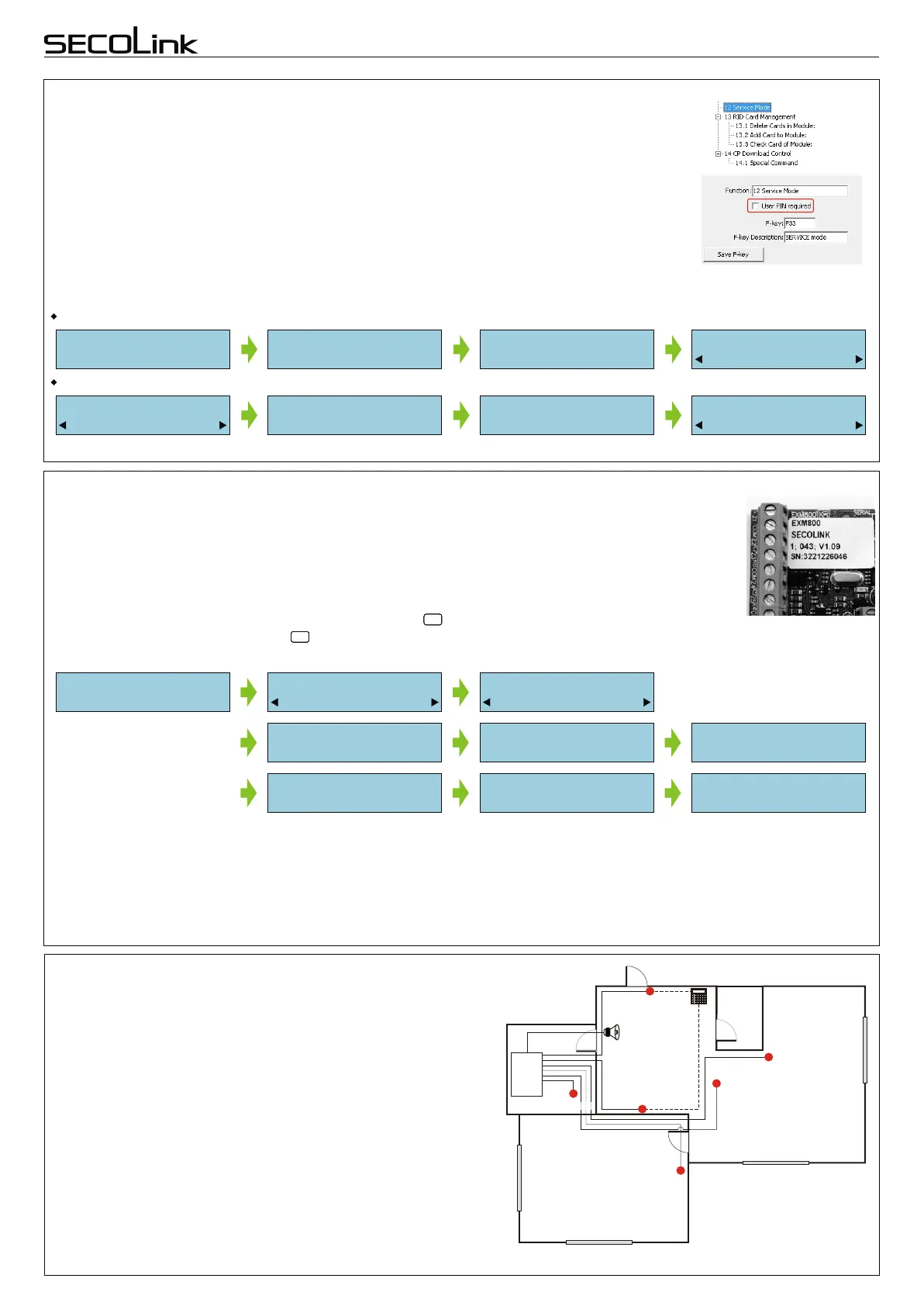
CHANGING THE SETTINGS. SERVICE MODE
For the installations with few partitions and more than 10 zones it is recommended to use
the PC and MASCAD software. For small installations it is quite efficient to change the
template manually by using LCD keypad. Changes are made in service mode when the system
is disarmed.
For the security reasons permission to access the service mode has to be given by the user
by entering user's PIN.
There is an option to set the system without the requirement to enter user's PIN for the
service mode access. To do this, you will need to modify the template (before installation) by
using MASCAD software. “User PIN required” check box must be cleared in F - key sheet
(see Fig. 2).
There are 2 ways to enter the service mode:
by F - key:
by navigating menu:
To start system setup use default PIN code of the first user - 0001, and default service PIN - 0000.
Fig. 2 MASCAD software,
F - key sheet
Enable Service:
User PIN:****
Service Mode:
ServicePIN:****
Service Mode:
System Setup
Main Menu:
Service Mode
F - key F33
SERVICE mode
Enable Service:
User PIN:****
Service Mode:
ServicePIN:****
Service Mode:
System Setup
STARTING A SYSTEM WITH 2 EXM800 MODULES
Control panels PAS808 and PAS816 support up to 7 modules on the system and the PAS832
supports up to 15 modules. If there are few modules in the system (two EXM800 or GSV2Ñ and LAN800
for example) with the same default address, these modules will not be registered during the first start
registration procedure. Green LED on module's PCB will make frequent flashes for 0.5 sec. and pause
for 2 sec. (indicating of no address).
In order to register the module an installer must enter service mode, type in 10 digit serial number,
which is on the module’s label, (see Fig. 3) then press key to jump to second row, enter module
address on the system and to press again to start registration. Below is the sample how 2 EXM800
modules (SN:3221226046, SN:3221226047) was registered on the system
ENTENTENTENTENT
ENTENTENTENTENT
Fig. 3 EXM800 label
If the correct serial number and address is entered the module will start to flash it's address with the green LED. If a
mistake was made while entering the serial number the module will stay unregistered. If a mistake was made while entering
the address which is used by another module, then the new module will overtake this address and the other module will stay
unregistered.
When all modules are registered successfully it is recommended to give reasonable names for modules. For example:
Garage Expander, 2nd floor Keypad. The system will use these names later when sending a problem or status reports in
SMS messages.
Service Mode:
System Setup
System Setup:
Modules
Modules:
Set Addresses
Short programming manual - basic information
Intruder alarm system
System with KM20B, KM20BT keypads
SN:3221226046
Address:
SN:3221226047
Address:
Registering...
Registering...
SN:3221226046
Address: 5
SN:3221226047
Address: 6
In order to simplify instalation the manufacturer supplied
SecoLink keypads with a copy of “2 rooms apartment” template
(see Fig. 4). It has a preprogrammed partition and 8 zones.
THE TEMPLATE
Z5 - Smoke detector
Z4 - Bedroom
Keypad
CP
+BELL - Siren
Bedroom
Z3 - Kitchen
Z2 - Hallway
Hallway
Kitchen box
Living room
Z1 - Entry Door
CHANGING THE SETTINGS. SERVICE MODE
For the installations with few partitions and more than 10 zones it is recommended to use
the PC and MASCAD software. For small installations it is quite efficient to change the
template manually by using LCD keypad. Changes are made in service mode when the system
is disarmed.
For the security reasons permission to access the service mode has to be given by the user
by entering user's PIN.
There is an option to set the system without the requirement to enter user's PIN for the
service mode access. To do this, you will need to modify the template (before installation) by
using MASCAD software. “User PIN required” check box must be cleared in F - key sheet
(see Fig. 2).
There are 2 ways to enter the service mode:
by F - key:
by navigating menu:
To start system setup use default PIN code of the first user - 0001, and default service PIN - 0000.
Fig. 2 MASCAD software,
F - key sheet
Enable Service:
User PIN:****
Service Mode:
ServicePIN:****
Service Mode:
System Setup
Main Menu:
Service Mode
F - key F33
SERVICE mode
Enable Service:
User PIN:****
Service Mode:
ServicePIN:****
Service Mode:
System Setup
STARTING A SYSTEM WITH 2 EXM800 MODULES
Control panels PAS808 and PAS816 support up to 7 modules on the system and the PAS832
supports up to 15 modules. If there are few modules in the system (two EXM800 or GSV2Ñ and LAN800
for example) with the same default address, these modules will not be registered during the first start
registration procedure. Green LED on module's PCB will make frequent flashes for 0.5 sec. and pause
for 2 sec. (indicating of no address).
In order to register the module an installer must enter service mode, type in 10 digit serial number,
which is on the module’s label, (see Fig. 3) then press key to jump to second row, enter module
address on the system and to press again to start registration. Below is the sample how 2 EXM800
modules (SN:3221226046, SN:3221226047) was registered on the system
ENTENTENTENTENT
ENTENTENTENTENT
Fig. 3 EXM800 label
If the correct serial number and address is entered the module will start to flash it's address with the green LED. If a
mistake was made while entering the serial number the module will stay unregistered. If a mistake was made while entering
the address which is used by another module, then the new module will overtake this address and the other module will stay
unregistered.
When all modules are registered successfully it is recommended to give reasonable names for modules. For example:
Garage Expander, 2nd floor Keypad. The system will use these names later when sending a problem or status reports in
SMS messages.
Service Mode:
System Setup
System Setup:
Modules
Modules:
Set Addresses
Short programming manual - basic information
Intruder alarm system
System with KM20B, KM20BT keypads
SN:3221226046
Address:
SN:3221226047
Address:
Registering...
Registering...
SN:3221226046
Address: 5
SN:3221226047
Address: 6
In order to simplify instalation the manufacturer supplied
SecoLink keypads with a copy of “2 rooms apartment” template
(see Fig. 4). It has a preprogrammed partition and 8 zones.
THE TEMPLATE
Z5 - Smoke detector
Z4 - Bedroom
Keypad
CP
+BELL - Siren
Bedroom
Z3 - Kitchen
Z2 - Hallway
Hallway
Kitchen box
Living room
Z1 - Entry Door
Z6 - CP tamper
Fig. 4 Example of template
PARTITIONS:
1st (only) system partition :
status: Enabled;
pre-set name: “Apartment”;
exit delay: 30 sec.*; (could be different for each PAS832 partition);
entry delay: On**; (could be different for each PAS832 partition);
common corridor function: Off**
timer assigned to the partition: None.
* - changing the setting is possible with KM20B (sw.v.>=4.011a)
or MASCAD;
** - changing the setting is possible with MASCAD only.
WC
Page 2



 To Next Page
 Loading...