Short programming manual - basic information
Intruder alarm system
System with KM20B, KM20BT keypads
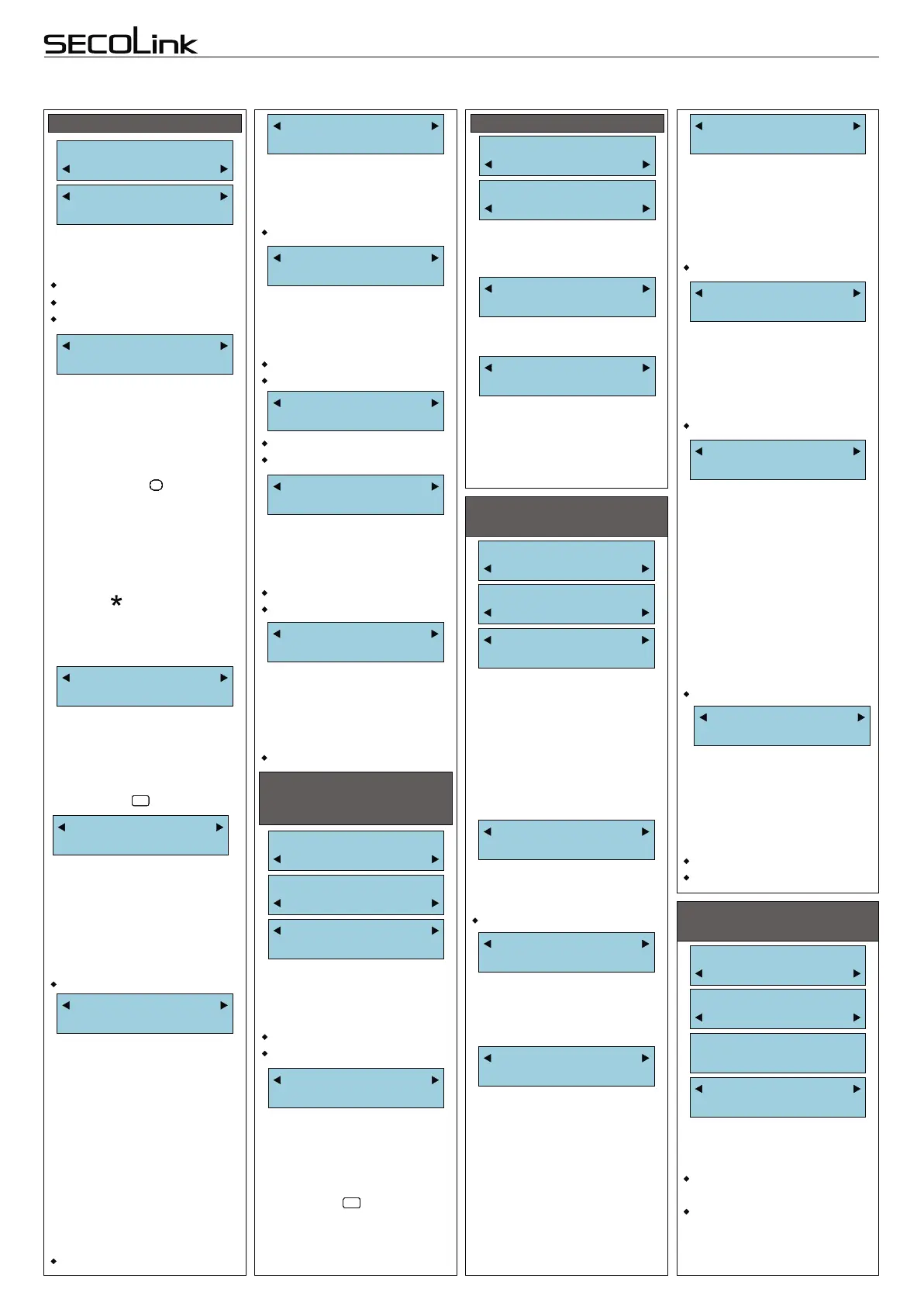
SYSTEM PROGRAMMING BY KEYPAD (continued)
System Setup:
Time Settings
Service Mode:
System Setup
Exit Delay
30 seconds
GLOBAL TIME SETTINGS
(6th step)
[1-255 sec.]
This menu allows to enable/
disable reporting to CMS via
PSTN line.
Enabled
Disabled
REPORTING VIA PSTN
The control panel can dial up
to 2 (4) different telephone
numbers.
Additional symbols: p - 3 sec.
pause, P - 10 sec. pause, w -
wait dial tone can be entered
by pressing key .
Note: control panel will call
to user when additional
symbol “p” is entered before
phone number (for PAS832
and PAS808M only).User
must acknowledge the call by
pressing [ ] key on the phone,
otherwise control panel will
call again.
##########
Report Communica
PSTN Communica
Reporting
Disabled
Tel. Number X
9p85478514254
PauseBTWsessio
1 minutes
[1-30 min.]
This parameter determines
the amount of time the control
panel will wait before
proceeding the next session.
Dial Tone Test
No
Yes
No
If parameter is set to “Yes”,
the system waits for the
telephone line tone before
dialing.
Yes
No
Method
Tone
Tone
Pulse
LineMonitoring
No
If parameter is set to “Yes”
then Control panel constantly
checks the presence of the
telephone line voltage.
1-15 sessions.
Service Mode:
Report Setting
TIME SETTINGS
Report Communica
Time Settings
This menu entry is used to
configure periodic test
schedule.
Use the 24-hour clock to
program the time.
Pause in Days
Per.ReportTime
00:00
1
The control panel will transmit
he test report code after the
number of days programmed
into this parameter.
0 = periodic test is disabled.
LineLossDelay
1 minutes
The control panel indicates
telephone line tampering if the
telephone line voltage is
absent for longer time than is
set in this parameter.
[1-30 min.]
REPORTING VIA
RADIO/GSM/GPRS
TRANSMITTERS
Service Mode:
Report Setting
Report Communica
SERIAL Connect
Enabled
Disabled
Reporting
Disabled
Account Number
C002
This menu allows to
enable/disable reporting to
CMS or to user via Radio,
GSM, GPRS channels.
A 4 - digit account number
CMS uses to identify the
client.
Additional symbols: B, C, D,
E, F can be entered by
pressing key .
#
!
#
!
#
!
#
!
#
!
#
!
SensSettleTime
5 seconds
The sensor settle time is
selected to be the time
expected for the fire detector
to become substantially
settled after power up.
FZoneVerifTime
5 seconds
ACLossRepDelay
3 minutes
If the AC power is lost for
longer period of time then is
set in this parameter, the
report will be sent to CMS, the
keypad will display the trouble
on screen.
[1-30 min.]
[1-255 sec.]
If the fire zone is violated, the
system performs a fire alarm
verification procedure to
confirm the actuality of the
alarm. How long the system
waits for second fire zone
verification procedure to
confirm the actuality of the
alarm. How long the system
waits for second fire zone
violation is described in this
parameter.
A 4 - digit account number
CMS uses to identify the
client.
Additional symbols: B, C, D,
E, F can be entered by
pressing key .
#
!
#
!
#
!
#
!
#
!
#
!
Account Number
B001
DialsInSession
4
The value programmed in
this parameter determines
how many times the control
panel will re-dial to all
monitoring station numbers
before proceeding to the next
session.
Sessions
1
Maximum possible amount
of unsuccessful dials (to all
telephone numbers) is
calculated by multiplying
number of sessions and
number of dials in session.
In case of unsuccessful
dialing during one session the
system waits for a specified
time (see “Pause Between
Sessions”).
After this time the system will
try to repeat dialing procedure.
1-15 sessions.
1-15 dials in one session.
Page 8
[1-255 sec.].
It is the time, when keypad will
sound an alarm and display
the name of violated zone.
AutoArm Delay
10 seconds
Arming by the timer can be
delayed. The delay time is
programmable within a 1 - 255
seconds range.
Pre-alarm Time
10 seconds
After pre-alarm zone is
violated the keypad will sound
an alarm and will display zone
name. If the PGM has attribute
“Pre-alarm” set, then it will be
switched On (Off). Pre-alarm
time is programmable within a
1 - 255 seconds range.
KM20 AlarmTime
10 seconds
The Exit Delay time is same
for all partitions in PAS808,
PAS808M, PAS816 panels,
but can be set different for
each partition in PAS832
panel (see 1st step).
The Exit Delay time is
programmable within 1 - 255
seconds range.
Immid.EntryAla
No
If parameter is set to “Yes”
then control panel will sent the
report about Entry/Exit zone
violation immediately,
otherwise report will be
delayed for 30 seconds.
Yes
No
LCD and keypad key
backlight can be adjusted to
suit user needs.
LCD backlight is always On;
LCD and keypad key
backlight are always On;
LCD
LCD&keypad
PIN:****
Light
LCD
Options:
Keypad Setting
Keypad Settings:
Main Menu:
Options
USER INTERFACE
(7th step)


 To Next Page
 Loading...