Short programming manual - basic information
Intruder alarm system
System with KM20B, KM20BT keypads
SYSTEM PROGRAMMING BY KEYPAD
System Setup:
Partitions
Service Mode:
System Setup
P01 Name
Apartment
P01 In Use
Yes
P01 Timers
-Timer 01
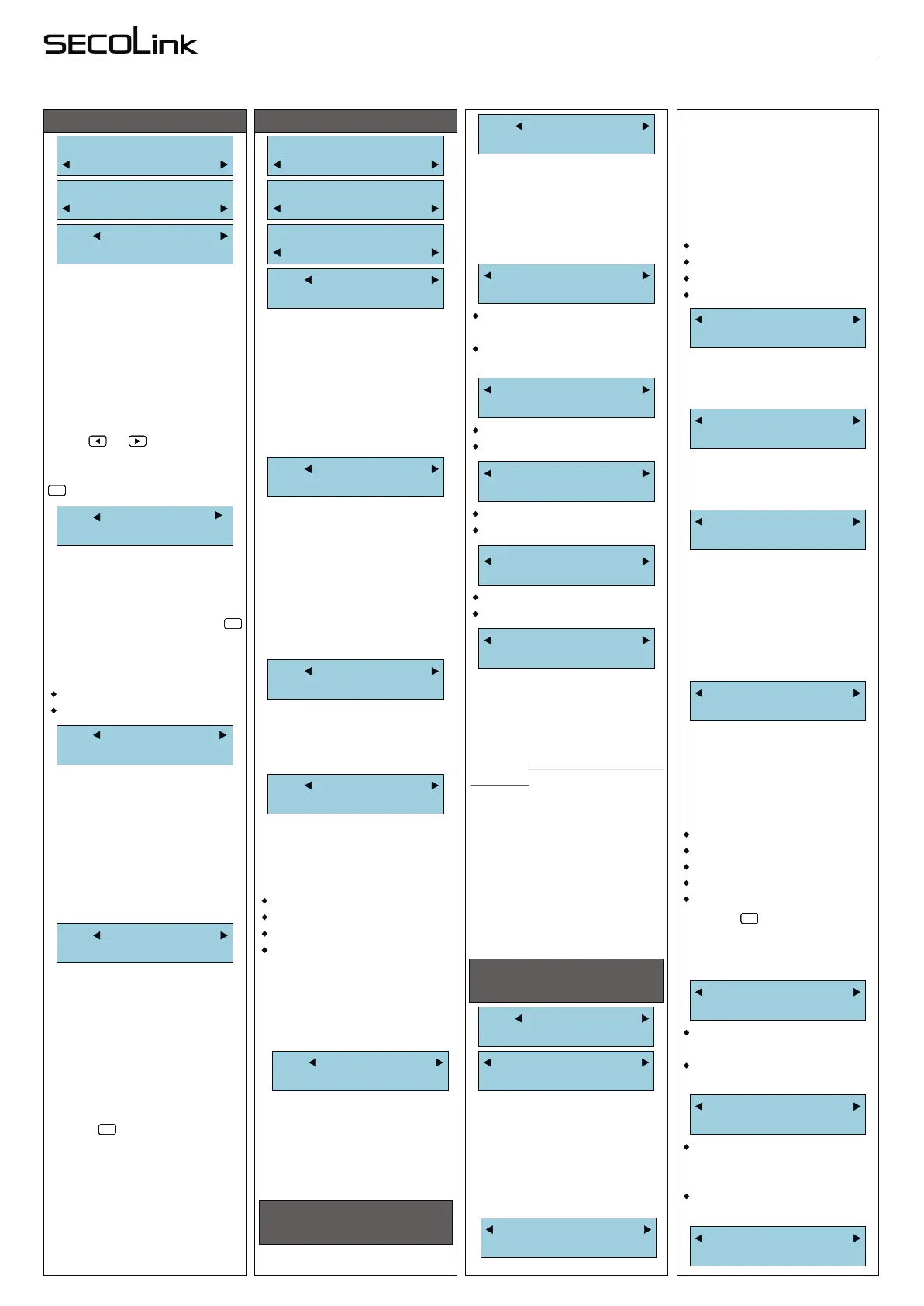
PARTITIONS (1st step)
Press key to assign timer
to partition.
“+” = timer is assigned.
“-” = timer is not assigned.
#
!
#
!
#
!
#
!
#
!
#
!
Note: more settings can be
made by using MASCAD
software. For more details
read “Advanced Programming
manual”.
M00 Name
Control Panel
Available module types:
PAS808, PAS808M,
PAS808R, PAS816, PAS832,
KM20B, KM20BT, KM24,
KM24A,RCM800, RCM800wl,
EXT116, EXT216, GSV2A,
GSV2C,GSV2M EXM800,
RID820, PROX8, PWR15,
LAN800.
Modules:
Settings
Service Mode:
System Setup
System Setup:
Modules
M00 Type
PAS808
M00 Serial No.
536870987
MODULES (2nd step)
P01 Exit Delay
30 seconds
It is recommended to give a
reasonable name to a
partition. The system will later
use it to send SMS or to show
the partition status on
keypad's LCD.
To type in partition name find
out a suitable character by
pressing corresponding key.
For next character possition
press or key. To delete
character move a cursor on
wrong character and press
.
000000
By assigning a timer to a
partition it's possible to make
the partition's auto-arm
schedule. Partition can be
armed by a timer only in the
Stay mode. Auto-arming will
be aborted if there are any
open perimeter zones or
system troubles.
For operation flexibility the
alarm system can be divided
to 4 partitions. Confirm the
activation of new partition by
selecting “YES” .
. If
only 1 partition is used, skip
this menu entry.
Press
key for the next partition
#
!
#
!
#
!
#
!
#
!
#
!
The Exit Delay time is same
for all partitions in PAS808,
PAS808M, PAS808R,
PAS816 panels, but can be set
different for each partition in
PAS832 panel.
The Exit Delay time is
programmable within 1 - 255
seconds range .
It is recommended to give a
reasonable name to module.
The module name will appear
on keypad LCD if there will be
a trouble with the module.
SecoLink modules are
manufactured with unique
serial numbers. See page 2 for
more information about SN.
Yes = partition is used.
No = partition is not used.
EXTENDED SETTINGS
FOR KM20B, KM20BT
Fire Alarm
Yes
Yes = emergency key is
available on keypad.
No = emergency key is not
available on keypad.
Medical Alarm
Yes
Yes
No
Panic Alarm
Yes
Yes
No
Panic Silent
Yes
Yes = panic silent.
No = panic audible.
Second mode
Max Away
Away, , Stay, Night
modes can be set as second
option.
Max Away
Users of system with
“corridor” type partition may
prefer to exclude emergency
keys in corridor keypads. This
setting is available in KM20B
with firmware >= 4.011.
M06 Extend.Sett
PROX8
Installation
Indoor
EXTENDED SETTINGS
FOR PROX8
If PROX8 is set as an indoor
module it’s starts Entry/Exit
delays for most arming
modes.
If PROX8 is set as an outdoor
module the Entry/Exit delay is
excluded.
Preferred mode
Away
Away, , Stay, Night
modes can be set as third
option.
Max Away
Away, , Stay, Night
modes can be set as fourth
option.
Max Away
Press key to assign
partition to the module.
“+” = partition is assigned.
“-” = partition is not assigned.
#
!
#
!
#
!
#
!
#
!
#
!
Third mode
Stay
Fourth mode
Night
Partitions
-Partition 01
This setting allows PROX8
to control only assigned
partitions. The assigned
partition troubles and NOT
READY status will be visible
on PROX8 status LED:
M01 Extend.Sett
KM20B
For more security it’s recom-
mended to use tamper to
protect modules. Tamper can
be activated by using:
M00 Use Tamper
Yes
If Use Tamper selected as
“NO” for a module, then Z6
and Z1 can be used as zone
terminal for control panel and
EXM800.
By default keypad is related
with all partitions.
If the partitioned system is
separately used by individuals
or companies and keypads are
placed inside of partition
premises it’s recommended to
relate keypad with it’s partition.
This way user of one partition
will be not disturbed by alarms,
entry/exit delay sounds of
other partitions.
“+” = partition will be controlled
and monitored by keypad;
“-” = partition will not be
controlled and monitored by
keypad;
Partition
+Partition 01
Note: if there are need of
only 1 arming mode, program
all options with the same
mode.
Z6 - on control panels;
Z1 - on EXM800;
TMP - on RCM800(wl);
back switch - on keypads.
M00 Extend.Sett
PAS808
Most new system settings
are added to menu as
extended module’s settings.
Check a keypad firmware
version and a list of extended
settings compatible with it .
Red color - Alarm
Red blinking - Alarm memory
Green color - Not Ready
Yellow color - Trouble
Blue color - Bypassed Zone
Red color - Away
Blue color - Night
Green color - Stay
White color - Max Away
Note: module address is
shown on the upper-left corner
of LCD (eg. M00 = 00
Yes = audible notification for
arm, disarm, failure is On.
No = audible notification is
Off.
Sound
Yes
Yes = the system status will
be shown for 5 sec after last
action.
No = the system status will
be shown always.
HideStatusIndi
Yes
Intruder RFID
No action
Preferred arming mode will
appear as first option. With
preferred arming mode
correctly set user will spend
less time on arming. Arming
mode are indicated by PROX8
LED color:
Page 5


 To Next Page
 Loading...