Short programming manual - basic information
Intruder alarm system
System with KM20B, KM20BT keypads
Short programming manual - basic information
Intruder alarm system
System with KM20B, KM20BT keypads
Z01 Attributes
+Limit alarms
SYSTEM PROGRAMMING BY KEYPAD (continued)
Operation Mode
Small System
The PROX8 is designed to
have different meanings of
active LEDs when system is in
different operation mode.
The meaning of LEDs in
Small System mode:
1st and 2nd LED are
showing the arming mode of
1st and 2nd partition;
3rd LED is showing
troubles in the system;
4th LED is showing alarm,
alarm memory, not ready
status and zone bypass.
If the system has 3 partitions
then arming mode of the 3rd
partition will be shown on 3rd
LED, the troubles in system
will be shown on 4th LED.
In Large System mode (4
partitions) the same LED is
showing all information of the
assigned partition, i.e. 1st LED
is showing 1st partition’s
arming mode, alarms,
troubles and zone bypass.
Zone name will be used by
system for SMS sending or
to show on keypad LCD an
open/bypassed status.
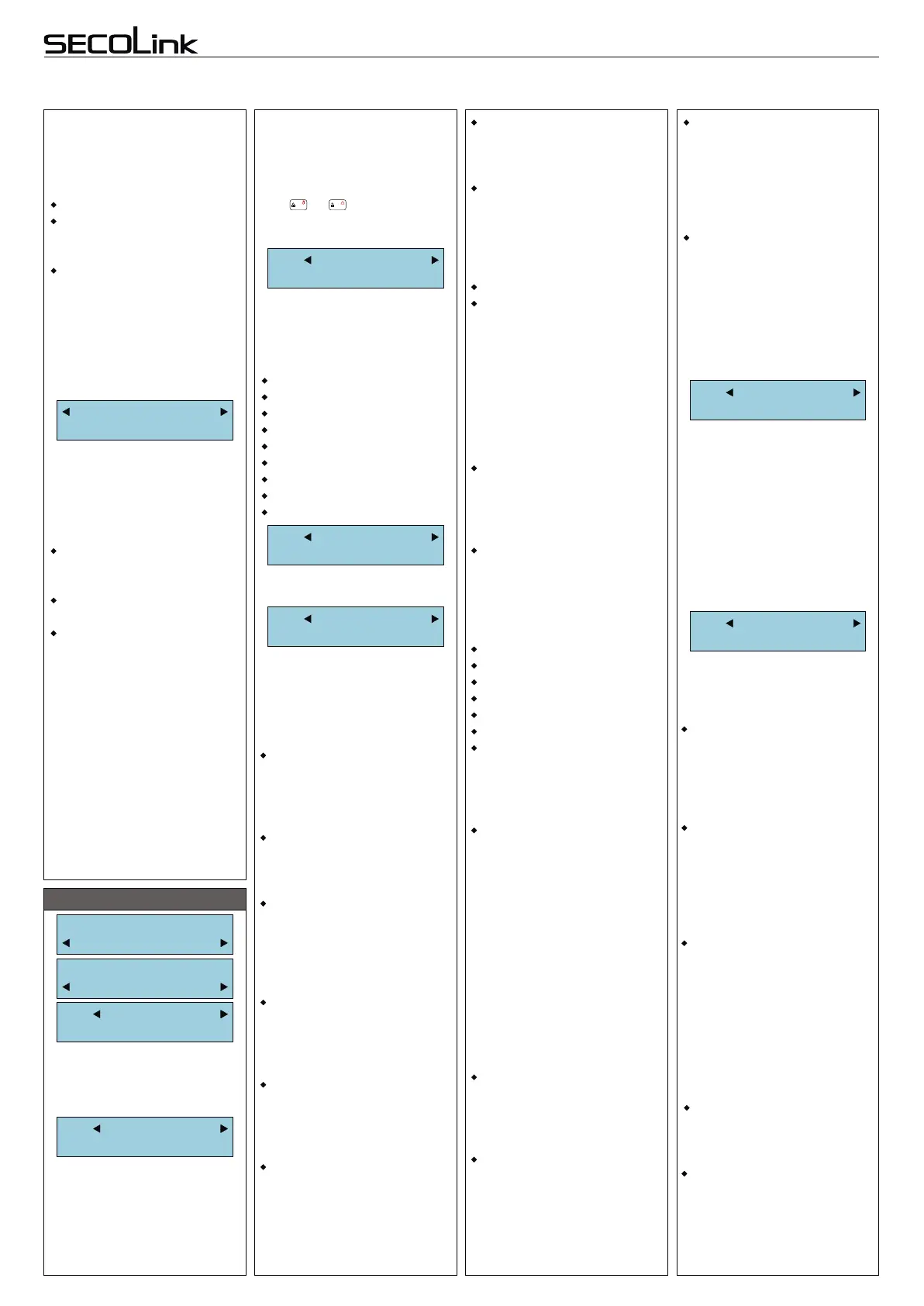
Z01 Address
00_1
Z01 Loop type
NC
Z01 Partition
1
By default all zones are
assigned to 1st partition.
Z01 Definition
Entry/Exit
Zone definition allows to
group zones for arming
modes, to specify how zone
operates during an arming or
when system is armed.
Zone with Entry / Exit
definition will start Entry Delay
when system is armed in Away
or Stay mode.
Zone with Interior definition
will be ignored in Night or Stay
mode.
Violation of zone with
Perimeter definition will make
instant alarm when system is
armed in Away, Stay, Night or
Max Away mode.
Violation of zone
with Instant definition will make
instant alarm when System is
armed in Away, Stay, Night or
Max Away mode.
An opening of 24h Burglary
zone will trigger an alarm
regardless a system is armed
or disarmed.
An opening of Panic Silent
zone will trigger an alarm
regardless a system is armed
or disarmed. Control panel will
send a panic report to CMS.
Alarm will be silent.
Burglary alarm zones:
Entry/Exit
Interior
Perimeter
Instant
24h Burglary
Panic Silent
ZONES (3rd step)
Service Mode:
System Setup
System Setup:
Zones
Z01 Name
Entry doors
Same as Panic Silent, just an
alarm will be audible.
An
alarm is audible.
To avoid false alarms, a zone
attribute “Fire Verification” is
recommended to use.
Fire button definition is used
for zones which is wired with
button for fire alarm activation.
Medic alarm zone:
Medic button definition is
used for zones which is wired
with button to make a call for a
medical assistance.
Technical alarm zones:
This group of definitions is
used for a 24h technical zones
to report about abnormalities
in environment.
Zone with PGM control
definition mostly used to
activate PGM outputs when
zone is triggered. Zone will be
triggered regardless system is
armed or disarmed and no
alarm will be activated.
For PAS832 panel PGM
control definition may be used
to make a KEY-SWITCH zone.
With the help of MASCAD it’s
possible to set KEY-SWITCH
zone for system armin
This zone is the same as
Interior with In Exit Route and
In Entry Route attributes
automatically being set.
This zone is the same as
Follower zone, but unlike the
Follower zone, this zone will be
armed in Night mode (for
PAS832 and keypad KM20Bx
firmware v4.125 or higher).
Panic Audible
24h Tamper
24h Fire
24h Smoke
Fire button
Medic button
24h Fire supervisory
Low Water Level
24h RF Jam
Gas Detected
Water leakage
High Temperature
Low Temperature
PGM control
Follower
Follower Night Armed
Burglary/Tamper alarm zone:
An opening of 24h Tamper
zone will trigger a tamper
alarm regardless a system is
armed or disarmed.
Fire alarm zones:
opening of Fire zone will
trigger a fire alarm regardless
a system is armed or
disarmed. Control panel will
send a fire report to CMS,
g,
disarming or clearing an alarm.
Module has 3 options what it
must do when the non-
assigned (intruder) RFID tag
is detected close to the
module:
No action
Indication - module starts to
blink with red LEDs and starts
to sound the annoying noise.
Alarm Intruder RFID -
module starts to blink with red
LEDs and starts to sound the
annoying noise. The alarm will
be triggered after three
attempts to control system
with non-assigned tag is
detected.
Depend on security
requirements different type of
loops are used for detectors
wiring. See wiring diagram for
each type.
NC S&W (PAS832 only)
Not used
NC
NO
NC/EOL
NO/EOL
NC/DEOL
NO/DEOL
VIBRO (PAS808M, PAS832 only)
Zone attribute is an extra
specification used to
determine zone’s operation
during system arming or alarm.
To avoid numerous false
alarms, by default, a system
is set to make zone shutdown
when
violations of zone are detected.
The shutdown will be active
for reporting.
Note: when this attribute is set
to (-) the keypad automatically
changes Limit alarms attribute
to (-).
Used with 24h fire zones.
With this attribute being set the
triggered fire zone, first of all,
will wait for fire detector power
supply reset and later will
check violation again. It’s
recommended to use
+PGM(2) as fire detector
power supply.
With this attribute being set
zone with Interior definition can
be violated during Exit Delay.
With this attribute being set
zone with Interior definition can
be violated during Entry Delay.
Limit alarms
3 or 7 (PAS832)**
Limit reports
Fire Verification
In Exit Route
In Entry Route
Interior Night Armed
Entry/Exit Forced
This zone is the same as
Interior zone, but unlike the
Interior zone, this zone will be
armed in Night mode (for
PAS832 and keypad KM20Bx
firmware v4.125 or higher).
This zone is the same as
Entry/Exit zone, but unlike the
Entry/Exit zone, this zone
definition allows to arm the
system when the entry/exit
zone is violated (for keypad
KM20Bx firmware v4.125 or
higher).
Z01 Zone Speed
0,4 seconds
By selecting zone speed it’s
possible to adjust system to a
various type of detectors.
Normally zone speed is within
0,1 - 2,5 seconds range.
With “VIBRO” zone loop type
selected, the zone speed must
be within 0,01 - 0,25 seconds
range (fast zone). Fast zone
is available for PAS832,
PAS808M only.
Page 6
Zone address is a 3-digit
number MA_Z ( ) where
MA ( ) specifies a module
address on system (see page
1) and Z ( ) specifies a zone
terminal on module PCB.
“00_1”
“00”
“1”
In order to program double
zones, the corresponding
letter (A - for sensor A or B - for
sensor B) must be entered
next to 3-digit number MA_Z.
Use or key to enter the
necessary letters (example:
00_1 A, 00_1 B, ...).
A B
!
BYP


 To Next Page
 Loading...