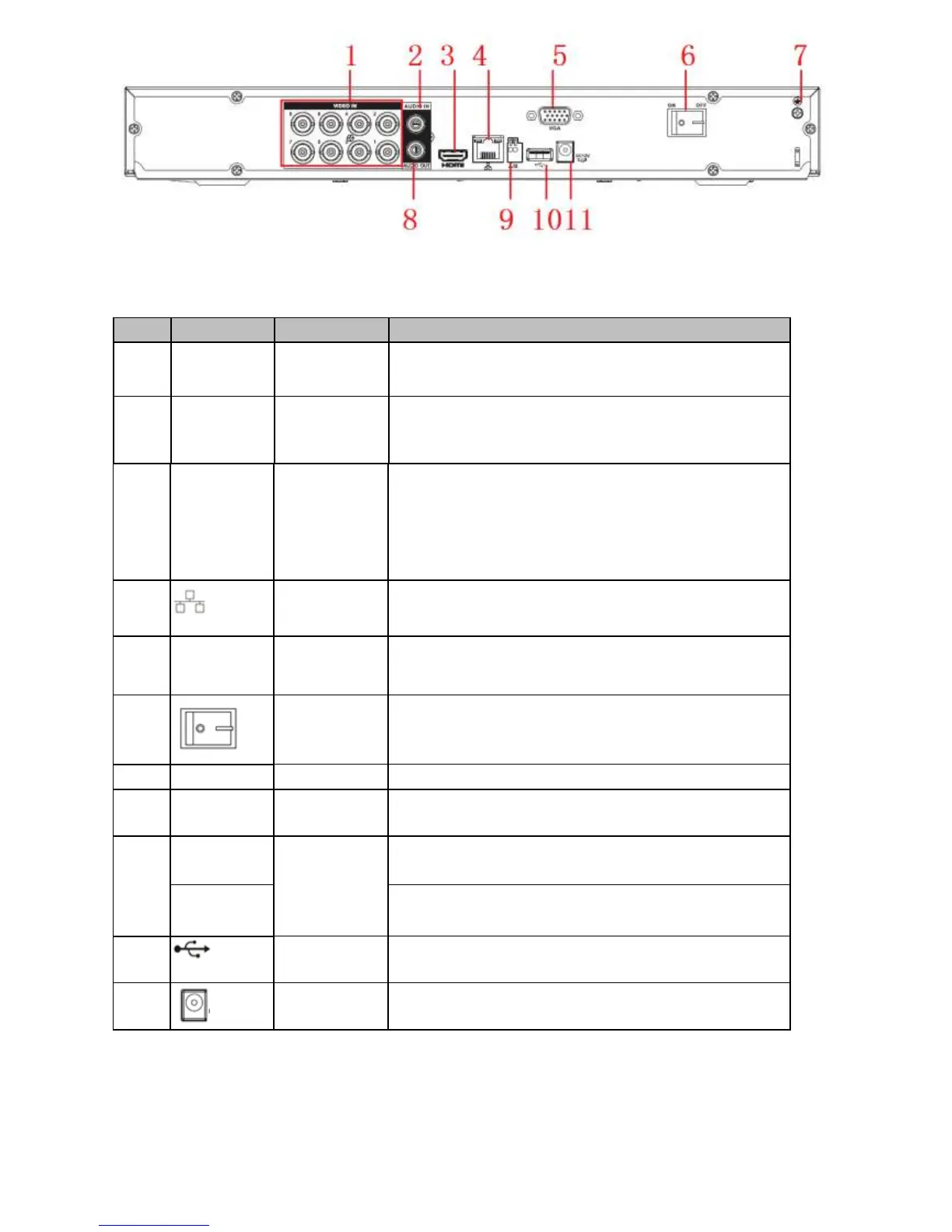
Please refer to the following sheet for detailed information.
SN Icon Name Function
1 VIDEO IN Video i
nput
port
Connect to analog camera, video input signal.
2 AUDIO IN Audio input
port
Connect to microphone and etc to input signal.
3 HDMI High definition
media
interface
High definition audio and video signal output port. It
transmits the same video signal as that of the VGA/TV or
different video signal from that of the VGA/TV(support
customized setup).
S
upport mouse operation.
4 Network port 1000M Ethernet port
5 VGA VGA VGA video output port
6 Power switch Power on/off button.
7 GND Power switch Power on/off button.
8 AUDIO OUT Audio output
port
Connect to sound box and etc to output audio signal.
9 A RS485
communicatio
n port
RS485_A port. It is the cable A. You can connect to the
control devices such as speed dome PTZ.
B RS485_B.It is the cable B. You can connect to the control
devices such as speed dome PTZ.
10 USB3.0 port Connect to mouse, USB storage media, USB-burner and
etc.
11 Power socket Power input port



 To Next Page