Please refer to chapter 4.7.1 for detailed information.
4.3.9 Record Control
Please refer to chapter 4.9.4.5 for detailed information.
4.3.10 Alarm Output
Please refer to chapter 4.9.3.10 for detailed information.
4.3.11 Remote Device
Please refer to chapter 4.9.1.1 for detailed information.
4.3.12 Video Matrix
Please refer to chapter 4.9.5.3 for detailed information.
4.3.13 Main menu
Please refer to chapter 4.6 for detailed information.
4.4 Navigation Bar
You need to go to the Main menu->Setting->System->General to enable navigation
bar function; otherwise you cannot see the following interface.
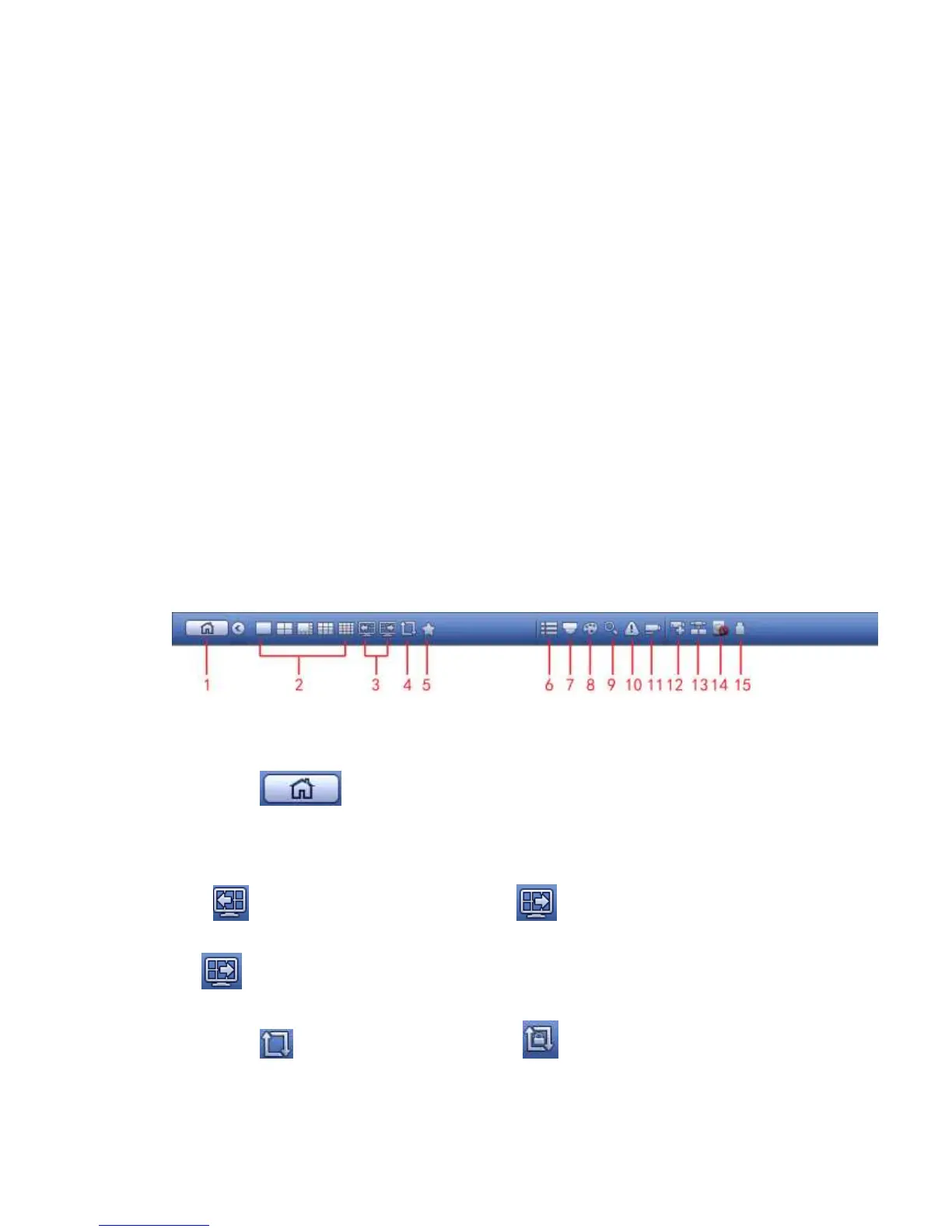
The navigation bar is shown as below. See Figure 4-66.
Figure 4-66
4.4.1 Main Menu
Click button to go to the main menu interface.
4.4.2 Output Screen
Select corresponding window-split mode and output channels.
4.4.3 Previous/Next Screen
Click to go to the previous screen, click to go to the next screen. For
example, if you are using 4-split mode, the first screen is displaying the channel 1-4,
click , you can view channel 5-8.
4.4.4 Tour
Click button to enable tour, the icon becomes , you can see the tour is in
process.
4.4.5 Favorites



 To Next Page