EasyManua.ls Logo

Seiko 7B24 - Setting Time Zone and Station

Seiko 7B24
82 pages
Print Icon
To Next Page IconTo Next Page
To Previous Page IconTo Previous Page
Loading...
106
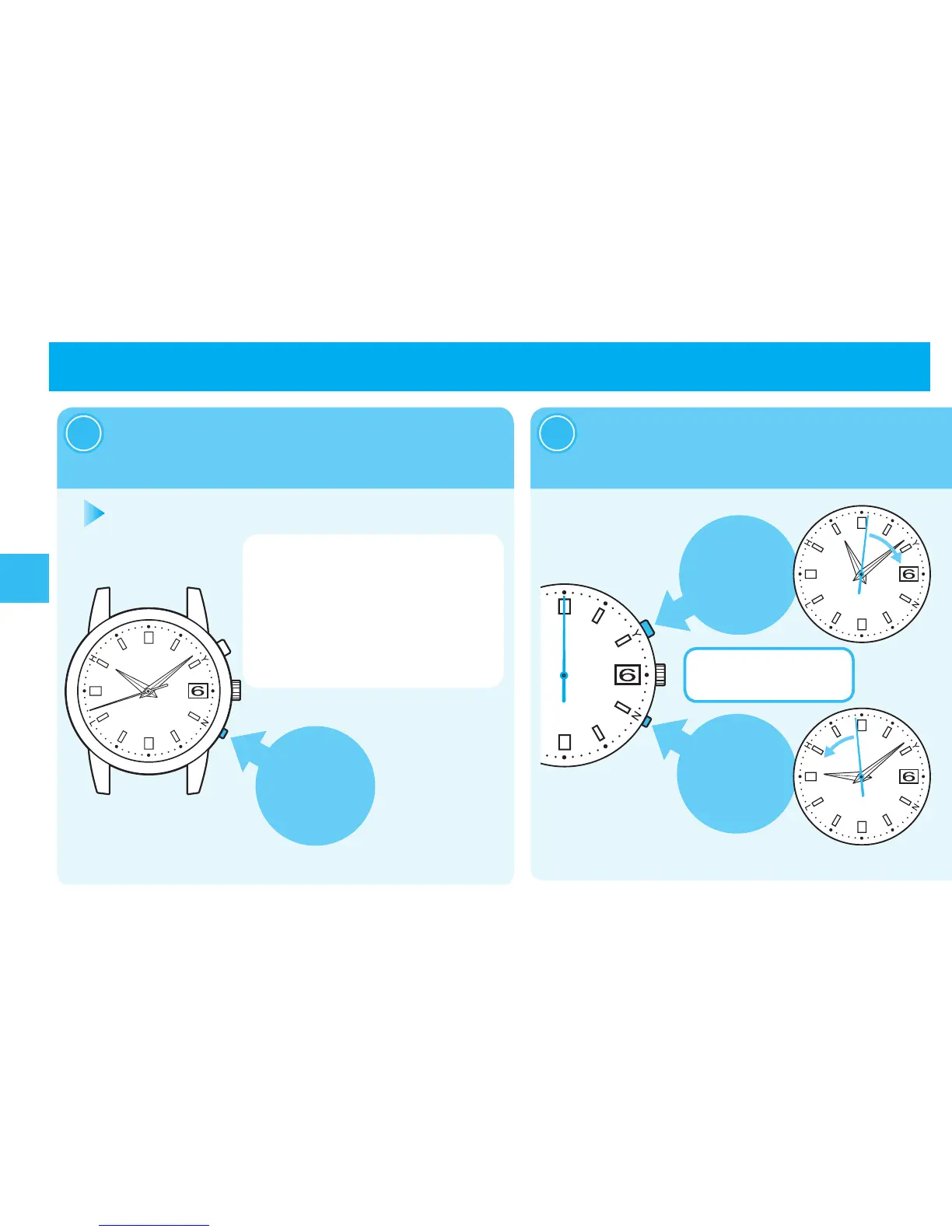
TimeZoneAdjustmentFunction
Pressandhold
ButtonBfor
fourseconds,
Thesecondhandstartstomove,andthenthe
watchentersthetimezoneadjustmentmode.
Howtosetthetimezone(Selectingtransmittingstation)
SettheTimeZonebypressingthe
buttontomovethesecondhand.
2
Whenanomovementstateofthesecond
handiskeptfortensecondsormore,the
watchautomaticallyswitchestothetime
displaystate.
Whenitisinthemiddleofoperation,re-
attempttheoperationfromprocedure“1.
PressandholdButtonBuntilthe
secondhandmoves(forfourseconds).
1
※PressButton
Bwitha
pointedobject.
→page90
※Thebuttonscanbepressedcontinuously.
Thesecondhand
movesclockwiseby
pressingButtonA.
Thesecondhand
movescounterclockwise
bypressingButtonB.
Pressing the but ton once moves
thesecondhandeveryonesecond.

Table of Contents

Related product manuals