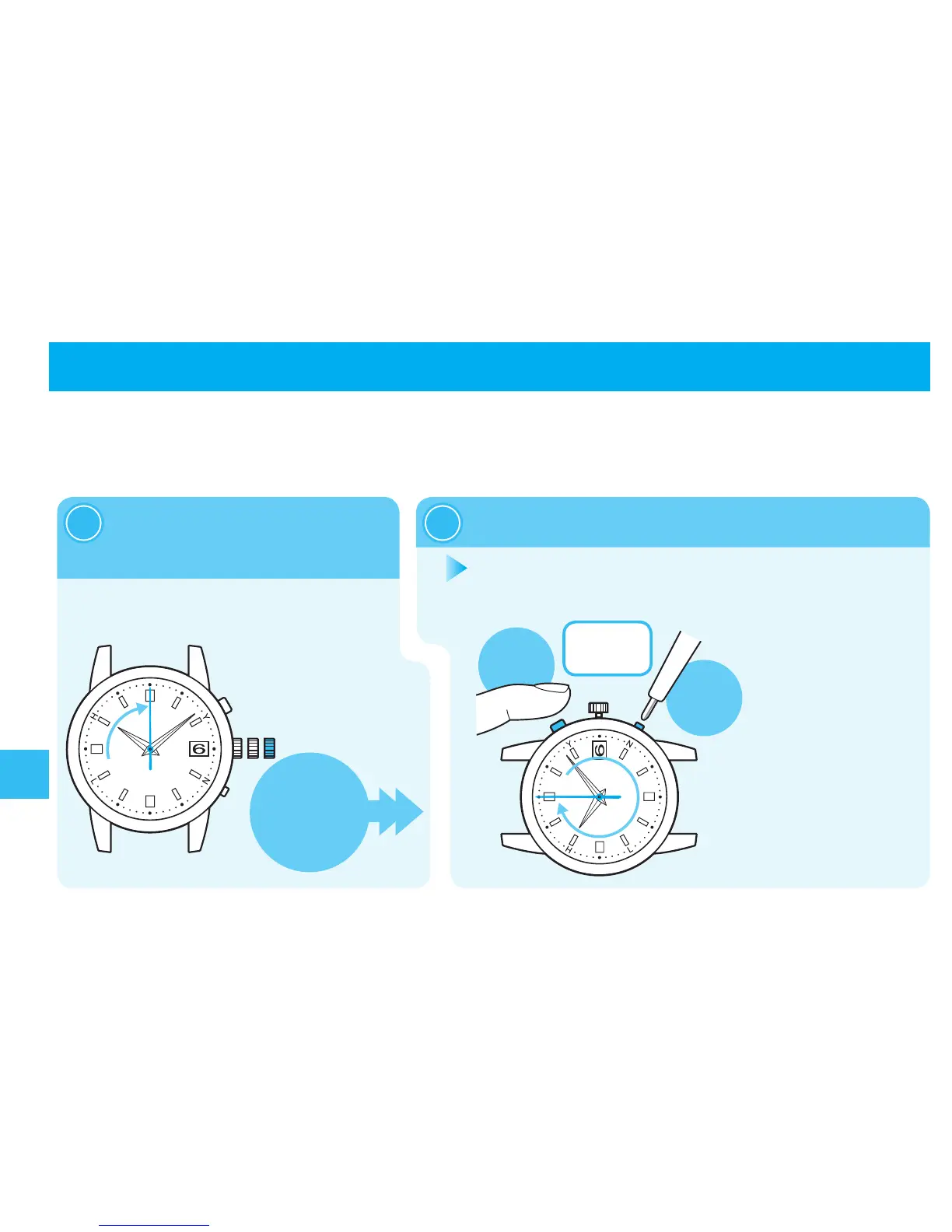
Invesecondsafterreleasingthebuttons,thesecondhandmakesafull
rotationandstopsatthezerosecondposition.Thenthehandsofthe
hourandminutewillstarttomovetowardtheZerosecondposition.
Incaseofanabnormalmovement
156
Inthecasethatthewatchmovesabnormallyorthatthewatchdoesnotmoveatone-secondintervalseven
afterfullychargingthebattery,performtheproceduresfrom① - ⑧tore-establishnormalfunction.
※Whenthecrown
isascrewlock
type, unlock it.
→page91
PressandholdButtonAandButtonBsimultaneouslyforfourseconds,andthenreleasethem.
2
Whenpullingthecrowntothesecondclick,the
secondhandstopsatthezerosecondposition.
1
※
Inordertoperformthe
procedureseasily,itis
recommendedtofirstpress
andholdButtonB,andthen
pressButtonA.
※
PressButtonB
withapointed
object.→page90
Troubleshooting
PressandholdButtonAand
ButtonBsimultaneouslyfor
fourseconds



 To Next Page