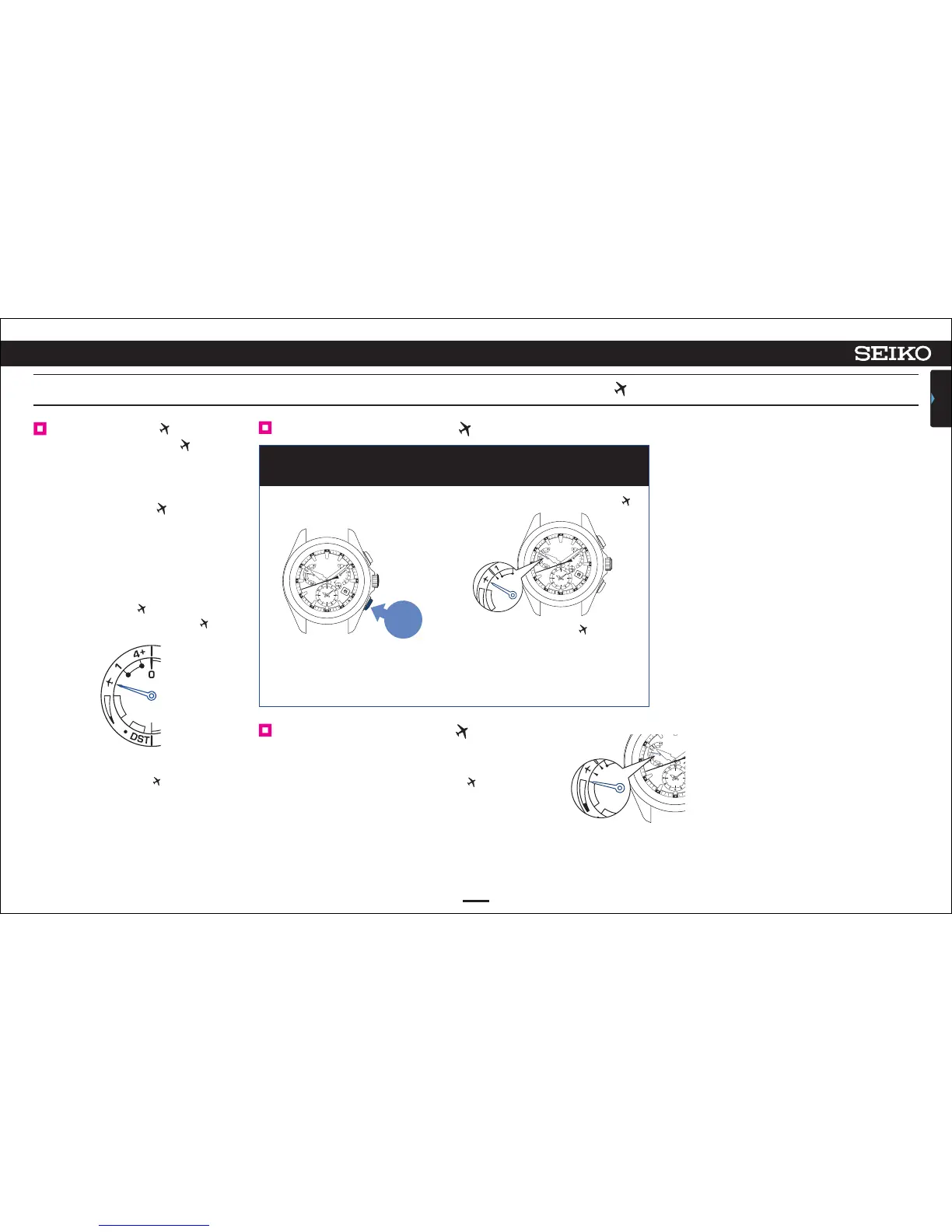
Continue to press Button B (3 seconds)
1
22
ASTRON 8X53 GPS SOLAR
BASIC OPERATION (HOW TO SET THE TIME/HOW TO RECEIVE GPS SIGNALS, ETC.)
CONTENTS
4
Set to the in-flight mode ( ).
Reset the in-flight mode ( ).
Carry out operation
①
.
When the indicator hand points to “the charging status”
in the figure at the right, the in-flight mode ( ) is reset.
When boarding (in-flight mode ( ))
⇨
When the in-flight mode ( ) is set,
the indicator hand does not indicate
the charging status.
To set the watch to the local time of the
destination in an airplane, etc. (Manual
time zone setting) P. 2 3
The display when the charging status is “full”
The indicator hand indicates
the charging status.
The indicator hand points to .
In-flight mode ( )
Set to the in-flight mode ( )
where the reception may influence
operation of other electronics devices
in an airplane, etc.
In the in-flight mode ( ), the
GPS signal reception (time zone
adjustment, manual time adjustment,
and automatic time adjustment) does
not work.
<
In-flight mode ( )
>
The indicator hand points to .
When the in-flight mode ( ) is reset, the
indicator hand indicates the charging status.
Press for
3 seconds



 To Next Page