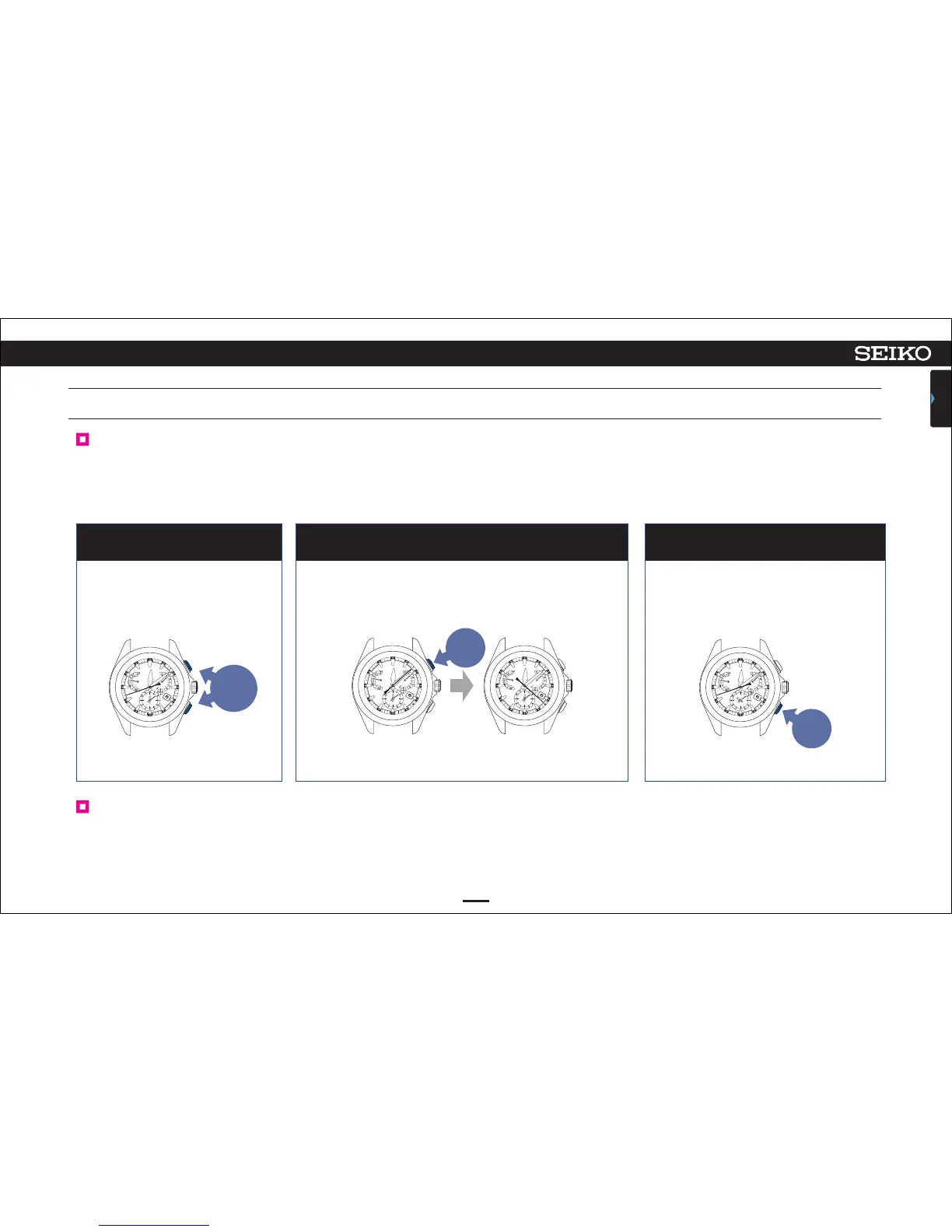
Continue to press Button A and
Button B simultaneously (three
seconds).
1
Continue to press Button A (three seconds). Press Button B
2 3
49
ASTRON 8X53 GPS SOLAR
TROUBLESHOOTING
CONTENTS
7
“ON” or “OFF” of light detection can be selected.
The second hand that has pointed to Y (8-second position: ON)
turns to point to N (22-second position: OFF).
The watch returns to the time display
mode.
Cancel the light detection
Cancel the setting of light detection
How to turn the light detection on
Perform the operations
①
to
③
to turn the light detection on.
Adjust the second hand to point to Y (8-second position: ON) in the operation
②
.
Press Button
A and Button B
simultaneously
for three
seconds
Press
Button A
for three
seconds
Press
Button B
The light detection can be cancelled.
While the light detection is disabled, the automatic time adjustment setting is altered to the fixed time reception setting. In such a case, the watch stores
the time of the previously successful manual time adjustment, and automatically starts time adjustment at the same time.
The light detection is turned on by default.
The second hand stops at the 8-second
position.



 To Next Page