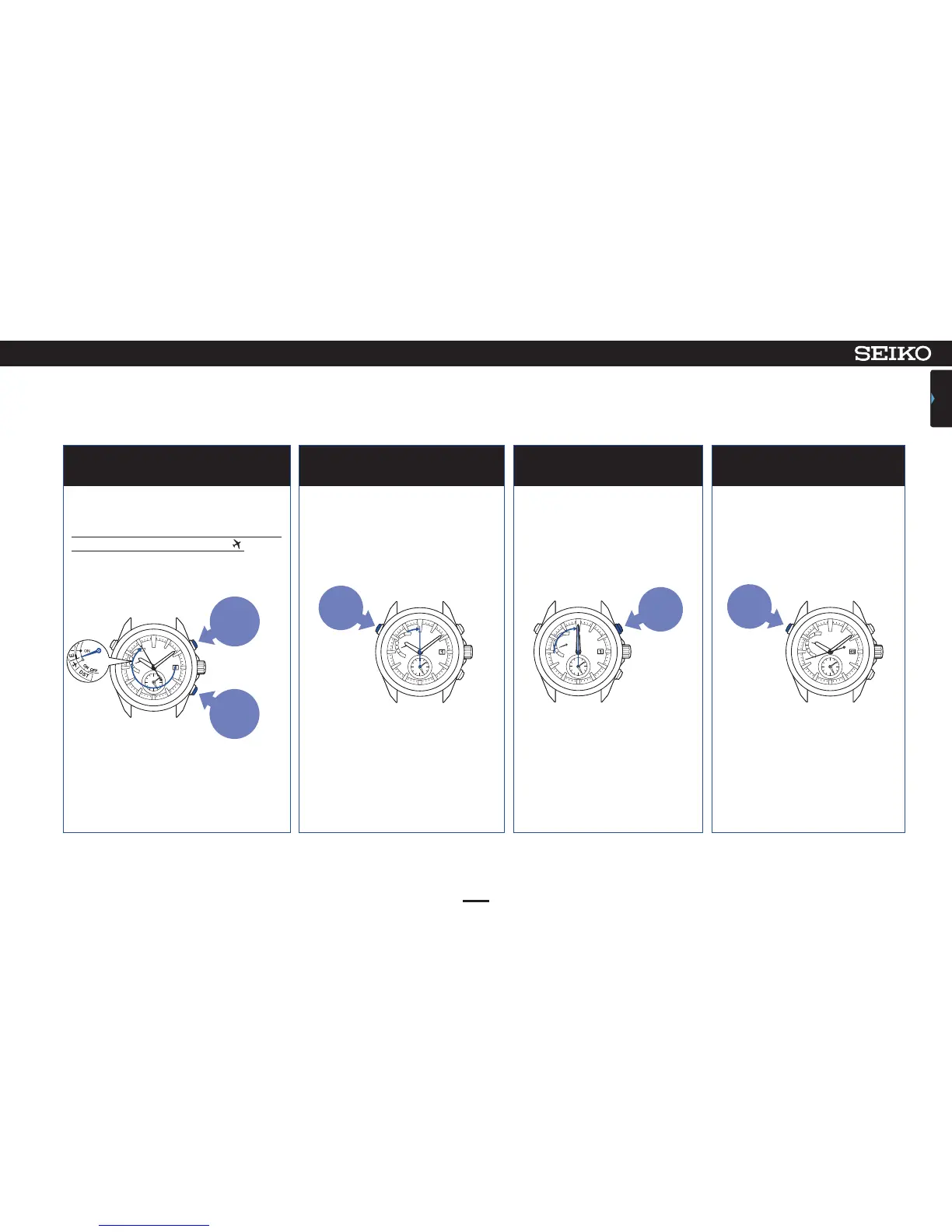
Press Button B or C to adjust the
indicator hand as shown in the figure
Continue to press Button A (2 seconds)
and release it when the second hand
moves to the 0-second position.
Press Button B once and then
release it
When operation is completed,
press Button A and release it
4 5 6 7
47
ASTRON 7X52 GPS SOLAR
TROUBLESHOOTING
CONTENTS
8
Slightly
moves the
hand
clockwise
Slightly
moves the
hand
counter-
clockwise
Press for
2 seconds
Button B
Button A
Adjust the indicator hand to the position
as shown in the figure.
The preliminary position of the indicator
hand is between “E” (low) and .
If the indicator hand points as shown in the
figure, go to operation of 5.
The indicator hand makes one complete turn,
but this does not mean a failure.
The watch enters the mode to adjust
the preliminary position of the hour/
minute hands.
If the watch displays the precise time, go to
operation of 7.
The hour/minute hands move,
and stop at “00:00 am.”
The mode to adjust the
preliminary position is
completed, and the second hand
and the hour/minute hands start
moving.
If the button is kept pressed
for 2 seconds or longer, the
hand will move continuously.
Press the button again to
stop the hand.
If no operation is performed for more than 1 minute or when Button A is pressed once, the
watch returns to the time display mode.
When the watch has returned to the time display mode, restart operation.












 To Next Page