8
ASTRON 7X52 GPS SOLAR
BEFORE USE
CONTENTS
3
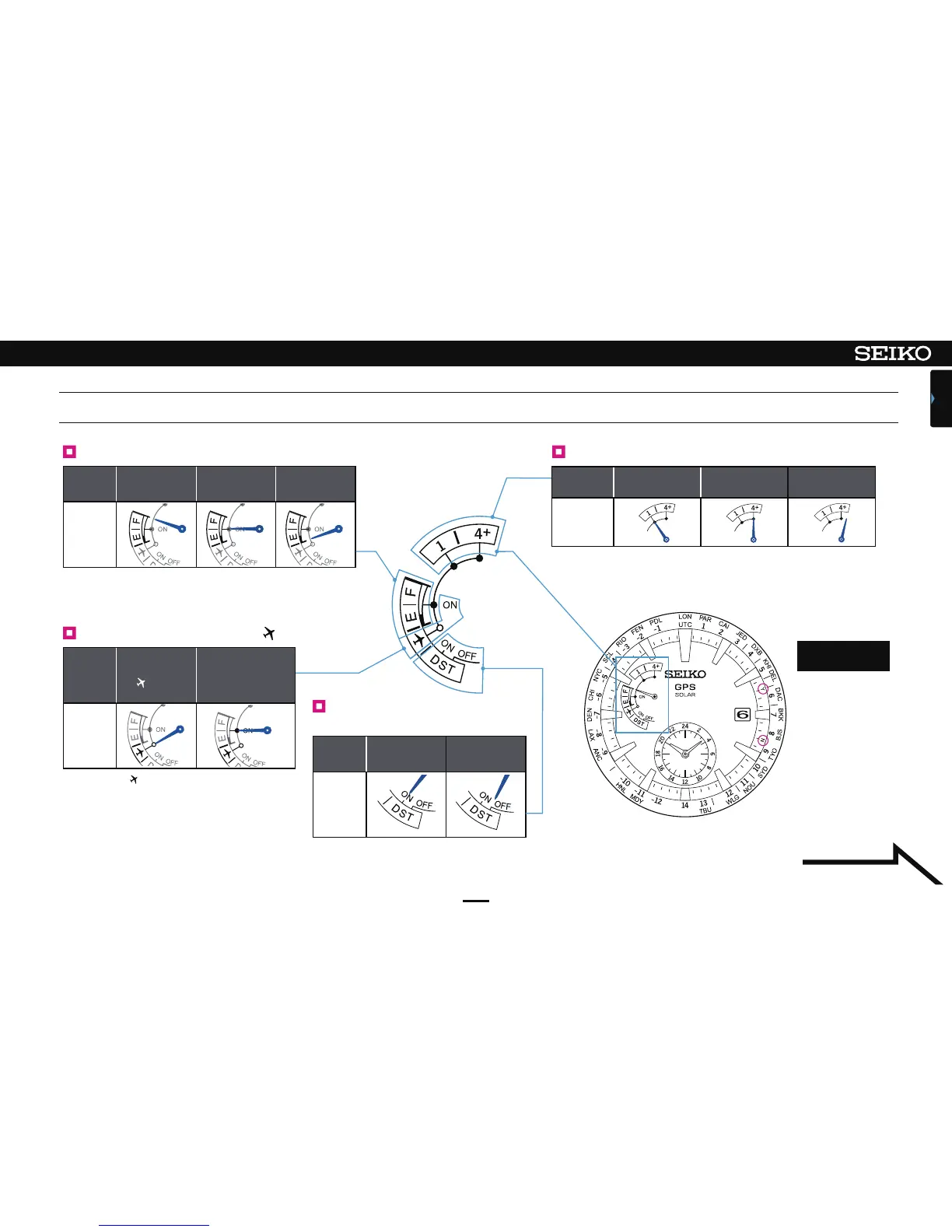
Hand
position
F (full)
Level position
(middle)
E (low)
Display
Hand
position
ON OFF
Display
Hand
position
In-flight mode
( ) status
Reset in-flight mode
Display
Receiving
process
1 (time
adjustment)
4+ (time zone
adjustment)
Receiving leap
second data
Display
Y … Reception successful
(12-second position)
N … Reception failed
(18-second position)
Display of
reception result
Indicator hand display and reception result display
Continued on the
following page
Display of charging status Display of receiving process
Display of in-flight mode ( )
Display of Daylight Saving
Time (DST)
Check the charging status. P. 10
How to charge the watch P. 11
Check the reception result P. 24
Automatic time adjustment P. 23
Manual time adjustment P. 21 ~ 22
Receive leap second data P. 30
Time zone adjustment P. 14 ~ 16
Check Daylight Saving Time (DST) P. 17
Set Daylight Saving Time (DST) P. 18
[Checking the reception
result] P. 24
In-flight mode (
) P. 19
It is displayed only
while the in-flight
mode is set.
Position of each display may differ depending
on the model (design).












 To Next Page