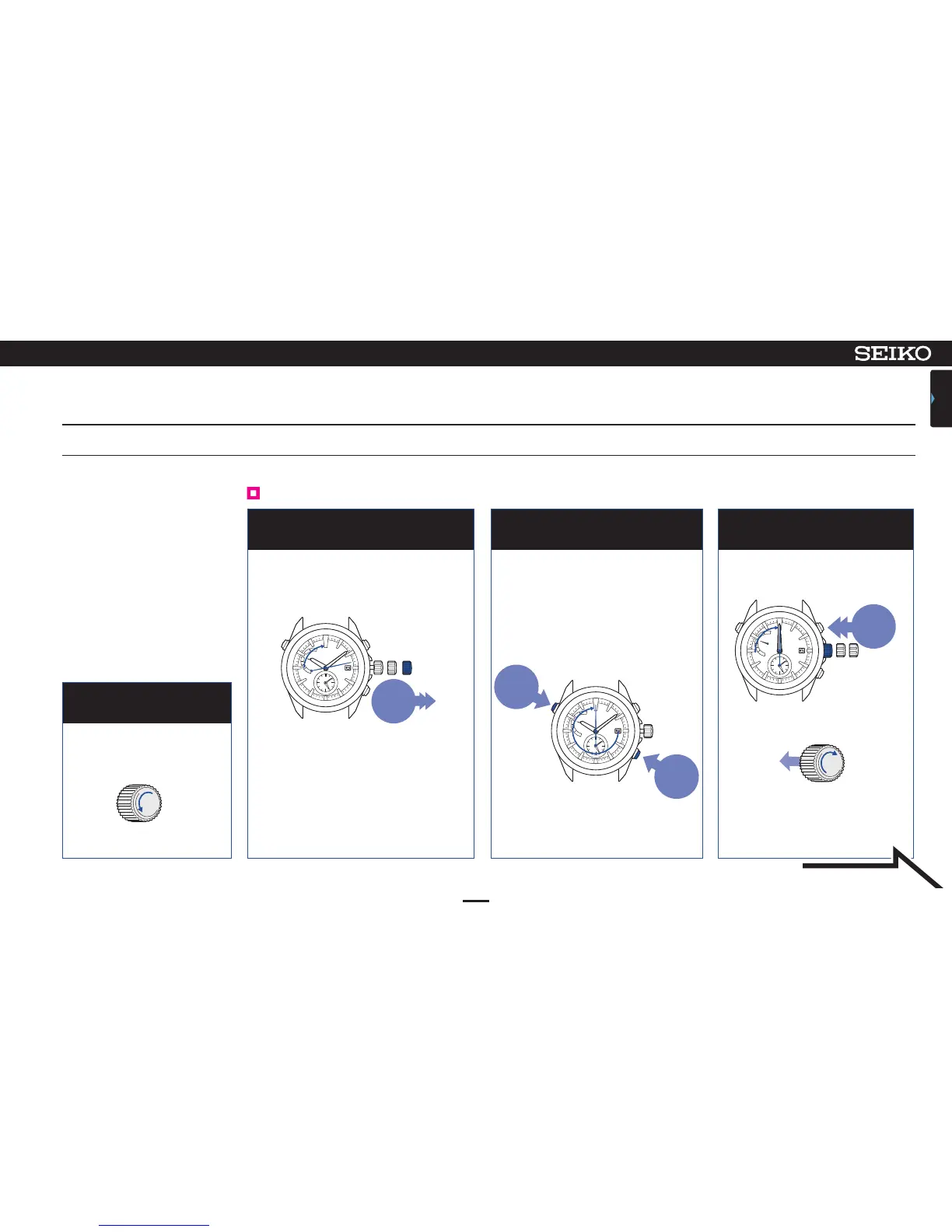
Pull out the crown
to the second click
Continue to press Button A and C
simultaneously for 2 seconds, and
then release them
When the hands stop at 00:00:00,
push the crown back in
2 3 4
48
ASTRON 7X52 GPS SOLAR
TROUBLESHOOTING
CONTENTS
8
In case of an abnormal movement (resetting the built-in IC)
Unlock the crown
1
0 1 2
Pull out to
the second
click
Press for
2 seconds
Press for
2 seconds
0 1 2
Push
back in
In the case that the watch
moves abnormally or that
the watch does not move at
1-second intervals even after
fully charging the battery,
perform the procedures from
1 to 9 to re-establish normal
function.
The watch can be recovered to the initial
state by the system reset when trouble
occurs. (2 ~ 4)
After that, adjust the preliminary
position of the date and indicator hand
(5 ~ 0) and set the time (0) before use.
Unscrew
Screw-lock type crown P.34
Unlock the crown
Reset the system (2 ~ 4)
The second hand stops at the
13-second position.
When the buttons are released, the
second hand makes one complete
turn, and stops at the 0-second
position.
After that, the hour/minute hands
move and stops at 00:00.
The second hand moves from
00:00:00.
Lock the crown.
P.34
After the system reset, the time zone
is set to UTC/LON.
While pressing the crown in
Screw
Continued on the
following page












 To Next Page