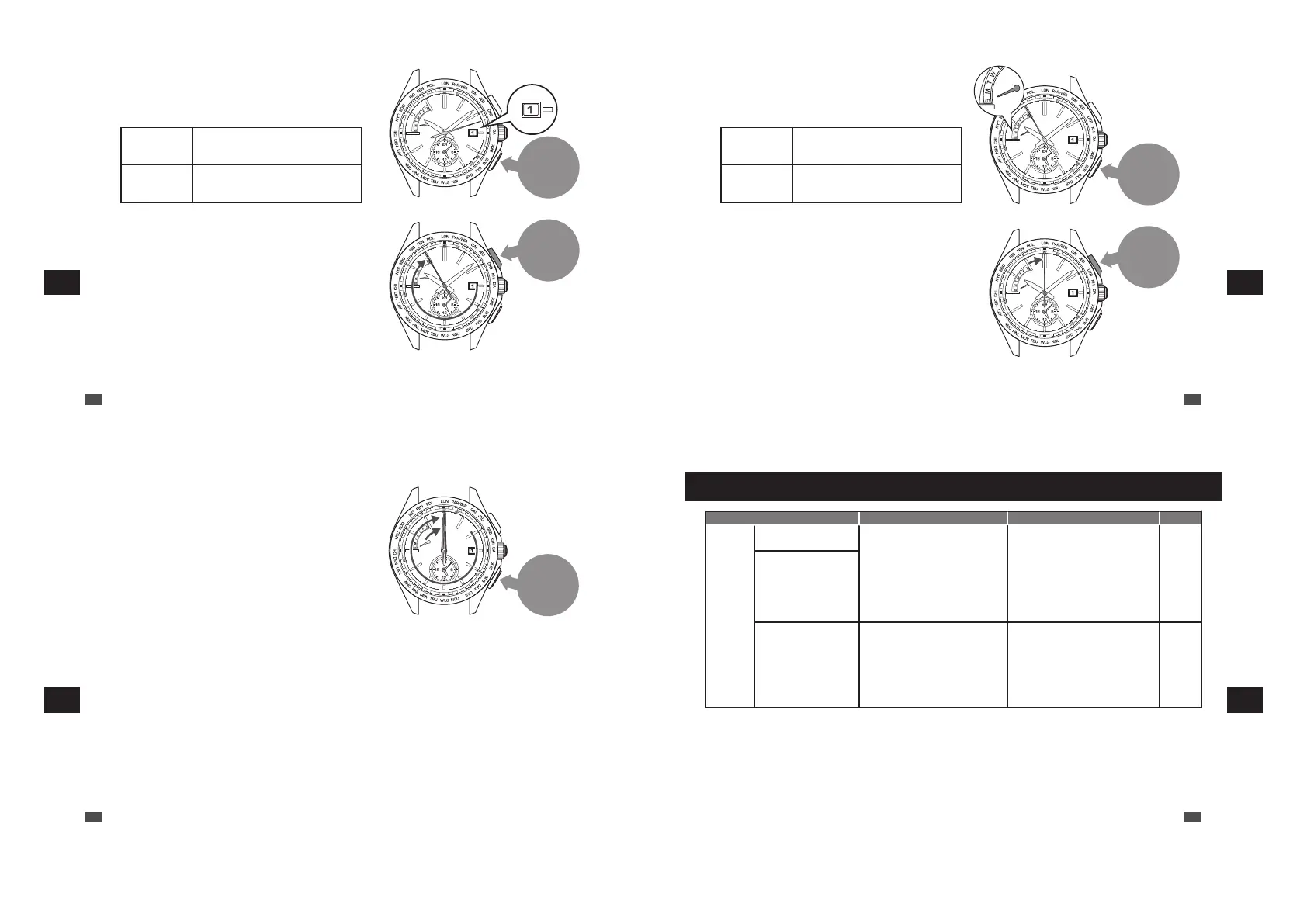
Button B
Press
Button A
Press for
2
seconds
2
Within 20 seconds after the date stops,
press the Button B to set the date to “1”.
Make sure that the numerical number “1” is located at
the center of the date window.
*
If “1” is shown, go to step 3.
Continuous
adjustment
Keep pressing down the button for
longer than 2 seconds. Press the
button once again to stop.
Fine
adjustment
When the button is pressed
intermittently, the hand will slightly
advance.
3
Keep pressing down the Button A (for 2
seconds) until the seconds hand moves to
point to the 55-second position.
The watch enters the preliminary position setting
mode for day of the week.
EN
84
7
TROUBLESHOOTING
Button B
Press
Button A
Press for
2
seconds
4
Press the Button B to set the day hand to
point to “S” (Sunday).
Make sure that the day hand is set to point to “S”.
*
If “S” is shown, go to step 5.
The day hand rotates clockwise.
Continuous
adjustment
Keep pressing down the button for
longer than 2 seconds. Press the
button once again to stop.
Fine
adjustment
When the button is pressed
intermittently, the hand will slightly
advance.
5
Keep pressing down the Button A (for 2
seconds) until the seconds hand stops
pointing to the 0-second position.
The watch switches to the preliminary position
alignment mode for the hour and minute hands.
*
If the correct time is shown, go to step 7.
EN
85
7
TROUBLESHOOTING
Button B
Press once
and release it
7
After completing the operation, leave the watch untouched for 20 seconds.
The watch automatically exits the preliminary position setting mode, and the seconds, hour and minute hands
start moving.
When the watch returns to the TIME display mode, check if the time, date and day of the week are all correct.
If the time, date and day of the week are not correct, manually set them.
Adjusting the time and date by receiving a radio signal
“How to conduct manual reception (Receive a radio signal manually)” → P.70
When the watch is unable to receive a radio signal, refer to
“How to manually set the time” → P.73
“How to manually set the date” → P.75
“How to manually set the day of the week” → P.78
6
Press the Button B once and release it.
The hour and minute hands move, and stop at the 12
o’clock position.
EN
86
7
TROUBLESHOOTING
Troubleshooting
At trouble Possible causes Solutions
Reference
Hand
Movement
The seconds hand moves
at two-second intervals.
The energy depletion forewarning
function is activated. (P.42)
If the seconds hand moves at two- or
five-second intervals while you wear
the watch everyday, the watch is in a
condition where it cannot acquire
sufficient light, for instance, the watch
is concealed under a long sleeve shirt.
Fully charge the watch so that the
seconds hand may move at one-second
intervals.
Be careful not to conceal the watch
under a sleeve, etc., while wearing it.
When taking off the watch, place it in as
bright a location as possible.
P.40
The seconds hand moves
at five-second intervals.
The stopped seconds
hand pointing to the
15-second position
started operating.
The power save function has been
activated. (P.43)
When the watch is not exposed to
adequate light for a certain period of
time, the power save function to limit
energy consumption is automatically
activated.
Wait until the current time is displayed.
No operation is needed. (This is not a
malfunction.)
-
EN
87
7
TROUBLESHOOTING



 To Next Page