At trouble Possible causes Solutions
Reference
Misalignment
of the time
and hand
positions
The watch displays an
incorrect time hour unit,
even though it displays the
precise time of minutes
and seconds.
The time zone selection is incorrect.
Check the selected time zone and set it
to the area where the watch is used.
P.31
Misalignment
of the date
The reception results are
successful and the precise
time is displayed, but the
date is not correctly
displayed.
The date is out of the preliminary
position.
This happens when the date is out of
the preliminary position as a result of
influence of various external sources or
after the built-in IC is reset.
Set the date to the preliminary position
“1” (the 1st).
P.82
Misalignment
of the day
The reception result
display confirms
successful reception, and
the correct time is
displayed, but the wrong
day is displayed.
The preliminary position of the day of
week is out of alignment.
This problem occurs when the
preliminary position of the day of week
is out of alignment due to external
influence and system reset etc.
Check if the day is set to the correct
preliminary position “S” (Sunday).
P.82
Wrong
display of the
sub dial
The sub dial is set to the
time shown by the main
watch, but the sub dial
displays the wrong time.
The sub dial displays the wrong time. Refer to“ How to set the sub dial”. P.38
EN
92
7
TROUBLESHOOTING
At trouble Possible causes Solutions
Reference
Operation
The crown or button
cannot be operated.
The stored electric power is running
short.
Sufficiently charge the watch until it
starts moving at one-second intervals.
P.40
Hands and date are moving right after
a setting is carried out by the crown or
button operation.
Wait without doing anything.
After the date stops, the crown and
button can be operated.
-
Operation
You get lost in the middle
of the operation.
-----------
Return to the status before the start of
the operation, and try the operation
again.
If the crown is pulled out, push it in.
If the crown is not pulled out, then pull it
out and push it in again.
This will return to one-second interval
movement for a maximum of 9 minutes.
After this, try the operation again.
-
Others
Blur on the dial glass
persists.
A small amount of water has got inside
the watch due to deterioration of the
gasket, etc.
Contact the retailer from whom the
watch was purchased.
-
* For the solution of troubles other than the above, consult the retailer from whom the watch was purchased.
EN
93
7
TROUBLESHOOTING
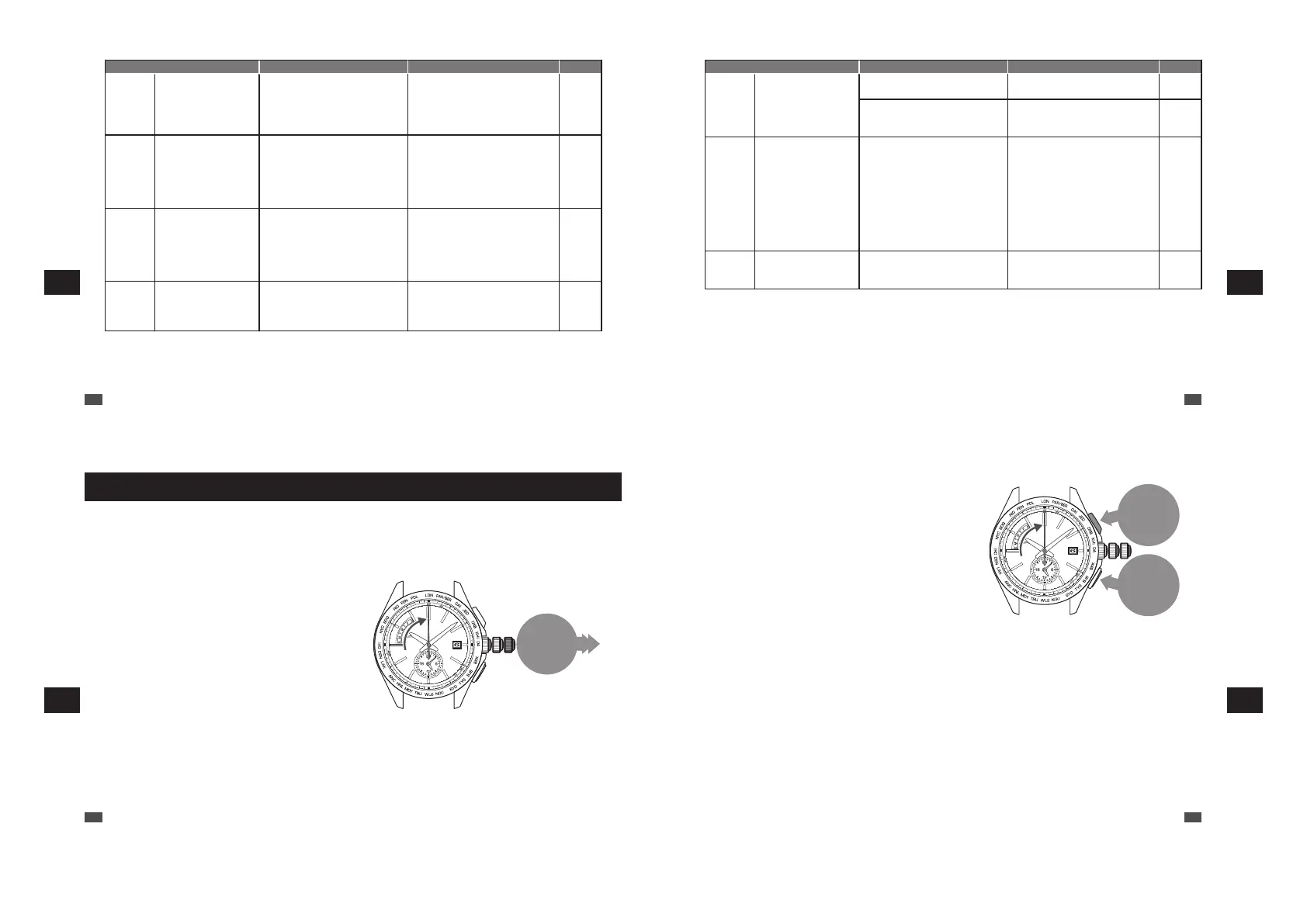
In case of an abnormal movement
In the case that the watch moves abnormally or that the watch does not move at one-second intervals even
after fully charging the battery, then it can be returned to normal operation using the following operation.
■ Reset the system
0
1
2
Pull out the
crown to the
second click
1
Pull out the crown to the second click.
The seconds hand moves to the 0-second position
and stops.
* When the crown is a screw lock type, unlock it.
→ P.14
EN
94
7
TROUBLESHOOTING
Button A
Press for
3 seconds
Button B
Press for
3 seconds
3
When all the hands stop pointing to 12 o’clock 0 minutes and 0 seconds, push
the crown back.
The seconds hand starts moving from 12 o’clock 0 minutes and 0 seconds.
* After the built-in IC is reset, the watch is set to the time zone LON.
After completion of a system reset, perform the following operations.
• “Setting the preliminary position of the date, day hand, hour and minute hands” → P.82
• “How to select the time zone (How to display the local time around the world)” → P.31
• “How to conduct manual reception (Receive a radio signal manually)” → P.70
* When the crown is a screw lock type, lock it. → P.14
2
Keep pressing down the Button A and B
at the same time for 3 seconds, and then
release them.
After releasing the button, approximately 5 seconds
later the seconds hand moves, and stops at the
0-second position.
Then the hour and minute hands will start to move
and stop pointing to 12 o’clock 0 minutes.
* First, press the Button B, and subsequently press the
Button A while keeping holding down the Button B so
as to press both of them successfully.
* The button cannot be operated until all the hands stop.
EN
95
7
TROUBLESHOOTING



 To Next Page