Bluetooth
Ⓡ
communication
● Fromthesmartphonetothewatch
● Fromthewatchtothesmartphone
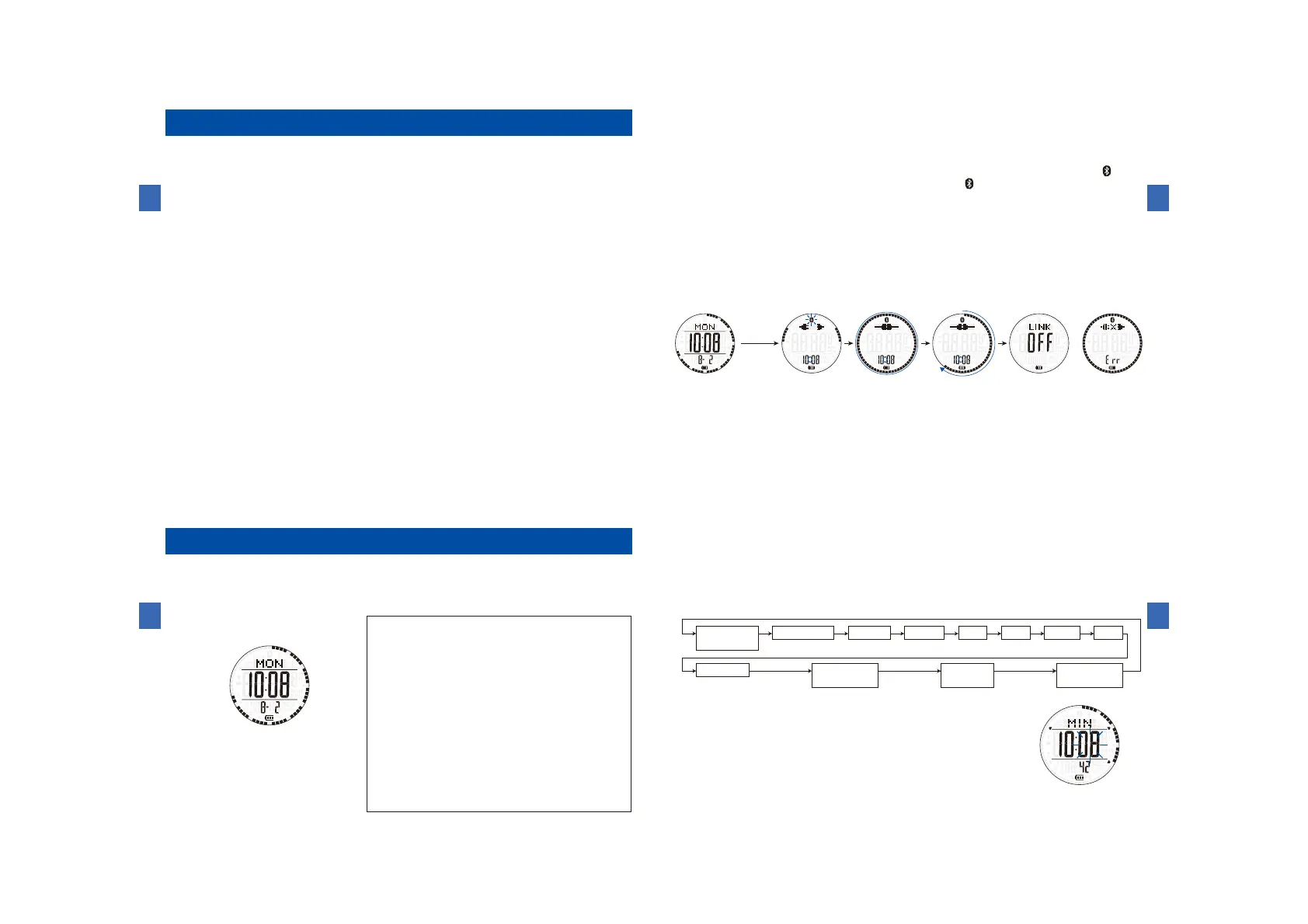
(1)HowtoperformBluetoothcommunication
Connectioncompleted
LINKOFFcompleted
Connectingyourdata
Connectionfailure
Connectionstart
Ⓕ
Pressandhold
Ⓕ
Howtousethetime/calendarmode
(1)Buttonsandfunctions
ButtonⒷ
ButtonⒶ
ButtonⒸ
ButtonⒹ
ButtonⒺ
ButtonⒻ
ButtonⒶ:Toswitchtothesensorfunction
ButtonⒷ:Toswitchtothecurrentlocationsunrise
andsunsettimemode
/Toselecttheitemtobeadjusted
ButtonⒷ
(Pressandhold):Tochangetothetime/calendarmode
ButtonⒸ:Toshowthecitynameandtimedifference
/Toshowthelastsynchronoustimewiththeapplication/
/Toselecttheitemtobeadjusted
ButtonⒸ(Pressandhold):
Toset/cancelin-flightmode
ButtonⒹ(Pressandhold):Tochangetothetime
/calendarsettingmode
ButtonⒺ:Toturnonoroffthehourlytimesignal
andbuttonoperationconfirmationsound
/Todecreasethevalue(moveback)
ButtonⒻ:Toturnonthebuilt-inilluminatinglight
ButtonⒻ
(Pressandhold):TostartoftheBluetoothcommunication
(2)Howtosetthetime,calendar,citynameandsummertime
(Minute-adjusting
state)
ⒷⒸ
Ⓓ
Ⓔ
HOME
(cityname)
Second
Ⓑ
Minute Hour Date Month Year
12/24H
DSTon/off
Contrast
adjustment
Powersave
setting
Lighting
time



 To Next Page