EasyManua.ls Logo

Seiko S830 - 1)Buttons and Functions; 2)How to Use the Alarm; 2)How to Use the Stopwatch; 3)Engagement and Disengagement of the Alarm

Seiko S830
55 pages
Print Icon
To Next Page IconTo Next Page
To Previous Page IconTo Previous Page
Loading...
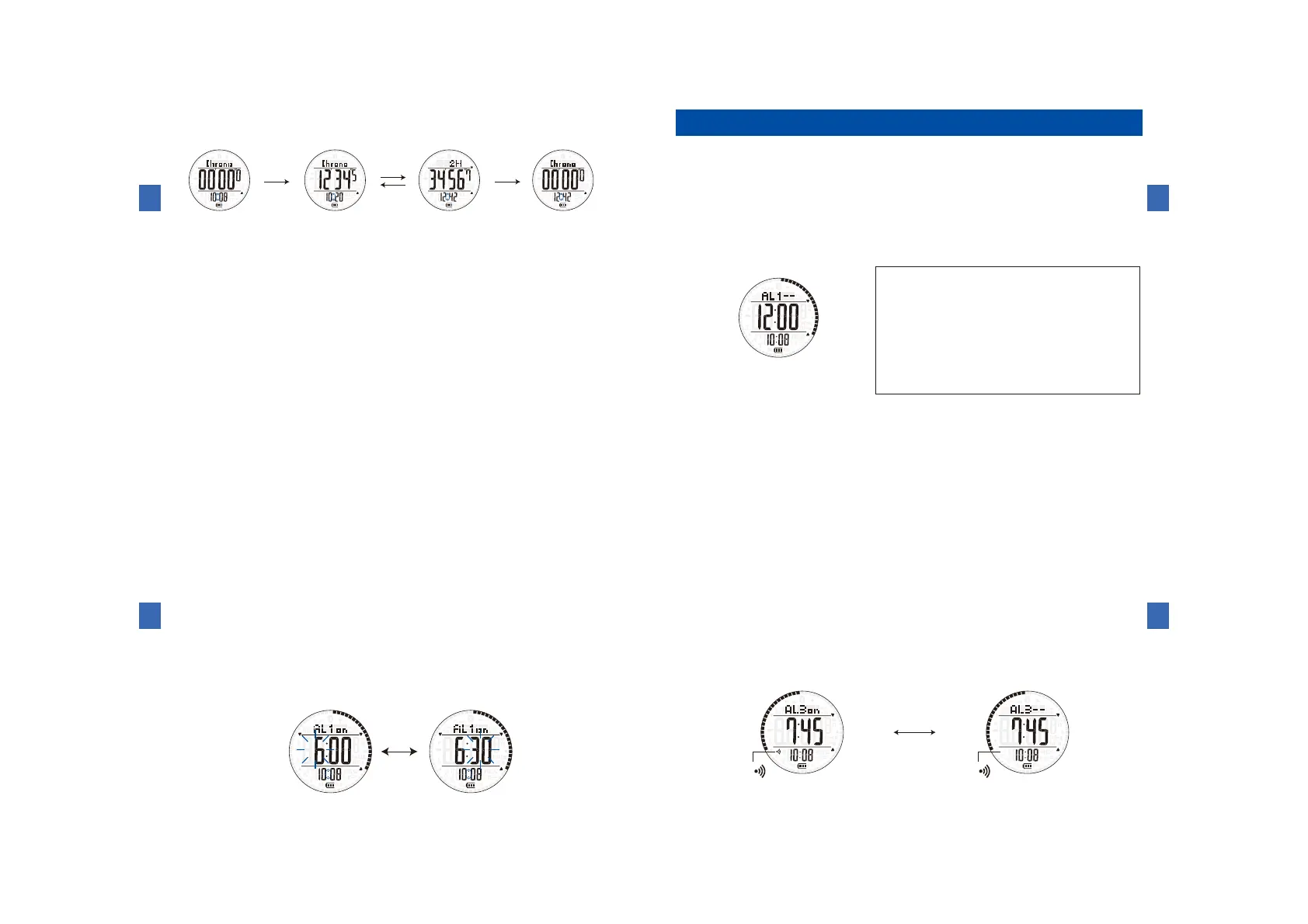
(2)Howtousethestopwatch
󰴤 󱠈
󰴥 
󱠈
󰴦 
󱠆
󱠈
󱐯

  



Start
ⒺⒺⒺ
Restart
Stop
Reset
Reset Measurement Stopped Reset


Howtousethealarmmode



 




(1)Buttonsandfunctions
󱠅

Button
Button
Button
Button
Button
Button
ButtonⒶ:Toswitchtothesensorfunction
ButtonⒷ:Toswitchtotheworldtimemode
/Toselecttheitemtobeadjusted
Button
(Pressandhold):Toswitchtothetimeandcalendarmode
ButtonⒸ:Toswitchthealarmchannel
/Toincreasethevalue(advance)
Button
(Pressandhold):Tochangetothealarmsettingmode
ButtonⒺ:Toengageordisengagethealarm
/Todecreasethevalue(moveback)
ButtonⒻ:
Toturnonthebuilt-inilluminatinglight
Button
(Pressandhold):ToswitchtotheBluetoothmode


(2)Howtousethealarm


󰴤
󱠆󱠇

󰴥
󱠅 

󱠅
󰴦
󱠆 

󱠈 
󱠆󱠈
󰴧     󱠇
 
󱠇

   

(hour:6:00a.m.)
(minute:30minutes)


(3)Engagementanddisengagementofthealarm
󱠈


 

(4)Howtostopthealarmwhileitissounding



ON
(Alarmisengaged.)
OFF
(Alarmisdisengaged.)
(Hourlytimesignalsounds.) (Hourlytimesignaldoesnotsound.)
Alarmmark 
appears.
Alarmmark 
doesnotappear.



Table of Contents

Related product manuals