7
English
English
6
ALARM
MIN.
15
45
30
30
60
3
9
6
12
60
55
05
10
15
50
45
30
25
20
35
40
60
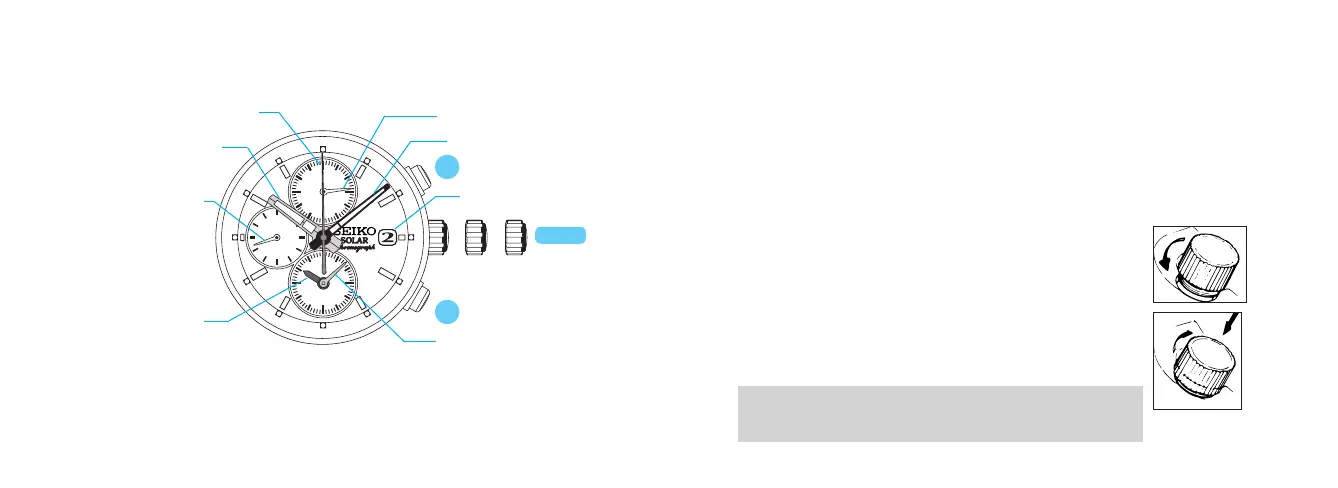
a b c
CROWN
Hour hand
Minute hand
STOPWATCH 1/5-second hand
STOPWATCH minute hand
ALARM minute hand
Small second hand
Date
a: Normal position
b: First click
c: Second click
ALARM hour hand
DISPLAY AND BUTTONS
• Somemodelsmayhaveascrew-lock-typecrown.Ifyourwatchdoes,refertothe
“SCREW-LOCK-TYPECROWN”sectiononthenextpage.
• Simpliedillustrationsmaybeusedinthefollowingsectionsofthismanual.
SCREW-LOCK-TYPE CROWN
u Some models may have a screw-lock mechanism that can securely lock the
crown by a screw when not being operated.
u Locking the crown will help prevent operational errors and enhance the
water resistant quality of the watch.
u It is necessary to unlock the screw-lock-type crown before operating it.
Once you have finished operating the crown, make sure to relock it.
l
How to use the screw-lock-type crown
Keep the crown securely locked unless you need to operate it.
• Whenlockingthecrown,turnitslowlywithcare,ensuringthatthe
screwisproperlyengaged.Ifthereisanyresistance,unscrewitand
tryagain.Becarefulnottoforciblypushitin,asdoingsomaydamage
thescrewholeinthecase.
[How to unlock it]
Turn the crown counterclockwise.
The crown is unlocked and can then be operated.
[How to lock it]
Once you have finished operating the crown, turn it
clockwise while gently pressing it in toward the watch body
until it stops.
A
B




 To Next Page