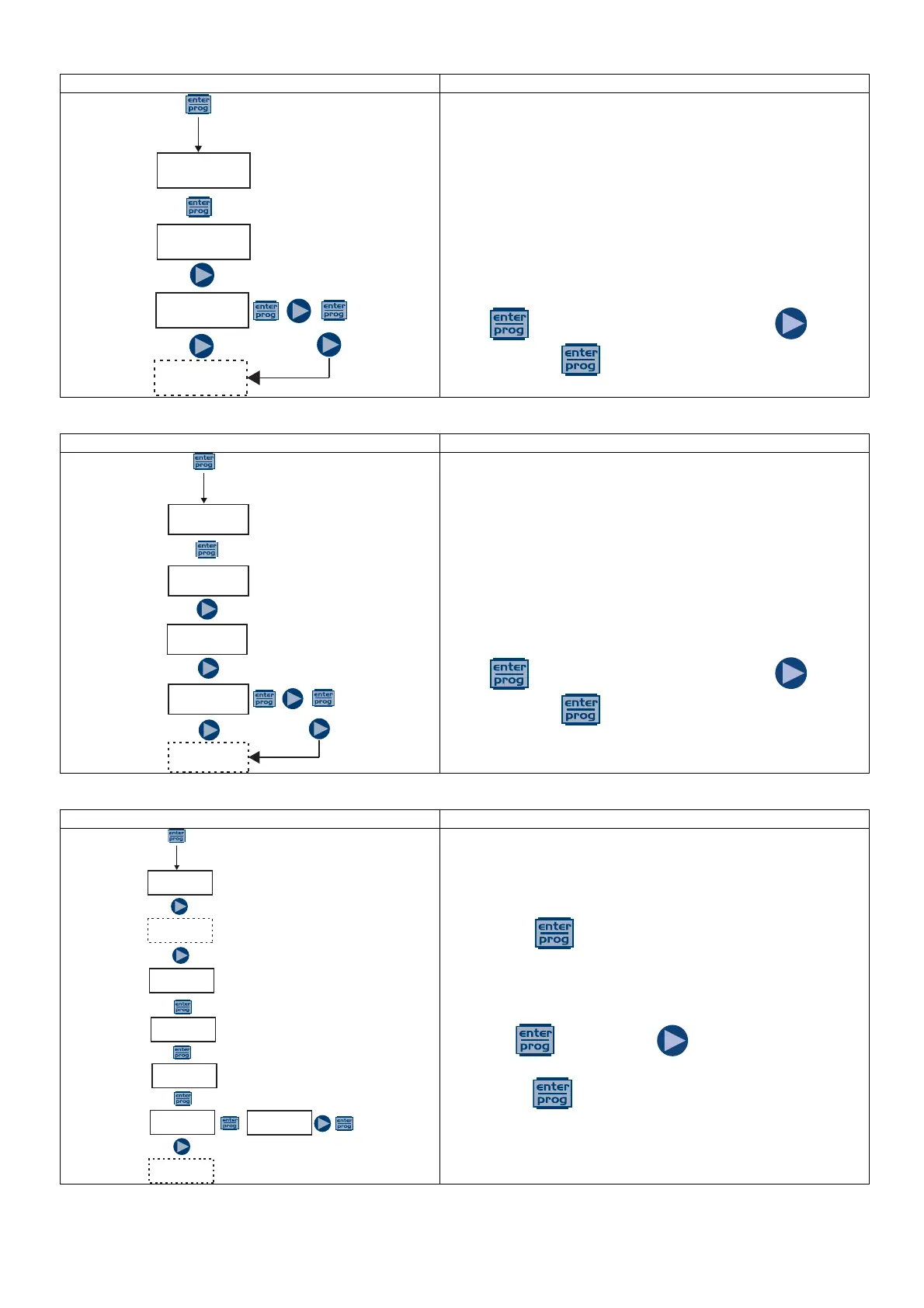
Paragraph 4 – Setting the Power On Delay
Allows you to set a pump operation delay at the start up of
the pump. This delay takes effect only if the pump is
switched off and then switched on by disconnecting the
power supply.
The delay can be disabled, Off (default) or can be set from 1
to 60 minutes.
With the delay enabled, during the set time the LED flashes
(1 sec On – 1 sec Off) and the display shows the countdown
in seconds. If the pump is in Stop mode the display shows
only the flashing LED. During the delay time the function can
be disabled by accessing the menu and setting the time to
Off.
Press to access the item, and then press to set
the value. Press to confirm and return to the main
menu.
Paragraph 5 – Setting the Calibration Delay
Allows you to set a pump operation delay after the probe
(Redox or pH) calibration
The delay can be disabled, Off (default) or can be set from 1
to 60 minutes.
With the delay enabled, during the set time the LED flashes
(1 sec On – 1 sec Off) and the display shows the countdown
in seconds. If the pump is in Stop mode the display shows
only the flashing LED. During the delay time the function can
be disabled by accessing the menu and setting the time to
Off.
Press to access the item, and then press to set
the value. Press to confirm and return to the main
menu.
Paragraph 6 – Flow Rate Calibration
On the main menu appears, the value in mL in memory
since the last calibration or the default value if it is the first..
By pressing , the pump will dose for 30 seconds and
the display will show the countdown; during that time, by
means of a graduated container you can measure the
dispensed quantity.
After 30 seconds, the display will show the value in memory,
press the key and then to change the value with
the actual amount measured by the graduated container and
confirm with .
The data entered will be used in flow calculations.
PROG
Config.
Config.
Funct.
Delay ON
Off
PROG
Config.
Config.
Funct.
Delay ON
Off
CAL Delay
Off
PROG
Config.
Pump Cal
60.0ml
Quantity
60.0 ml
Quantity
65.0 ml
Pump Cal
ENTER
WAIT
30s



 To Next Page