12
LOWER LIMIT
Hold the LIMIT button until the shade starts jogging.
Use the DOWN button to lower the shade. Press stop when the shade is near the
desired lower limit.
Use the UP and DOWN buttons to adjust the length more accurately.
Hold the CONFIRM button until the shade jogs. is locks in the lower limit.
UPPER LIMIT
Use the UP button to raise the shade. Press stop when the shade is near the
desired upper limit.
Use the UP and DOWN buttons to adjust the upper limit more accurately.
Hold the CONFIRM button until the shade jogs. is locks in the upper limit.
Note: If you also desire to set a favorite position you should do so prior to
relinking other shades on that channel. See the next page for setting favorites.
1
2
3
4
5
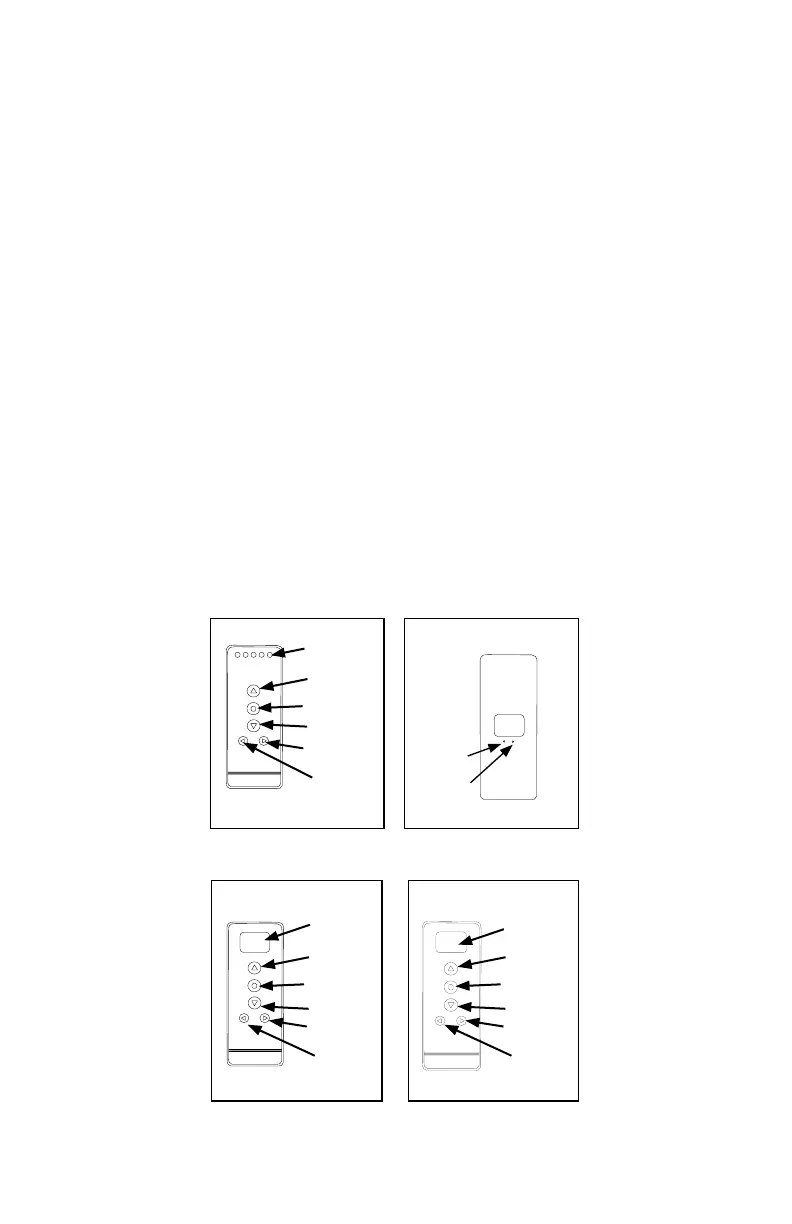
Channel
Display
Up
Stop/Favorite
Down
Channel +
Channel -
5 Channel Remote (front)
C
L
Conrm
Limit
Back of all Remotes
Channel
Display
Stop/Favorite
Down
Channel
Rail
Selector
14 Channel Remote (front)
Up
00:00
MANUAL
Display
Screen
Stop/Favorite
Down
Channel
Mode
Timer Remote (front)
Up



 To Next Page