15
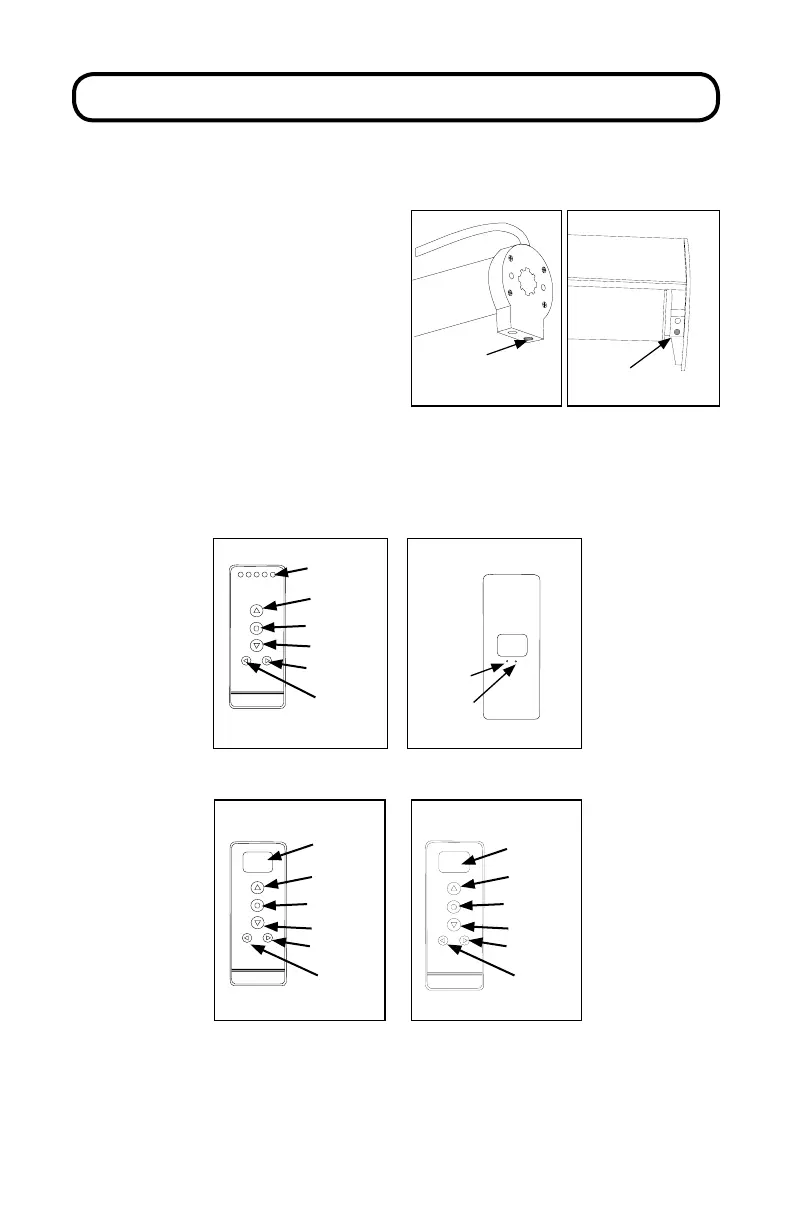
1. Select the channel that you want to
program using the CHANNEL selector
button.
2. Press the SETTING button on the
motor until the shade jogs once.
ADVANCED PROGRAMMING
P
Setting
(red button)
Setting
(red button)
3. Press and hold the CONFIRM button until the shade(s) jogs once.
4. Repeat steps 1-3 to program the rest of the channels on a multi-channel
remote.
REPLACE ORIGINAL REMOTE, ADD ADDITIONAL
REMOTE OR ADD SHADE TO AN ADDITIONAL CHANNEL
1
2
3
4
5
Channel
Display
Up
Stop/Favorite
Down
Channel +
Channel -
5 Channel Remote (front)
C
L
Conrm
Limit
Back of all Remotes
Channel
Display
Stop/Favorite
Down
Channel
Rail
Selector
14 Channel Remote (front)
Up
00:00
MANUAL
Display
Screen
Stop/Favorite
Down
Channel
Mode
Timer Remote (front)
Up



 To Next Page