IN0051 Revision 05 (005293)– 12 of 26
POWER PERFORMANCE PASSION
SP PRO Interactive Inverter Charger
Section 3 for LG RESU (Single battery)
1. The SP PRO battery temperature sensor remains connected to the SP PRO.
Roll it up and place it inside the SP PRO.
2. Do not connect any wires to the pre-charge/battery sense terminals. The battery sense voltage is
read from the RESU BMS.
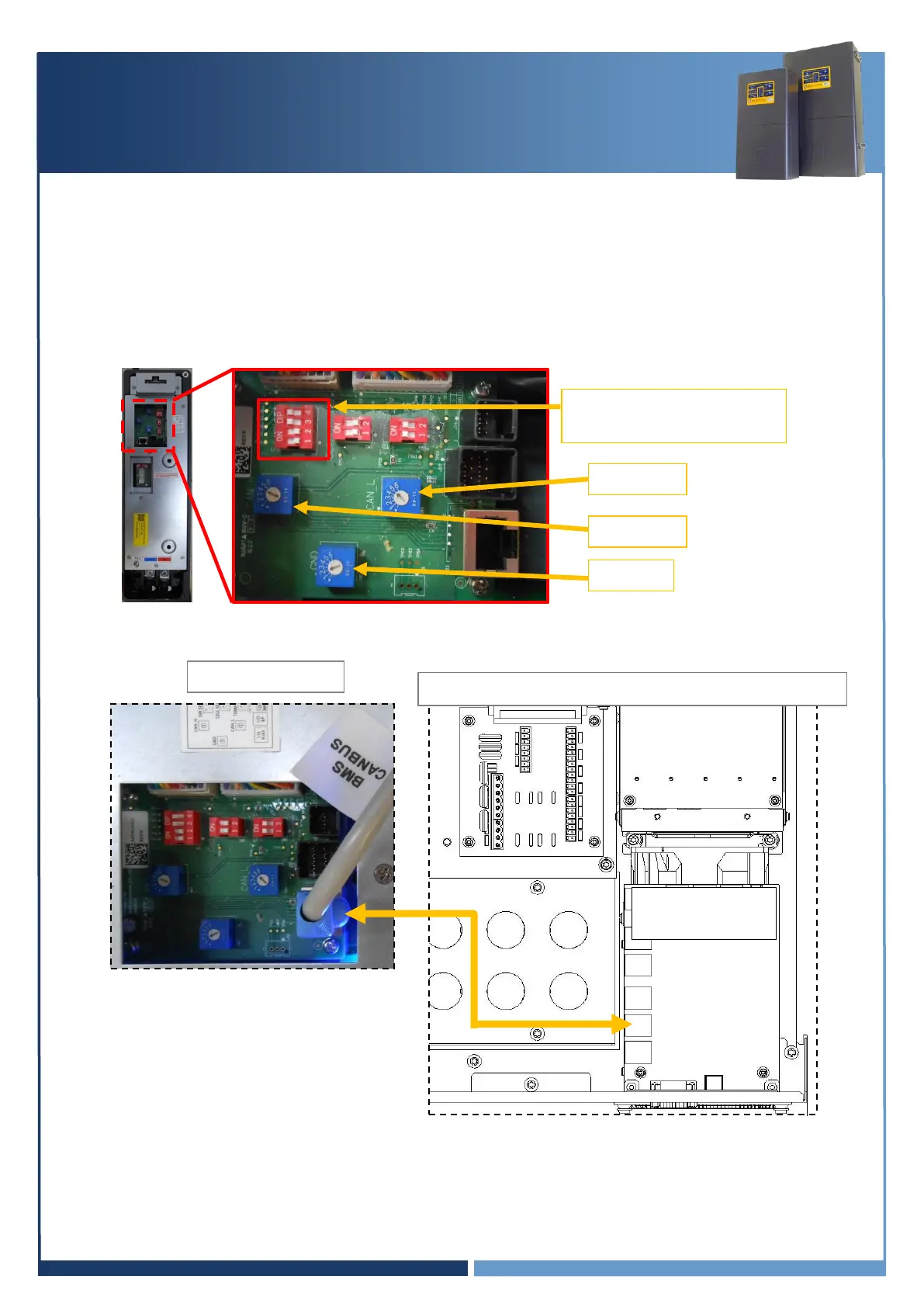
3. Configure the LG Chem RESU dip switch, set “SW Select”: 1&2 = OFF and 3&4 = ON.
4. Configure blue rotary switches, CAN H = 4, CAN L= 5 and GND = 2
5. Using the applicable installation kit, connect the RJ45 Connector cable from the SP PRO blue or
black comm card “SP PRO CANBUS” to the LG Chem RESU “BMS CANBUS”.
Go to section “Check Communications Card Firmware” page 16
SW Select: 1&2 = OFF
3&4 = ON
SP PRO Inverter (L1 only in a multiphase system)





 To Next Page