English
52 SAEfon CL - Operating instruction
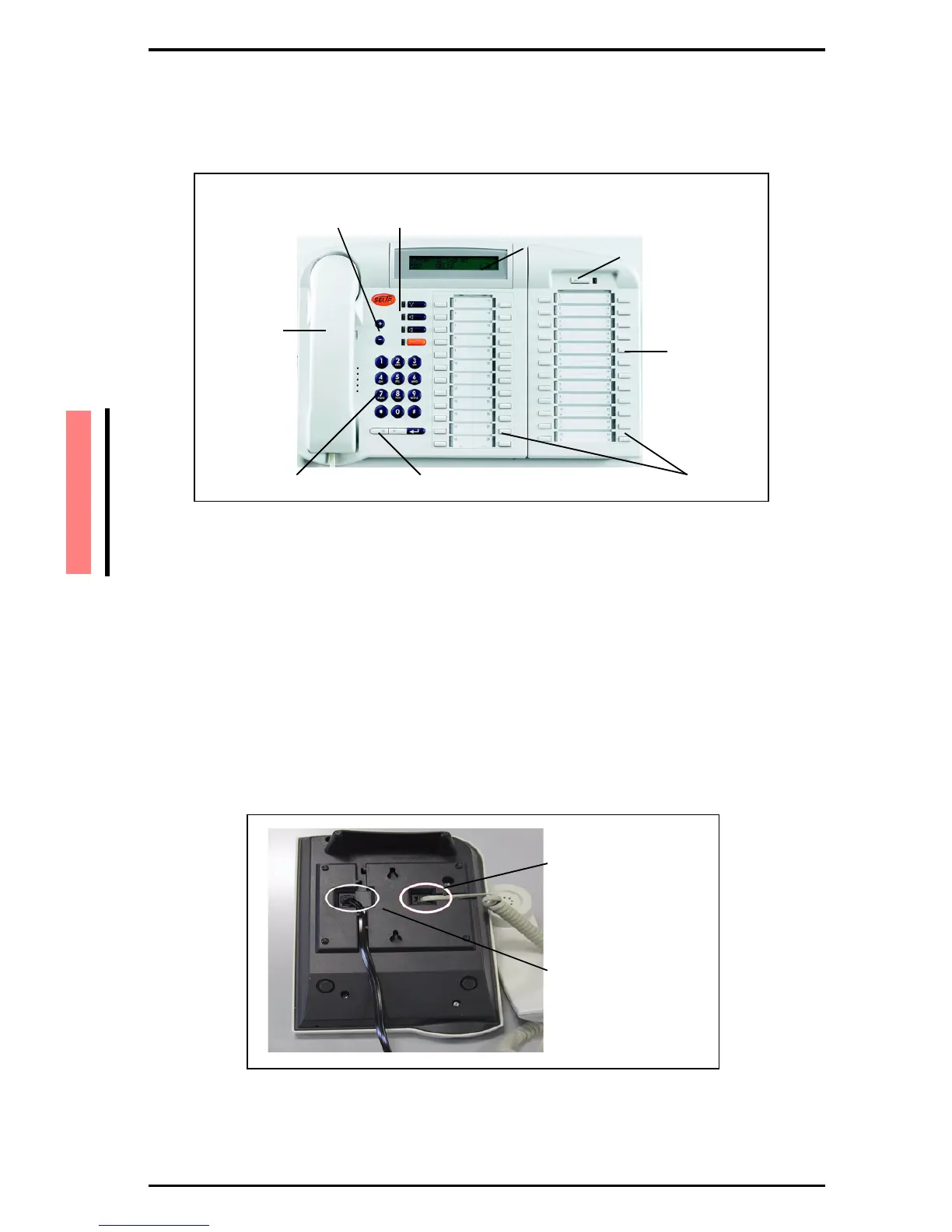
6.3. SAEfon CL 76D
The telephone SAEfon CL 76D includes all SAEfon CL 28D functions,
plus a 24 keys expansion module (K module).
6.4. Connecting the handset cable
Connect one end of the spiral connecting cable into the appropriate
jack on the back of the telephone and the other end of this cable into
the handset.
6.5. Connecting the line cable
Connect one end of the line cable to the appropriate jack on the back
of the telephone and insert the other end into the RJ45 socket
towards the SELTATEL exchange.
Figure 1-1 Connecting SAEfon CL 08D cables
4 pre-programmed function keys
(recall, hands-free, speaker, release)+ and - keys
Display
Shift key with LED
Handset
Dialling pad
Menu navigation keys Programming function keys
K module
plug for handset cable
plug for line cable



 To Next Page