EasyManua.ls Logo

Semtech SX1276 - Eiger Platform Presentation

Semtech SX1276
54 pages
Print Icon
To Next Page IconTo Next Page
To Previous Page IconTo Previous Page
Loading...
W
W
IRELESS,
Revision
©2014 S
e
4 Ei
g
4.1 P
l
The Eige
r
the mode
Top/Bot
t
Short ce
2-secon
d
E
When s
c
led will
b
Bottom
r
Top gre
e
Red+Gr
e
fully cha
Eiger
p
Only us
e
STM32
This US
B
plug for
t
to enabl
e
with PC
SENSING
&
1
.1 – May 20
e
mtech Corp
o
g
er Plat
f
l
atform
D
r
platform is i
n
m parameter
s
5-Way main
t
om/Right/Le
f
nter click to
s
d
es center cli
E
iger platfo
r
c
reen is turne
d
b
link
Charging
r
ed: charging
e
n: battery is
e
en: chargin
g
rged
p
latform fun
c
e
d to move b
e
daughter b
o
B
should onl
y
t
he SX1276
S
e
communic
a
software
&
TIMING P
R
14
o
ration
f
orm Pr
e
escripti
o
n
tended to e
n
s
are pre-con
F
i
button
ft
/Center
s
tart
ck to shutdo
w
r
m LEDs
d
off the gre
e
LEDs
charged
g
error or batt
c
tion ‘button
s
e
tween scree
n
o
ard
y
be
S
KA
a
tion
ODUCTS
P
a
e
sentati
o
o
n
n
able a quick
figured and t
h
i
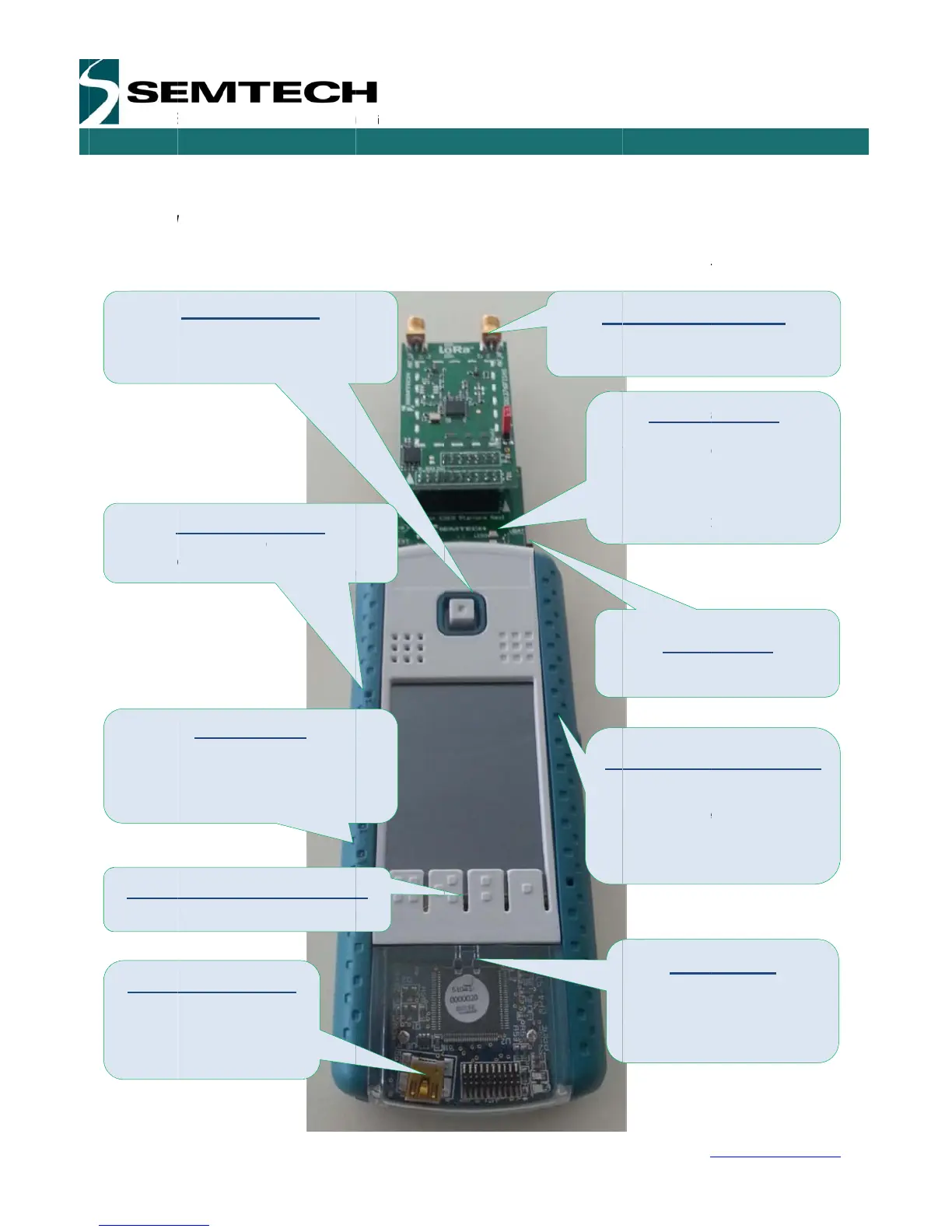
gure 2: Eig
e
w
n
e
n
ery
s
n
s
a
ge 10 of 53
o
n
and easy ra
n
h
e user only
n
e
r platform d
e
n
ge test of th
n
eeds to set
s
escription
A
n
Do not s
t
load con
n
R
e
Gr
R
e
Tr
a
Y
e
fo
r
L
e
Pl
a
Mi
n
U
s
ba
t
ba
t
us
e
SX127
6
w
e sx1276 m
o
s
ome RF pa
r
tenna SMA
C
t
art TX witho
u
n
ected
LoRa bo
a
e
ceive Mode
r
een: PER pa
c
e
d: NonPER
p
a
nsmit Mod
e
e
llow: Packet
r
each packe
t
S_VD
C
e
ave in uppe
r
a
form main
U
n
i-B USB typ
e
s
e to charge t
h
t
tery or pow
e
t
tery is off or
e
d to update
Batte
r
Switch the E
ON or OFF (
and ‘0’).
6
Develop
m
USE
R
w
ww.semtec
h
o
dule. Here
m
r
ameters.
C
onnector
u
t an antenn
a
a
rd LEDs
c
ket rcvd OK
p
acket rcvd
O
e
sent (flashes
t
C
_Switch
r
most positio
n
U
SB connec
e
h
e platform
e
r it when
empty. It is a
the firmware
r
y switch
iger platform
indicated by
m
ent Kit
R
GUIDE
h
.com
m
ost of
a
or
O
K
n
tor
lso
1’

Related product manuals