EasyManua.ls Logo

Sencor SBR 930 SS - Page 6

Sencor SBR 930 SS
20 pages
Print Icon
To Next Page IconTo Next Page
To Previous Page IconTo Previous Page
Loading...
BREAD
MAKER
SBR
930
SS
Displayed
warnings:
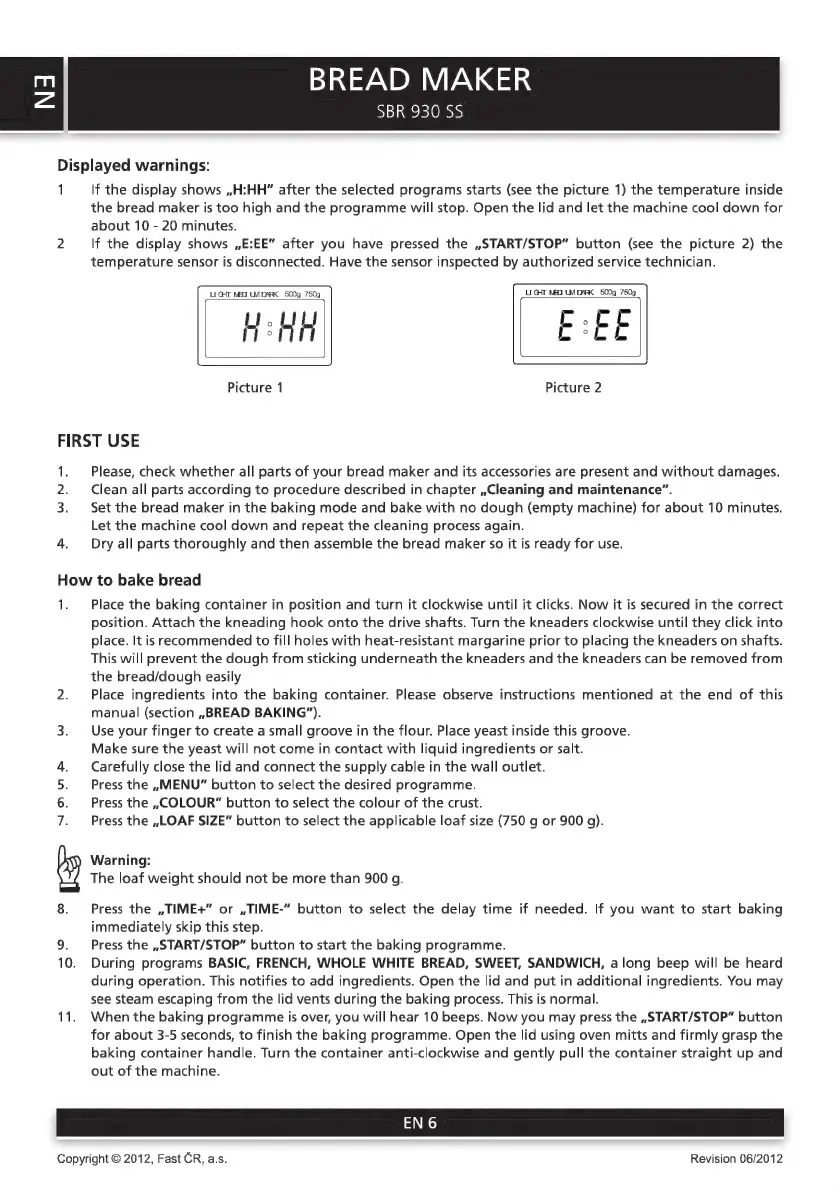
1
If
the
display
shows
,,H:HH”
after
the
selected
programs
starts
(see
the
picture
1)
the
temperature
inside
the
bread
maker
is
too
high
and
the
programme
will
stop.
Open
the
lid
and
let
the
machine
cool
down
for
about
10
-
20
minutes.
2
If
the
display
shows
,E:EE”
after
you
have
pressed
the
,START/STOP”
button
(see
the
picture
2)
the
temperature
sensor
is
disconnected.
Have
the
sensor
inspected
by
authorized
service
technician.
LIGHT
NED
UM
DAR
500g
750g
LIGHT
NED
UM
DARK
500g
750g
H:
H
EEE
Picture
1
Picture
2
LII
ne
FIRST
USE
1.
Please,
check
whether
all
parts
of
your
bread
maker
and
its
accessories
are
present
and
without
damages.
2.
Clean
all
parts
according
to
procedure
described
in
chapter
„Cleaning
and
maintenance”.
3.
Set
the
bread
maker
in
the
baking
mode
and
bake
with
no
dough
(empty
machine)
for
about
10
minutes.
Let
the
machine
cool
down
and
repeat
the
cleaning
process
again.
4.
Dry
all
parts
thoroughly
and
then
assemble
the
bread
maker
so
it is
ready
for
use.
How
to
bake
bread
1.
Place
the
baking
container
in
position
and
turn
it
clockwise
until
it
clicks.
Now
it is
secured
in
the
correct
position.
Attach
the
kneading
hook
onto
the
drive
shafts.
Turn
the
kneaders
clockwise
until
they
click
into
place.
It
is
recommended
to
fill
holes
with
heat-resistant
margarine
prior
to
placing
the
kneaders
on
shafts.
This
will
prevent
the
dough
from
sticking
underneath
the
kneaders
and
the
kneaders
can
be
removed
from
the
bread/dough
easily
2.
Place
ingredients
into
the
baking
container.
Please
observe
instructions
mentioned
at
the
end
of
this
manual
(section
„BREAD
BAKING”).
3.
|
Use
your
finger
to
create
a
small
groove
in
the
flour.
Place
yeast
inside
this
groove.
Make
sure
the
yeast
will
not
come
in
contact
with
liquid
ingredients
or
salt.
Carefully
close
the
lid
and
connect
the
supply
cable
in
the
wall
outlet.
Press
the
,
MENU”
button
to
select
the
desired
programme.
Press
the
,COLOUR”
button
to
select
the
colour
of
the
crust.
Press
the
„LOAF
SIZE”
button
to
select
the
applicable
loaf
size
(750
g
or
900
g).
4
5
6
7
Warning:
The
loaf
weight
should
not
be
more
than
900
g.
8
Press
the
,
TIME+”
or
,,TIME-"
button
to
select
the
delay
time
if
needed.
If
you
want
to
start
baking
immediately
skip
this
step.
9.
Press
the
,
START/STOP”
button
to
start
the
baking
programme.
10.
During
programs
BASIC,
FRENCH,
WHOLE
WHITE
BREAD,
SWEET,
SANDWICH,
a
long
beep
will
be
heard
during
operation.
This
notifies
to
add
ingredients.
Open
the
lid
and
put
in
additional
ingredients.
You
may
see
steam
escaping
from
the
lid
vents
during
the
baking
process.
This
is
normal.
11.
When
the
baking
programme
is
over,
you
will
hear
10
beeps.
Now
you
may
press
the
,
START/STOP”
button
for
about
3-5
seconds,
to
finish
the
baking
programme.
Open
the
lid
using
oven
mitts
and
firmly
grasp
the
baking
container
handle.
Turn
the
container
anti-clockwise
and
gently
pull
the
container
straight
up
and
out
of
the
machine.
Copyright
©
2012,
Fast
ČR,
a.s.
Revision
06/2012

Related product manuals