Connecting devices to the Soundbar
AMBEO Soundbar | Max | 21
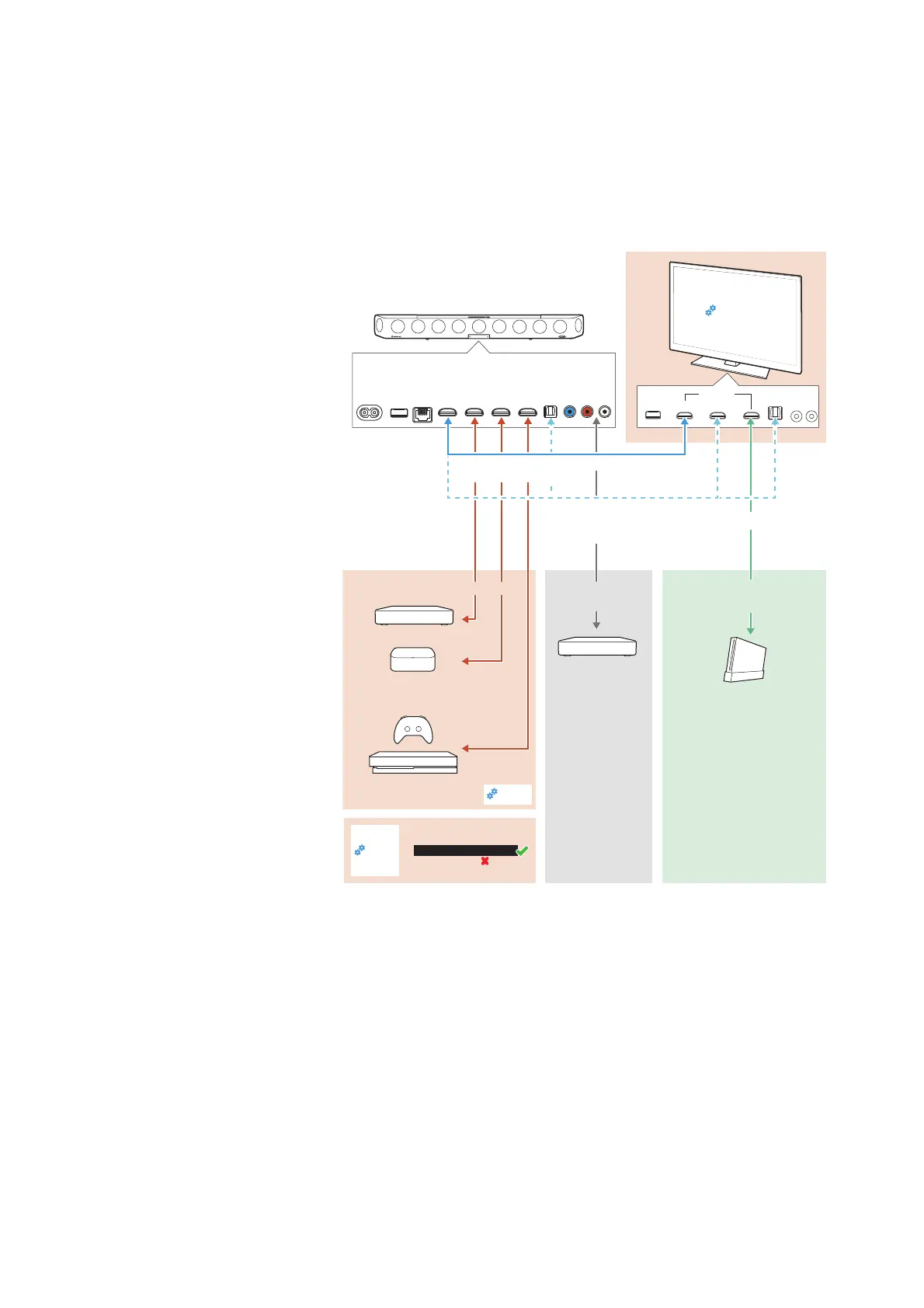
Connection diagram (example)
Connect your audio sources to the AMBEO Soundbar | Max and your
TV according to the following diagram (example). Sonova Consumer
Hearing recommends connecting the audio sources for high-resolu
-
tion surround formats directly to the AMBEO Soundbar | Max using a
High Speed HDMI
® Cable.
AUX IN
SW PRE
OUT
OPT IN
HDMI 3 IN
HDMI 2 IN
HDMI 1 IN
HDMI TV
(eARC) OUT
ETHERNET
USB
POWER
HDMI IN
eARC or ARC
OPTICAL
OUT
Streaming device e.g.
Apple TV, Netflix, ...
Gaming console e.g.
PS4, Xbox, ...
CD
Gaming console
e.g. Wii, ...
Blu-ray
Connect additional
devices to the HDMI IN
of your TV.
The audio will be routed to
the AMBEO Soundbar via
the HDMI eARC/ARC or
OPTICAL connection.
If no eARC/ARC is available, use the
OPTICAL connection of the TV (for audio)
and HDMI IN (for video)
High-definition audio content
Auto/Bypass/Pass-Through
Downmix/Stereo
TV/Player sound menu*:
HDMI Audio OUT/Optical OUT
Sound
settings
* sound menu can vary
Sound
settings
Sound
settings
In case of more than
3 audio sources:
Stereo audio
content
TV connection via HDMI eARC or HDMI ARC
(for audio and video)



 To Next Page