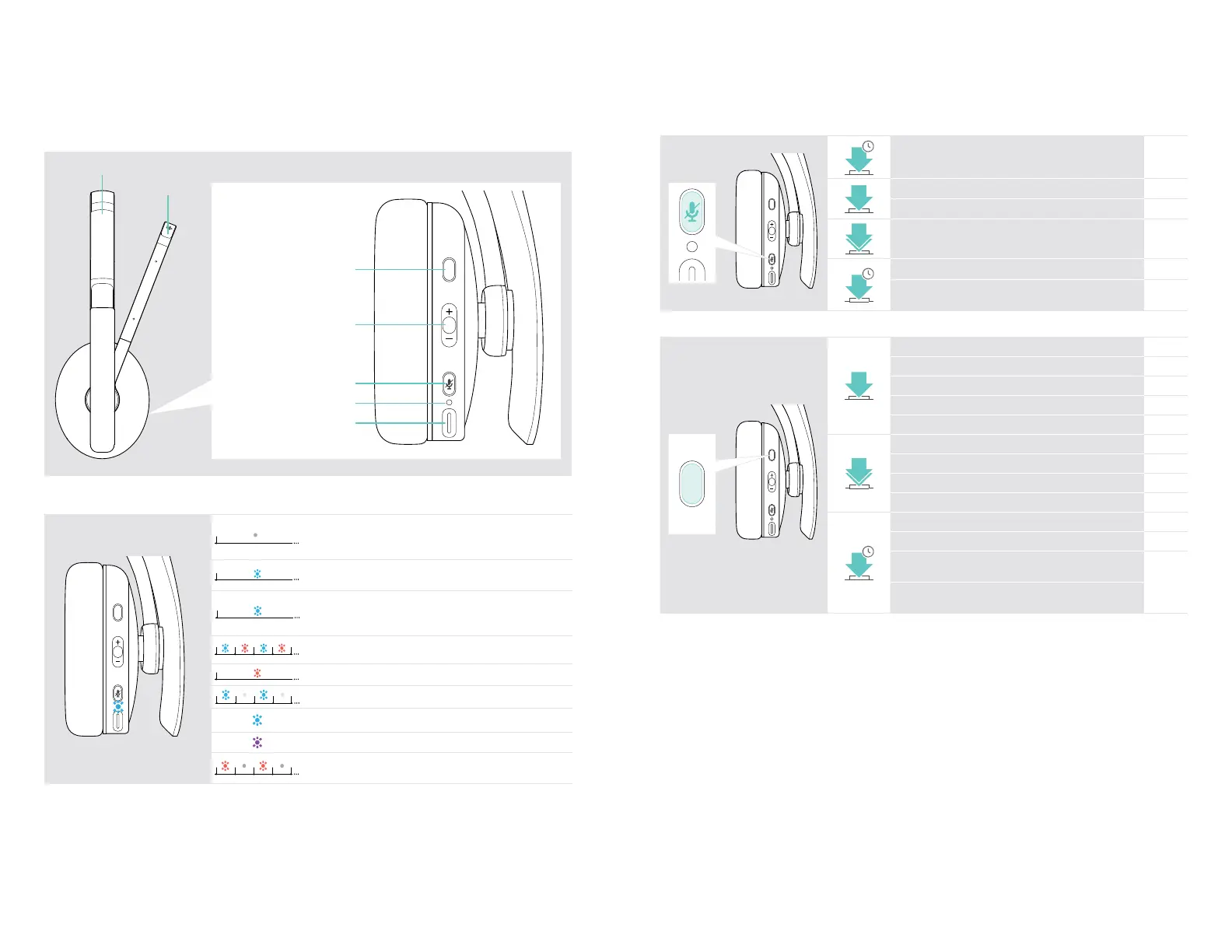
• Bluetooth device found
• Headset disconnected from mobile device/dongle
• Bluetooth reconnects
Headset in pairing mode:
searching for mobile device/dongle
*
3x
Headset turns off
Incoming call
Battery power between 61 and 100%
Battery power between 21 and 60%
• No Bluetooth device found
• Rechargeable battery is weak
*Once the headset is successfully connected, the LED goes o.
ADAPT 200 series Bluetooth
®
headset
Product overview5
Overview of the headset buttons
Power & Mute button Press Function Page
2s
Turns the headset on / off 11
Mutes / unmutes the microphone 13
Cancels pairing (Pairing mode) 8
2x
Requests remaining battery power 19
4s
Pairs the headset with a Bluetooth device 8
Clears pairing list (Pairing mode):
Press Power & Multifunction button
25
Hook / Teams button Press Function Page
Initiates a call 14
Accepts / ends a call 14
2 calls: Answers incoming & ends active call 16
2 calls: Ends active & unholds paused call 16
Invokes Microsoft Teams 17
2x
Puts an active call on hold (pause) / unholds call 14
Redials the last number 15
2 calls: Answers incoming & puts active on hold 16
2 calls: Toggles between two calls 16
1s
Activates voice assistant / Cortana 15
Rejects a call 14
Enables voice prompts:
Press Hook & Multifunction button in the direction +
21
Disables voice prompts:
Press Hook & Multifunction button in the direction –









 To Next Page