M2 AEBT | 29
Troubleshooting
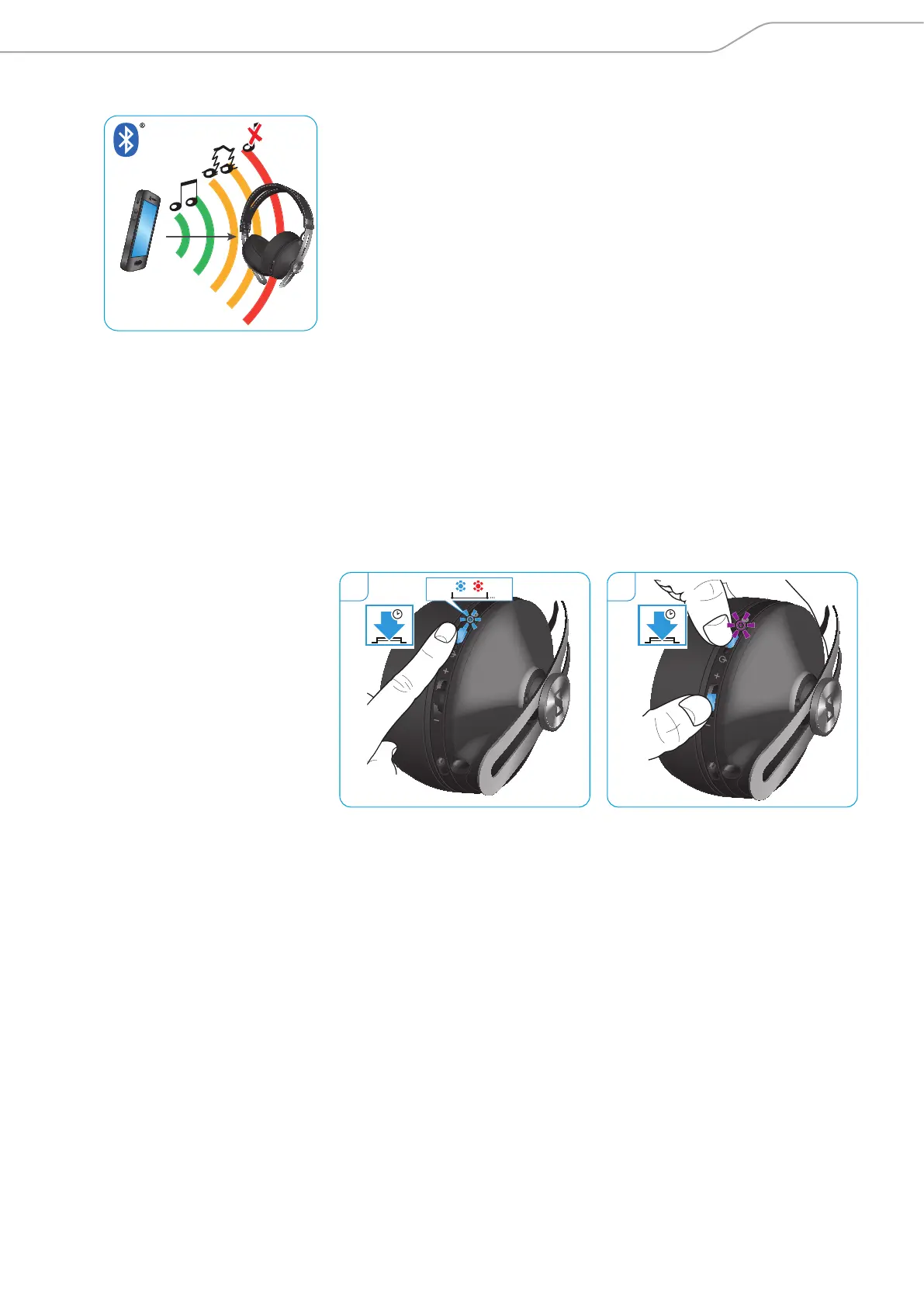
Leaving the Bluetooth transmission range
Wireless calling and streaming are only possible in the Bluetooth transmission
range of your smartphone. The transmission range largely depends on environ-
mental conditions such as wall thickness, wall composition etc. With a free line
of sight, the transmission range of most smartphones and Bluetooth devices is
up to 10 meters.
If the headphones leave the Bluetooth transmission range of the smartphone,
the sound quality deteriorates and you hear the voice prompt „lost connection”
repeatedly. At this point the connection breaks down completely. You can re-
establish the connection if you re-enter the Bluetooth transmission range and
you hear the voice prompt „connected”.
To re-establish the connection:
X Press the 3-way multifunction button.
Clearing the paired settings
1. Switch the headphones on (see page 17). Continuously press the power
button until you hear the voice prompt „pairing” and the LED flashes blue
and red.
The headphones are in pairing mode.
2. Press the 3-way multifunction button and the power button simultaneously
for 3 seconds.
The LED flashes purple thrice and the headphones go back to pairing mode.
The pair settings stored on the headphones are cleared.
1 2
4s
1s
3s
MOMENTUM
L




 To Next Page