M2 AEBT | 21
Using the headphones
Call functions
The following call functions are only available if the headphones and the smart-
phone are connected using Bluetooth wireless technology or if the USB cable is
used. Some smartphones may not support all the functions.
Making a call
X Dial the desired number on your mobile phone.
If your mobile phone does not automatically transfer the call to the headphones:
X Select the MOMENTUM M2 AEBT as the audio source on your smartphone (see
the instruction manual of your smartphone if necessary).
Accepting/Rejecting/Ending a call
If your headphones are connected to a smartphone and you received a call, you
hear a ring tone in the headphones and the LED flashes blue. If the battery level
of the headphones is low, the LED flashes red.
If you are listening to music when you received the call, the music stops until
you end the call.
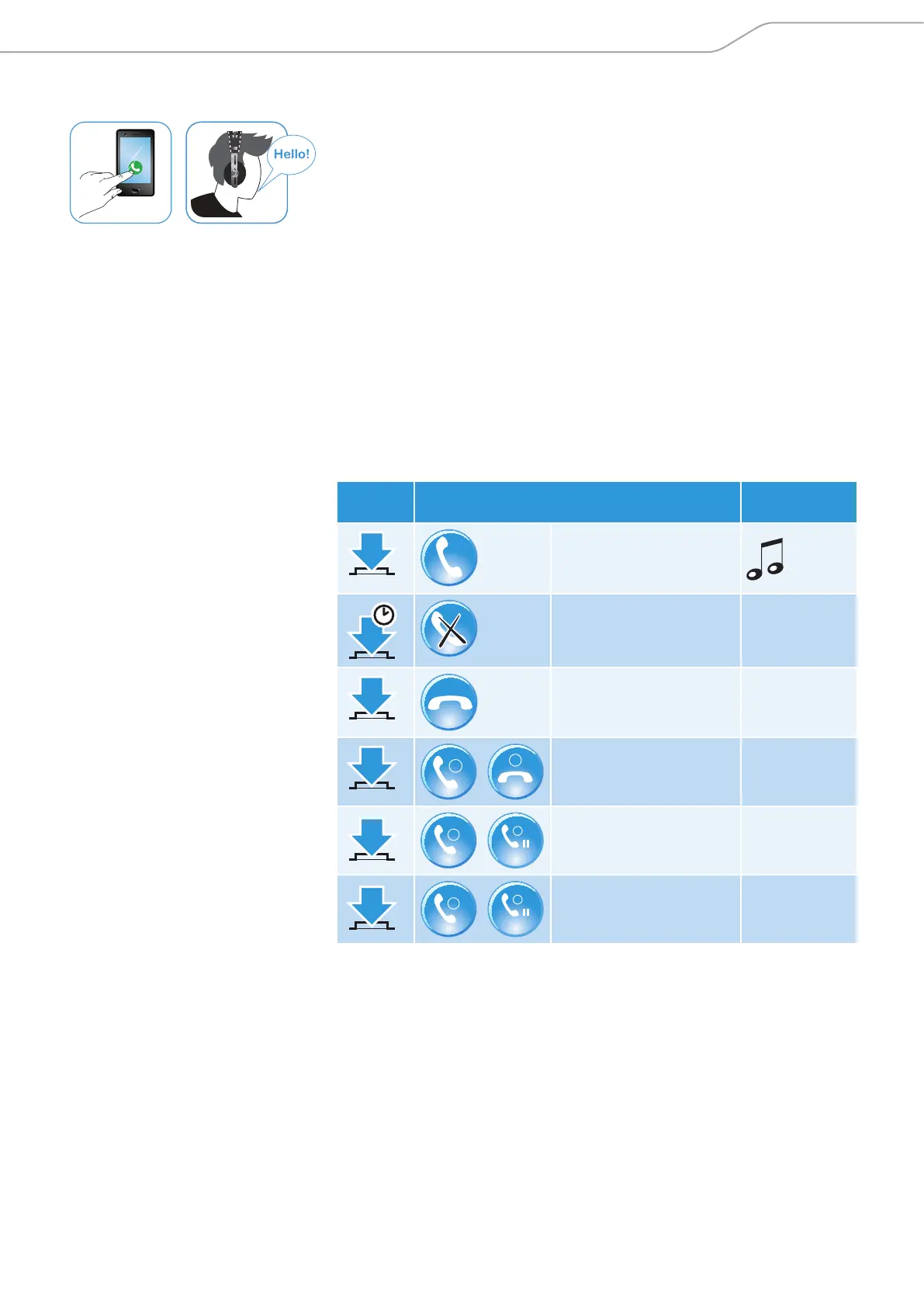
X Press the 3-way multifunction button.
Press Function Voice prompt/
tone
1 x
Accepts/Starts a call
1 s
Rejects a call „Call rejected”
1 x
Ends a call „Call ended”
1 x
1
2
Accepts an incoming call
and ends the active call
2 x
2
HOLD
1
Accepts an incoming call
and puts an active call on
hold
2 x
2
HOLD
1
Toggles between 2 active
calls










 To Next Page