24 | M2 AEBT
Using the headphones
Using the audio cable
There are 2 connection modes when you use the audio cable:
X Active mode - The connection mode when the audio cable is used and the
headphones are switched on.
X Passive mode - The connection mode when the audio cable is used and the
headphones are switched off.
Regardless of the connection mode, Bluetooth and the call and music control
functions are disabled if the audio cable is used. Use only the audio cable in any
of the following or similar circumstances:
– when the headphones ran out of battery
– when wireless transmission is not allowed e. g. during aircraft take-off and
landing
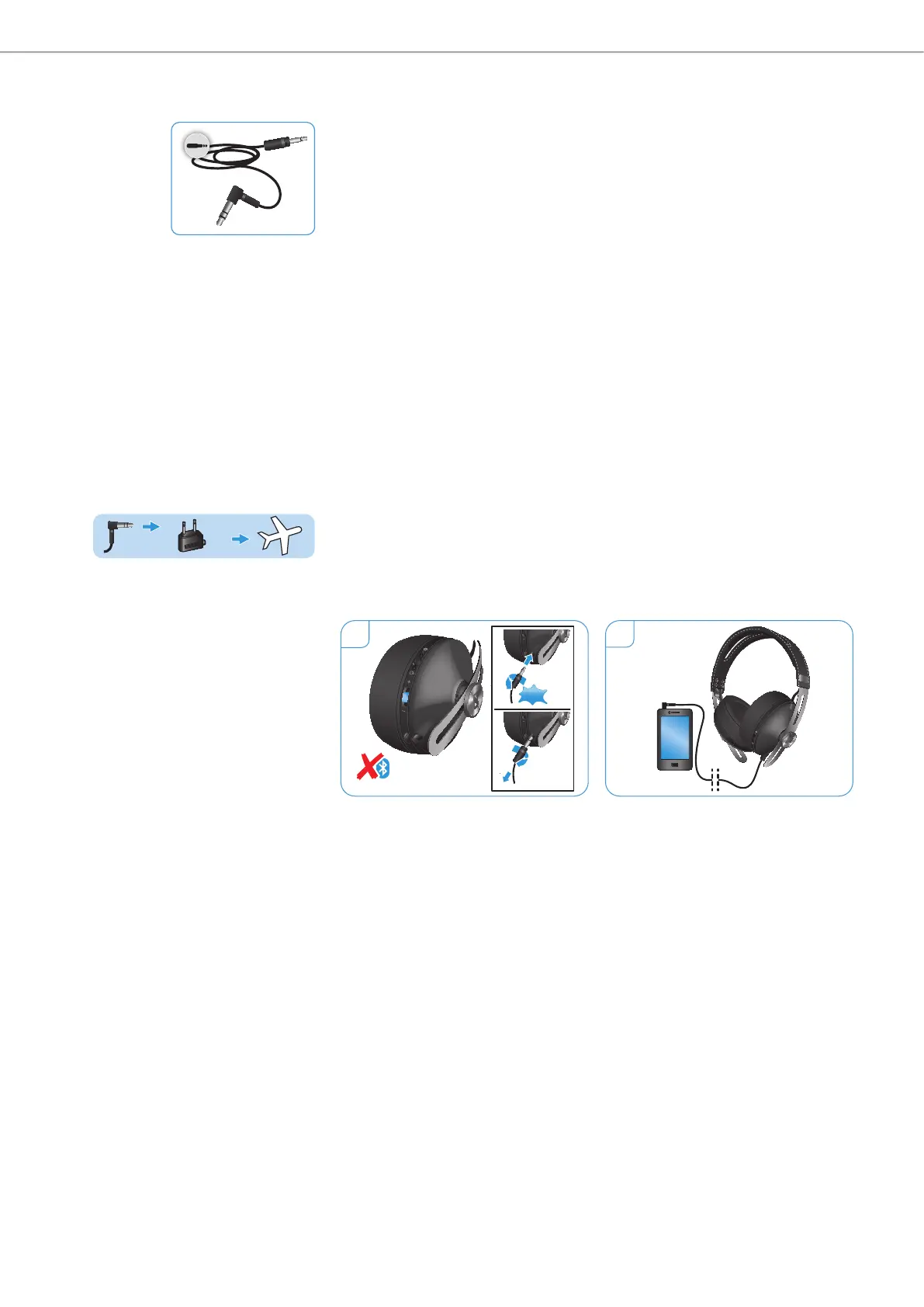
Connecting using the audio cable
1. Insert the 2.5 mm audio plug into the audio input of the headphones until
you hear a click sound. Turn counterclockwise and ensure that it is locked
securely in place.
The Bluetooth connection is disabled.
2. Connect the 3.5 mm audio plug into:
– the audio output of your smartphone.
– the in-flight adapter if you want to use the headphones with an in-flight
entertainment system.
If the connection mode is active, the NoiseGard active noise cancellation fea-
ture functions normally, if the connection mode is passive, the active noise
cancellation feature is disabled.
1
2
1
Click
2
2
1
MOMENTUM
L




 To Next Page