15
Connecting the NET 1 to a PC
The following applications with up to five NET 1 require the connection of
aPC :
y
Systems with up to 50 evolution wireless G2 rack-mount devices
y
Systems with up to 25 EM 3532 twin receivers
y
Mixed systems consisting of evolution wireless G2 devices and EM 3532
twin receivers
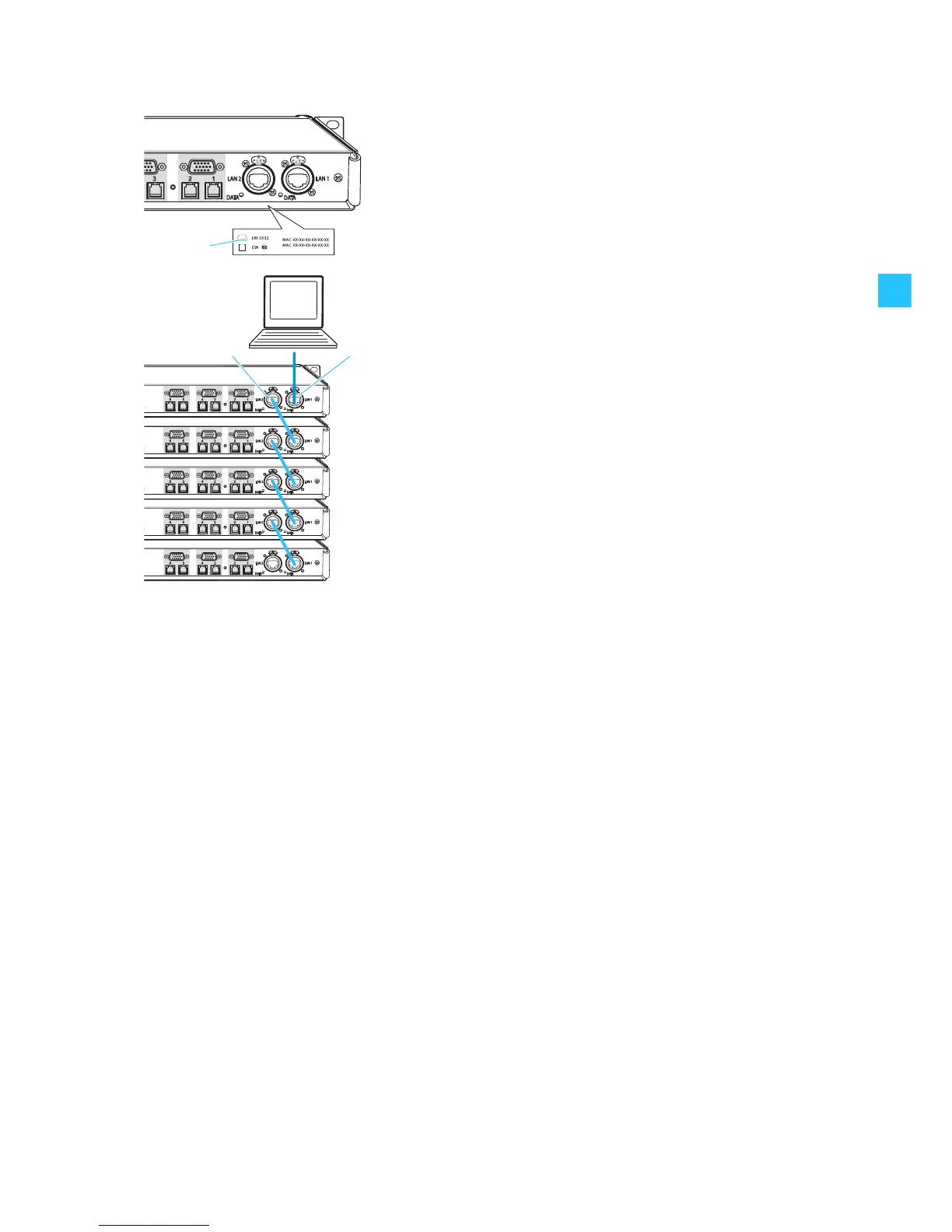
The MAC addresses of the NET 1 are indicated on the type plate .
왘 Connect one of the sockets LAN 1 or LAN 2 of the first NET 1 to the
PC using an Ethernet cable.
Notes:
y It is also possible to connect up to five NET 1 to a PC using a switch or a
router with switching function.
y Do not use a network hub! Attempting to use a hub with NET 1 may
cause network failure or other data communications problems.
왘 Then connect additional NET 1 via the sockets LAN 1 and LAN 2 using
Ethernet cables. The sockets LAN 1 and LAN 2 are identical, so it doesn't
matter in which order you connect them.
Installing the “Wireless Systems Manager” software
In order to operate the NET 1 with a PC, you have to install the “Wireless
Systems Manager” software (refer to the software installation manual).


 To Next Page