18
Performing a frequency scan for wireless monitoring
systems (IEM)
For wireless monitoring systems, the frequency scan is performed using the
EK 300 IEM G2 portable receiver. The frequencies of a selected channel bank
are then assigned to all SR 300 IEM G2 rack-mount transmitters of this
frequency range. Subsequently, the frequencies are transferred to the
corresponding portable receivers.
Switching the portable transmitters off
왘 Switch off all portable transmitters that are to be configured via the NET 1.
Preparing the frequency scan
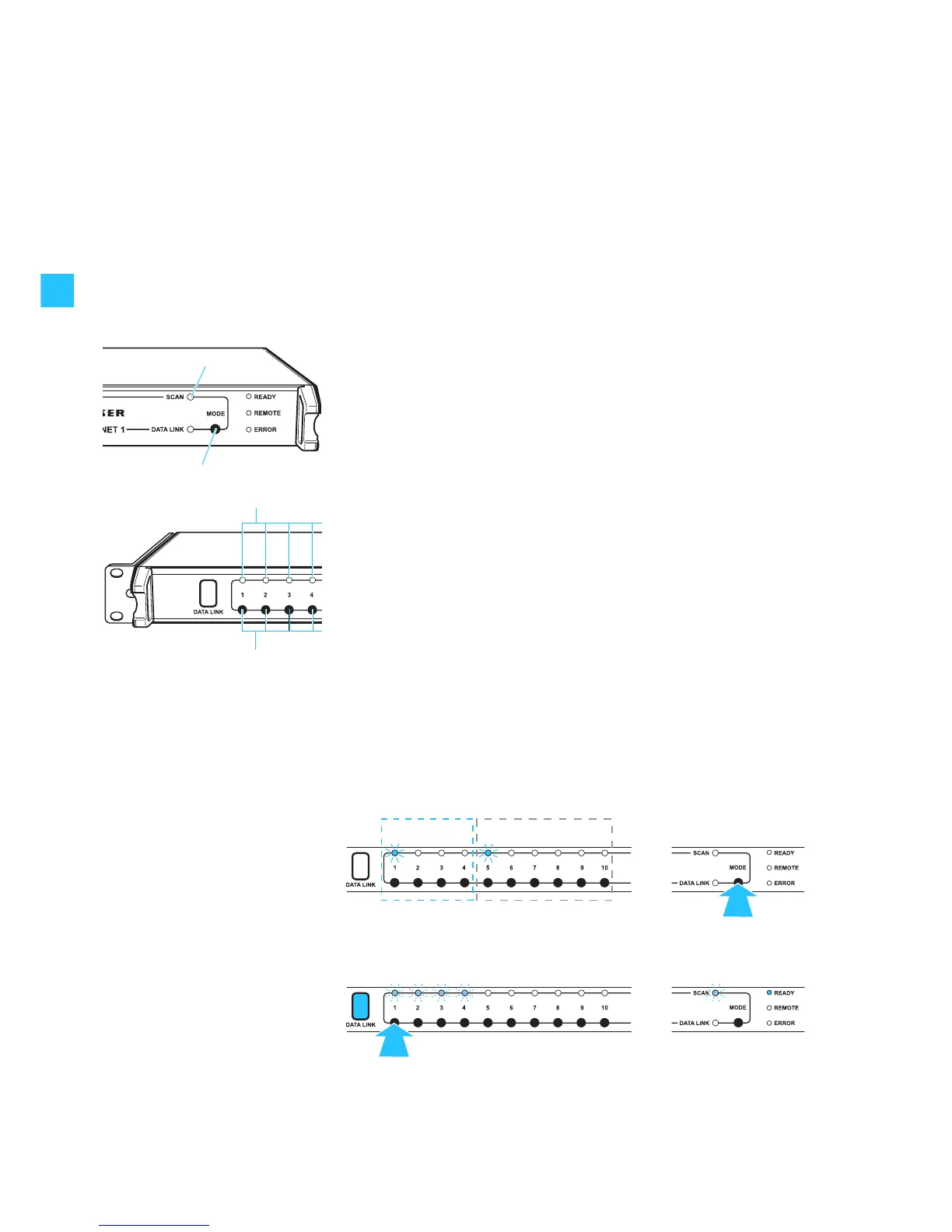
왘 Press and hold the MODE button on the NET 1.
The NET 1 selects one rack-mount device from each of the frequency
ranges. The “CHANNEL” LEDs assigned to these devices light up.
When two NET 1 are daisy-chained, pressing the MODE button
automatically determines the “master” NET 1. The “REMOTE” LED of the
“slave” NET 1 lights up and its MODE button is deactivated.
To determine the desired frequency range for the frequency scan, you first
have to select a rack-mount transmitter (IEM) belonging to the desired
frequency range as follows:
왘 Press the corresponding channel button .
The green “CHANNEL” LEDs of the rack-mount transmitters (IEM) with
the same frequency range flash. The infrared interface is permanently
backlit in blue and the yellow “SCAN” LED 쐋 flashes.
The RF signals of the rack-mount transmitters are muted. The display
backlighting changes from green to red.
Example:
The connection groups 1 to 4 of the NET 1 are occupied by transmitters (IEM).
The connection groups 6 to 10 are occupied by rack-mount receivers. After
pressing the MODE button , the green “CHANNEL“ LEDs for the first rack-
mount transmitter (connection group 1) and the first rack-mount receiver
(connection group 5) light up. The “CHANNEL“ LEDs of the other rack-
mount devices do not light up, i.e. they belong to the same frequency range.
After pressing the channel button , both the “CHANNEL“ LEDs 2 to 4 of
the monitoring system and the yellow “SCAN” LED 쐋 flash.
Wireless
monitoring system
Wireless
microphone system
1.
2.


 To Next Page