EasyManua.ls Logo

Sens S1901DVD - Power Connection and Installation Procedures; Connecting the AC Power Cord; Base Stand and Wall Mounting

Sens S1901DVD
27 pages
Print Icon
To Next Page IconTo Next Page
To Previous Page IconTo Previous Page
Loading...
E - 14
CONNECTIONS
INSTALLATION
MOUNTING ON THE WALL
        

 



        

3”
3”
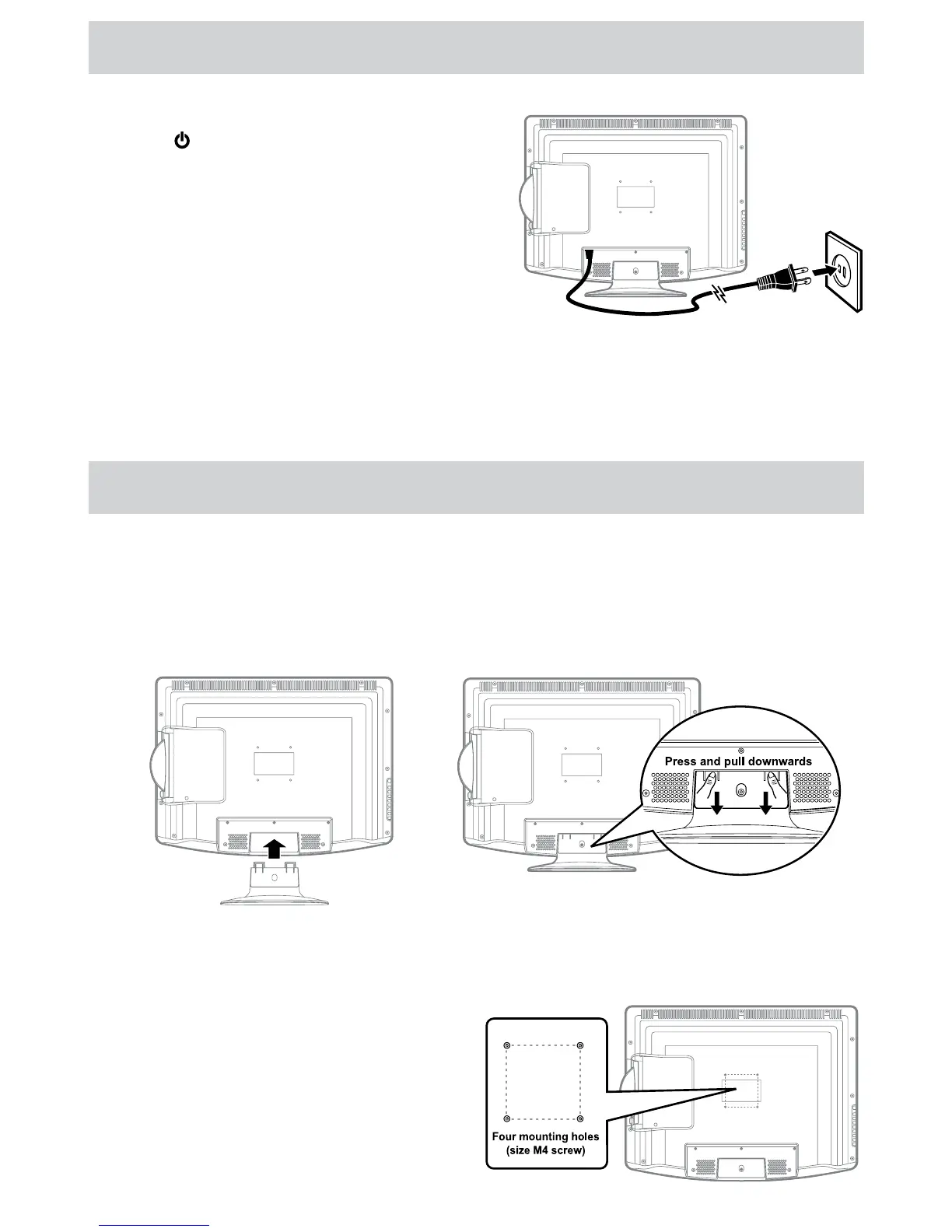
CONNECT THE POWER CORD
 
 
/ I 


 

       

To prevent electrical shock, match wide blade of plug
to wide slot of wall outlet, then fully insert.
 

 

 


INSTALLING / REMOVING THE BASE STAND
WARNING: The LCD Display is very fragile, and must be protected at all times when removing the base stand. Be
sure that no hard or sharp object, or anything that could scratch or damage the LCD display, comes into contact
with it. Do NOT exert pressure on the front of the unit at any time because the screen could crack.
1. Disconnect all cables or cords connected to the unit.
2. Lay the unit down on a flat surface with the back side facing up. Please make sure to place a soft cushioned
material (such as a pillow or thick piece of foam) beneath the screen.
4. To remove the base stand, keep pressing the locking area
of the base stand and pull downwards to release the base
stand.
3. To install the base stand, place the base
stand on the mounting slot, push the stand
till it locks.




Table of Contents

Related product manuals