IoT into the Wild
14
1) SenseCAP for Helium:
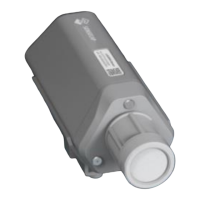
We provide the SenseCAP Portal to manage devices and data: sensecap.seeed.cc
We built a private Helium Console with an embedded SenseCAP Portal. When users get the
SenseCAP sensors, you can use it by scanning the code and binding it to the Portal.
“SenseCAP for Helium” is selected by default. The device runs in a fixed main frequency and
sub-band, refer to Helium Frequency Plan (https://docs.helium.com/lorawan-on-
helium/frequency-plans/ ). You only need to select the main frequency, such as EU868 and
US915.
SenseCAP for Helium supports the following frequency plan:
EU868 / US915 / AU915 / KR920 / IN865 / AS923-1 / AS923-2 / AS923-3 / AS923-4
2) SenseCAP for The Things Network
SenseCAP Portal also builds the TTN private server, and the sensor must be used together
with the SenseCAP Outdoor Gateway (https://www.seeedstudio.com/LoRaWAN-Gateway-
EU868-p-4305.html).
Due to the limitation of the SenseCAP outdoor gateway frequency, “SenseCAP for TTN”
supports the following frequency plan(The sensor is capable of supporting all frequency plan):


 To Next Page