Page 19
.
Sensor Check, Sensor Calibration/Storage and Membrane Change
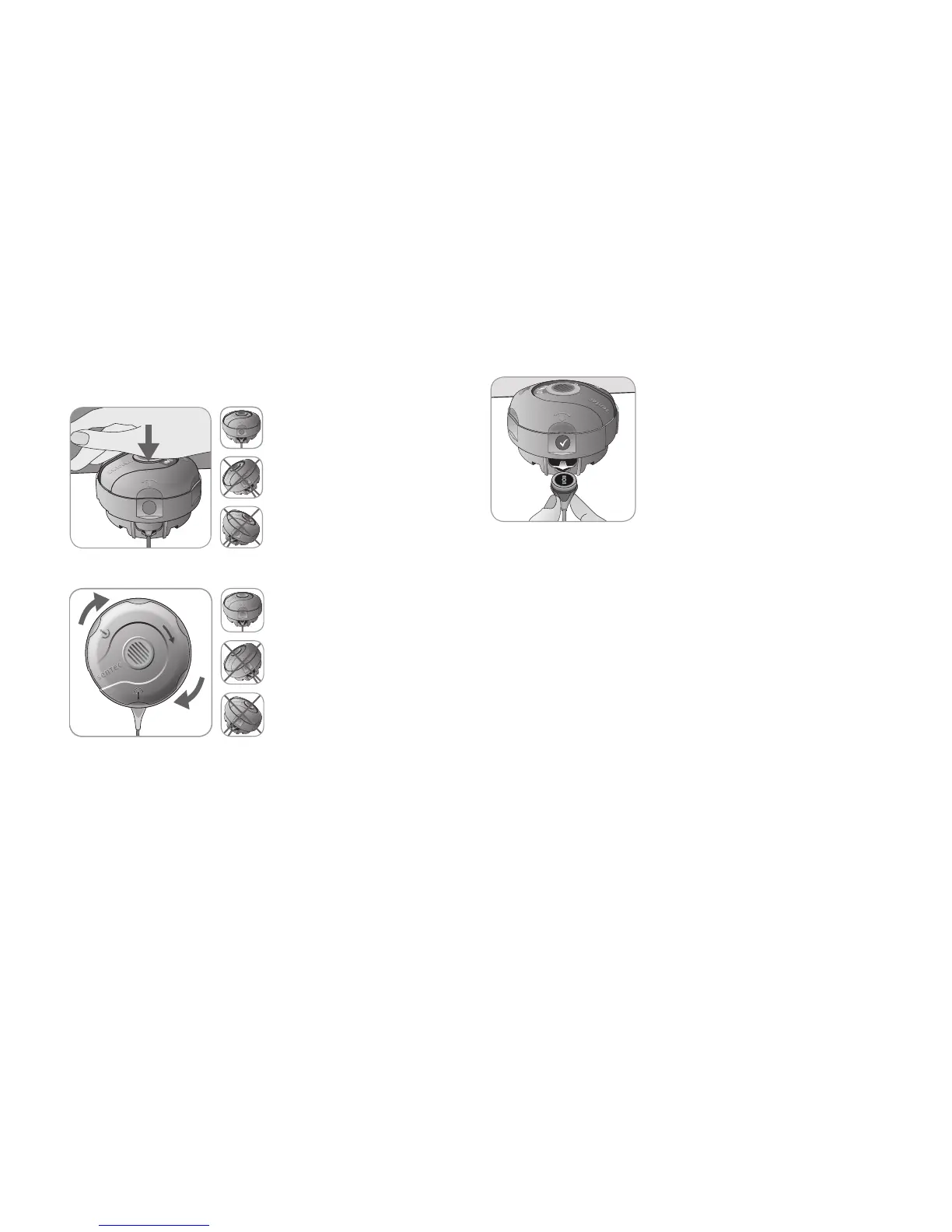
Keep the Membrane Changer horizontal while executing the
following Press-and-Turn step 4 times:
a. Press down slowly but
firmly with palm of the hand
and hold for 3 seconds.
b. Turn the top portion one
click clockwise to the next
stop. Keep the Membrane
Changer horizontal! Hold the
changer’s bottom half in place
while turning the top half.
Note: Do not press down on
the top while turning!
Removing Sensor from Membrane Changer
Press once again or lift the sensor to
release and remove the sensor from
the Membrane Changer.
Inspecting Sensor Membrane
Check the condition of the sensor membrane and the integrity
of the sensor (p. 15). Repeat the membrane change if nec-
essary. Do not use the sensor if any problems are noted.
Confirming Membrane Change on SDM
Once the inspection of the sensor membrane is completed
successfully, confirm the membrane change on the monitor
(menu ‘Membrane Change’).
Note: The membrane timer only resets if you confirm the
membrane change on the monitor.
Note: The menu ‘Membrane Change’ is only accessible if the
Docking Station Door is open.



 To Next Page