4
2.4 Calendar Screen / Standby Mode
The device will enter Calendar Screen / Standby Mode when:
No operation is detected for 120 seconds in other screen
interface, the device will automatically switch to the
Calendar Screen.
Pressing the Home button will return you to the Main Screen.
1. Current time
2. Current date
You can change the current time and date by going into the
Settings menu. Please refer to Section 5.1 for details.
3. This arrow indicates Users to press the Home button to exit
the Calendar Screen / Standby Mode.
4. Battery indicator
When the device enters Calendar Screen, it also begins to work in
Standby Mode, which is an ultra-low power consumption mode.
In Standby Mode, the touch screen operation will not function.
5
2.5 Result Screen
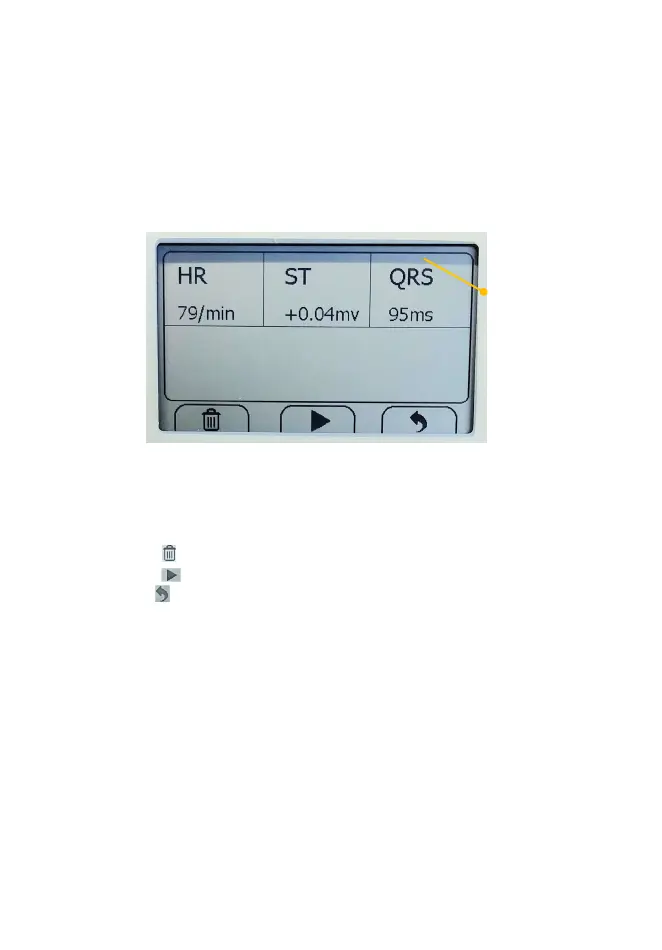
This device provides powerful measurement functionalities,
including Daily Check, ECG, Oximeter, and Internal
Thermometer. For each measurement, a Result report will be
provided after the measurement is finished. An example is shown
as below.
1. Measured parameters and readings.
2. Trash, replay, and back buttons.
Select to move recording to trash
Select button to re-record.
Press button to go back to the readings screen.
In the Result Screen, if there is no operation for 2 minutes, the
device will automatically return to Standby Screen.
Symbol for “ENVIRONMENT PROTECTION
electrical products should not be disposed of with
household waste. Please recycle where facilities exist.
Check with your local authority or retailer for recycling
, Against dripping(15° tilted)
Follow operating instructions
Caution or warning that requires special attention.


 To Next Page
 Loading...