
 Need help?
Do you have a question about the Serato Reloop Ready and is the answer not in the manual?
Details Serato DJ Lite/Pro compatibility and setup requirements for the Reloop Ready device.
Explains driver installation needs for Windows computers and absence for Mac.
Details the 8 performance pads and their various modes in Serato DJ Pro.
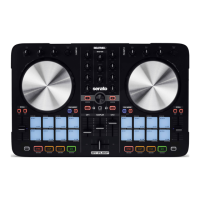
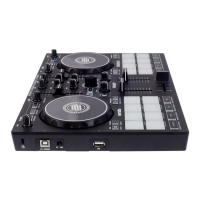
The Reloop Ready is a compact DJ controller designed for use with Serato DJ Lite and Serato DJ Pro software. It functions as a "Serato DJ Lite hardware unlocked" device, meaning it's ready to use with Serato DJ Lite right out of the box without any additional purchases. For users who wish to leverage the more advanced features of Serato DJ Pro, the device requires a "paid upgrade to Serato DJ Pro device," necessitating the purchase and activation of a Serato DJ Pro license. A 14-day trial for Serato DJ Pro is available for those who want to experience its capabilities before committing to a purchase. It's crucial to ensure that the latest version of Serato DJ Pro is installed for optimal performance.
Regarding driver software, the Reloop Ready is designed to be plug-and-play with Mac computers, requiring no manufacturer-specific drivers. However, Windows users will need to install a device driver, which can be downloaded from the Reloop website.
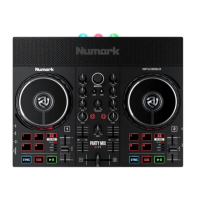
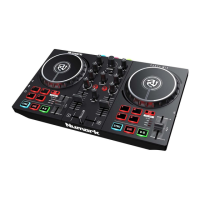
The controller features a comprehensive layout for intuitive DJing. On the left side, it includes a KENSINGTON LOCK for security, a PC USB port to connect to a computer, and a PC/IOS SWITCH to toggle between PC (Serato) and IOS device connections. An IOS USB port is dedicated for IOS device connections. For audio monitoring, there's a 1/8" HEADPHONE JACK. The CUE VOL knob adjusts the volume of the headphones, while the CUE MIX knob allows users to adjust the balance between cue and master audio heard in the headphones. The MASTER VOL knob controls the master output volume, and the MASTER OUTPUT uses RCA cables to connect to speakers or powered monitors.
The main control surface is divided into several sections. Each deck features an FX UNIT with FX LEVEL control to adjust the depth parameter for FX 1, 2, and 3, and FX UNIT buttons to enable FX 1, 2, or 3. The JOG WHEEL is used to control the waveform within Serato DJ Pro, allowing for precise track manipulation. Dedicated LOAD CHANNEL buttons (LOAD CHANNEL 1 and LOAD CHANNEL 2) are used to load the currently highlighted track to deck 1 or deck 2, respectively. The LOOP control allows users to scroll to choose the size of a loop and press to activate it. The TEMPO SLIDER adjusts the playback tempo of the current loaded track. CHANNEL GAIN knobs adjust the gain for each channel, and CHANNEL EQ knobs allow for adjusting the high and low frequencies. The BROWSE knob is used to scroll through the library or crate list.
Performance pads are a central feature, with 8 pads per deck that can be used across 9 different performance pad modes in Serato DJ Pro. These modes include HOT CUE, AUTO LOOP, MANUAL LOOP, SAMPLER, PITCH PLAY, SCRATCH BANK, LOOP ROLL, BEAT GRID, and USER MODE.
In HOT CUE mode, pads 1-8 trigger Serato DJ Pro Cue points. If no Cue point is present, pressing a pad will set one. Holding the SHIFT button while pressing a pad deletes the Cue point. AUTO LOOP mode, activated by holding MODE and pressing PAD 2, triggers autoloops of variable sizes. The loop selection area in the Serato DJ Pro user interface influences the 8 available autoloop sizes, which can be adjusted with the PARAMETER buttons. MANUAL LOOP mode (MODE + PAD 3) allows users to set in and out points for loops with PAD 1 and PAD 2, respectively. PAD 3 enables/disables the loop, and PAD 4 triggers Reloop. SAMPLER mode (MODE + PAD 4) triggers samples loaded into the Serato DJ Pro Sampler. The PARAMETER buttons move through banks A to D. PITCH PLAY mode (MODE + PAD 5) requires the Serato Pitch 'n Time DJ expansion pack. This mode allows playing Cue Points over variable pitch ranges. There are three key ranges (Up, Middle, Down) to choose from, toggled by the Parameter left & right buttons. The root key pad (0) is always lit white, playing the cue point at its regular pitch. Holding SHIFT and pressing Parameter left & right shifts the pitch up or down a single semitone. PITCH PLAY can only pitch one Cue point at a time. To change the selected Cue, hold SHIFT and press a performance pad corresponding to the desired cue point. SCRATCH BANK mode (MODE + PAD 6) allows assigning files from the Serato DJ Pro library to a pad. Triggering a pad loads the corresponding file to the deck (left pads for deck 1, right pads for deck 2). The Scratch Bank Panel in Serato DJ Pro allows loading/ejecting files and setting preferences like start point, Key Lock on/off, and Repeat on/off. PARAMETER buttons move through SCRATCH BANKS A to D. Holding SHIFT and clicking a Scratch Bank pad unloads the current file and re-loads the last track to that deck. LOOP ROLL mode (MODE + PAD 7) activates loop rolls of varying sizes. Releasing the pad exits the Loop Roll. PARAMETER buttons shift the roll position, and holding SHIFT while pressing PARAMETER buttons changes the 8 selected loop size options. BEAT GRID mode (MODE + PAD 8) offers precise beat grid adjustments: PAD 1 (Large Adjust Left), PAD 2 (Small Adjust Left), PAD 3 (Small Adjust Right), PAD 4 (Large Adjust Right), PAD 5 (Large Slip Left), PAD 6 (Small Slip Left), PAD 7 (Small Slip Right), and PAD 8 (Large Slip Right). USER mode (SHIFT + MODE) provides blank pads for user mapping via MIDI.
Other controls include SHIFT, which modifies the functions of other controls. The CROSSFADER fades audio between channels. CHANNEL FADERs adjust channel volume. CHANNEL FILTERs provide high and low pass filtering. SYNC turns Sync on/off for the respective deck. MODE, when held and pressed with a pad, selects a pad mode. VINYL toggles vinyl mode on/off for the platter. KEYLOCK enables/disables Key Lock for the deck. PARAMETER LEFT and PARAMETER RIGHT adjust pad mode parameters. PLAY plays/pauses the loaded track. CUE sets/plays from a temporary cue point. HEADPHONE CUE enables monitoring the channel through headphones.
The MIDI feature in Serato DJ Pro allows remapping software functions to the primary controller or assigning controls to a secondary MIDI controller. To remap, open the SETUP screen, click the MIDI tab, select the device, and check "Allow Serato Hardware Remapping." The MIDI assign button then becomes available. Users can save, edit, or delete MIDI presets, and 'Restore Defaults' erases custom mappings.
For help, users can click the Help button in Serato DJ Pro to enable tooltips, which provide context-sensitive information when hovering over screen sections. The Help button also links to Watch tutorials and Get support, navigating to the Serato DJ Pro knowledge base for articles and guides. A search box is available for specific topics.
 General
| Type | DJ Controller |
|---|---|
| Compatibility | Serato DJ Lite, Serato DJ Pro |
| Decks | 2 |
| Frequency Response | 20 Hz - 20 kHz |
| Connection | USB |
| Operating System Support | macOS, Windows |
| Audio Interface | Yes |
| THD+N | < 0.005% |
| USB | USB B |
| Headphone Output | 3.5 mm jack |
| FX | Yes |
| Software | Serato DJ Lite (included), Serato DJ Pro (upgradeable) |
| Supported Hardware | Serato DJ |
| Software Requirements | Serato DJ Lite |


 To Next Page