EN
21
6.2.3 Navigating the menu
SC_2VX
P1
P2
SFA
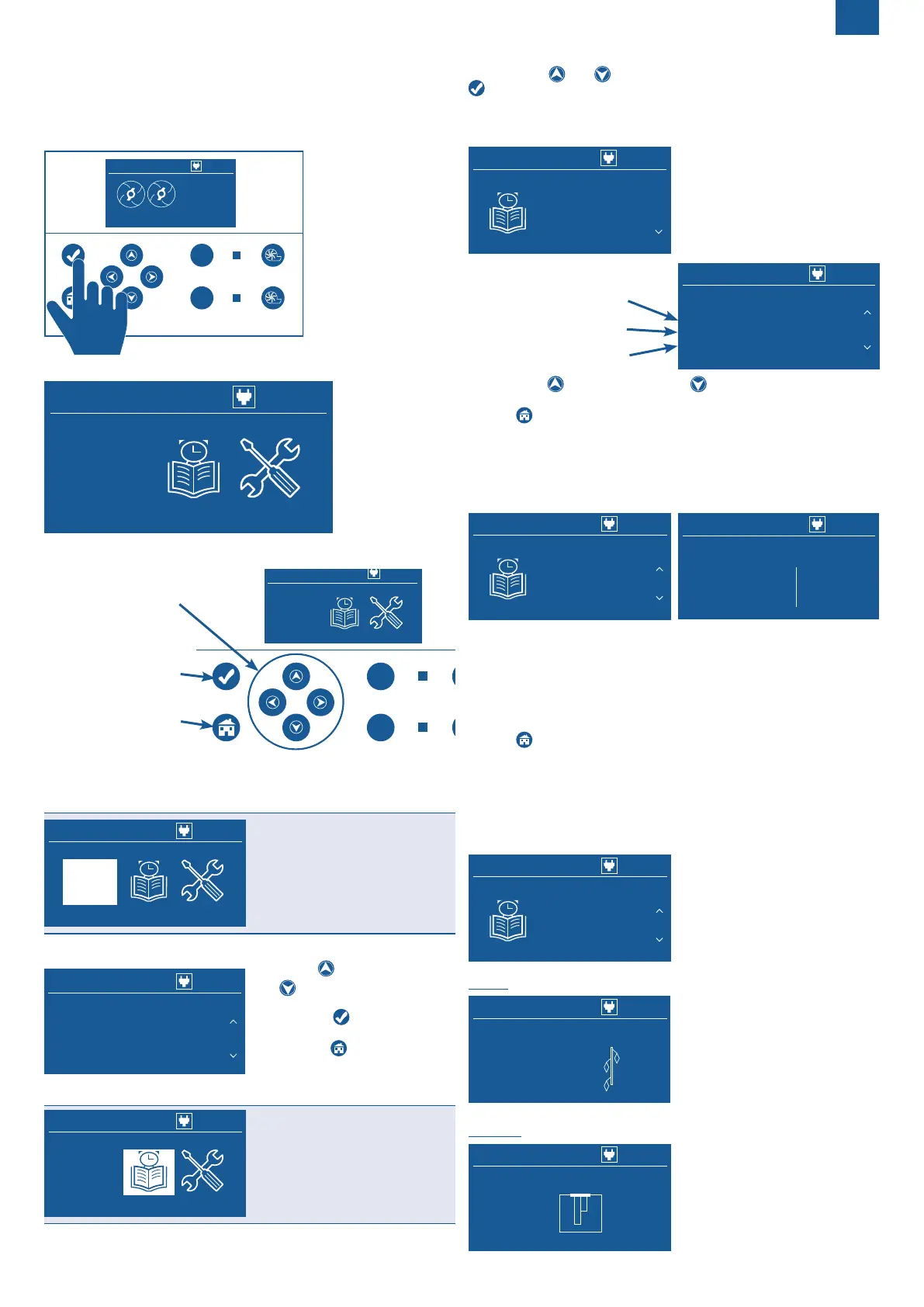
Pressing the “Enter” key
takes you to the main
menu:
SC_2VX
你好
Hello
Bonjour
Ciao
HALLO
HO
LA
Navigation through the menus and submenus is done using the arrow
keys, Enter and Back:
Entrering the menu
or
to the previous menu
P1
P2
SFA
你好
Hello
Bonjour
Ciao
HALLO
HO
LA
6.3 PRESENTATION OF THE MENUS
6.3.1 Language Menu
SC_2VX
你好
Hello
Bonjour
Ciao
HALLO
HO
LA
Allows you to choose the
language used in the interface.
Enter the “Languages” menu by pressing the “Enter” key.
SC_2VX
你好
Hello
Bonjour
Ciao
HALLO
HO
LA
Language
English
Then press (previous language)
and (next language) to scroll
through the available languages.
• Press to conrm the
choice.
• Press to return to the
main menu.
6.3.2 Logs Menu
SC_2VX
你好
Hello
Bonjour
Ciao
HALLO
HO
LA
Allows:
- consult the alarm logs,
- consult the pump operation
log,
- consult the operating levels of
the level sensors,
- consult the software versions.
• Enter the “Logs” menu by pressing the “Enter” key.
• Then press and to scroll through the submenus. Conrm with
to enter the submenu.
6.3.2.1 Alarm logs
Possibility to consult the history of the last 32 alarms.
SC_2VX
Logs
alarm
Date of last alarm
Time of last alarm
SC_2VX
• Then press (previous alarm) and (next alarm) to scroll through
the alarm messages.
• Press to return to the main menu.
No modications are possible.
The oldest alarms are automatically deleted when the number of
searchable alarms is exceeded.
6.3.2.2 Pumps operation
Allows you to view the operating information of the pumps.
SC_2VX
Logs
SC_2VX
_
ump 1
ump 2
an
• Press to return to the main menu.
No modications are possible.
The resetting of the pump counter is reserved for professionals (see
8.1
Resettingthepumplog
)
6.3.2.3 Sensors operation
Allows to consult the activation height of the level sensors ON, OFF
(for Sanifos) and ALARM.
SC_2VX
Logs
Sanifos
SF_610
Sanicubic
SC_2VX


 To Next Page
 Loading...