4
TOLL FREE: 1-800-798-7398
Getting Started
IMPORTANT: Don’t use on unsealed
wood or unglazed ceramic floors.
On surfaces that have been treated
with wax or some no wax floors,
the sheen may be removed by
the heat and steam action. It is
always recommended to test an
isolated area of the surface to be
cleaned before proceeding. We
recommend that you check the use
and care instructions from the floor
manufacturer.
3
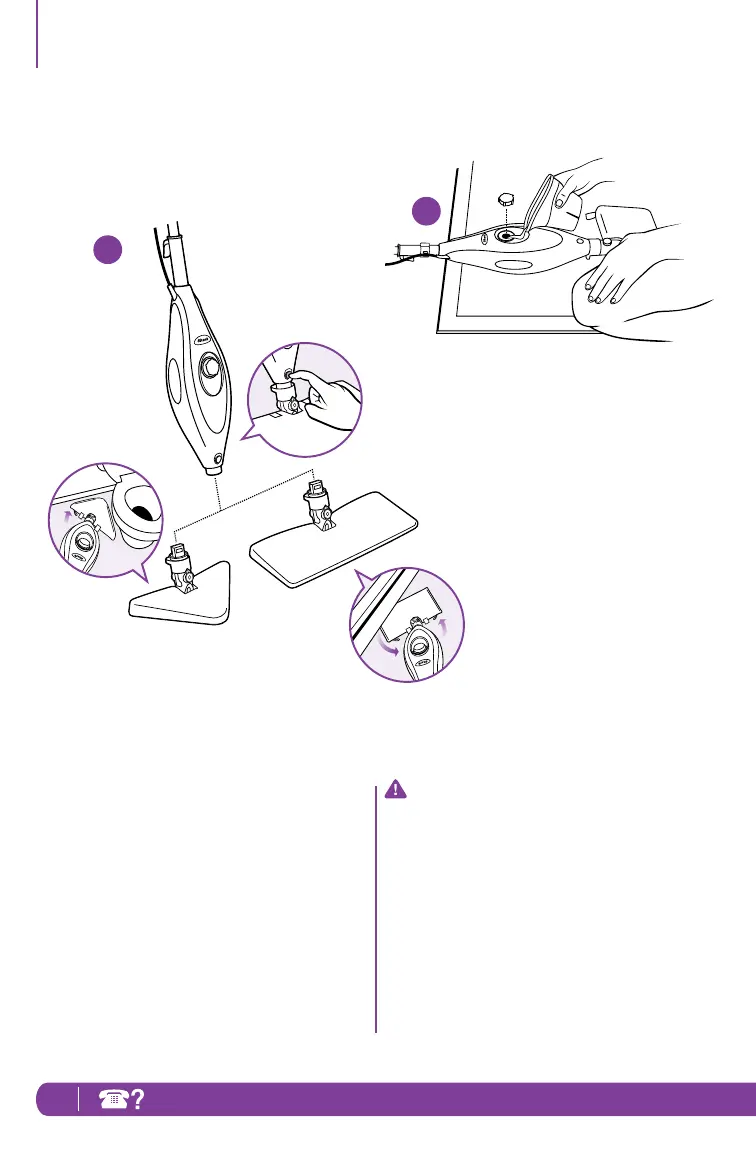
3 Snap the mop head into the base to
secure it. Press the release button to
exchange mop heads.
4 Turn the water tank cap counter
clockwise and remove from the tank.
Use the filling flask and pour water
into the tank. Please don’t overfill.
Replace the cap on the water tank by
turning clockwise and tightening.
4




 To Next Page