17
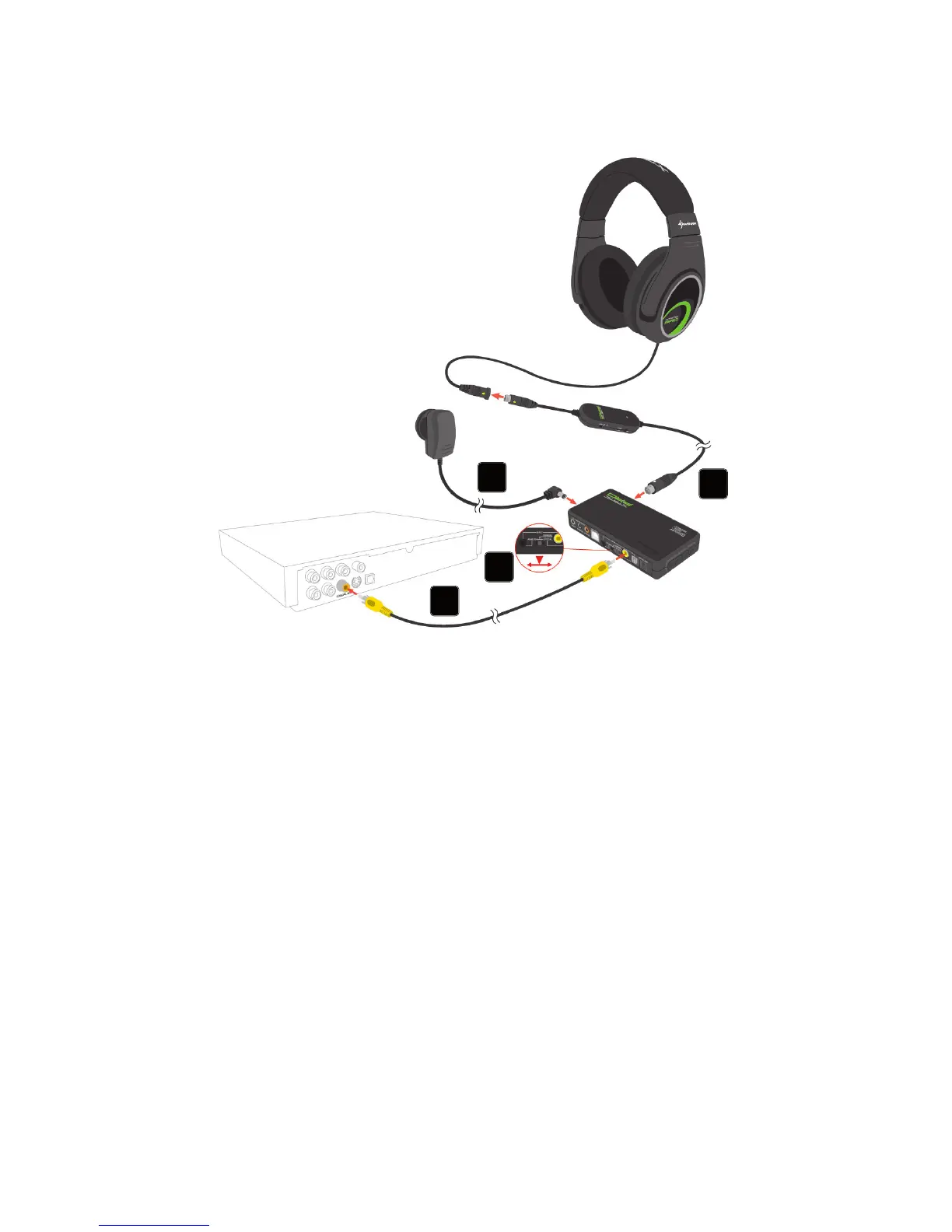
10. Connecting to a DVD player
(or other sound source with coaxial audio connector)
1. Connect the X-Tatic PRO to the SCU by plugging the breakaway cable’s G9 male
connector (white arrow) to the SCU’s G9 plug female socket (silver indication).
2. Connect the included coaxial connection cable to the coaxial audio output of
your DVD player (or other compatible device) and the coaxial audio input of the
SCU.
3. Connect the power adapter of the X-Tatic to a wall outlet and the SCU‘s ISO
power jack.
4. Toggle the audio input selector switch to “Coaxial”.
5. Switch on the SCU and the audio source. The X-Tatic PRO is ready to use.
Note:
Some manufacturers may use different color indications for Coaxial Out Connections
(e.g. black or orange). In order to connect to the correct output, please see the indica-
tions of your device or refer to its user manual.
1
2
3
4



 To Next Page