4
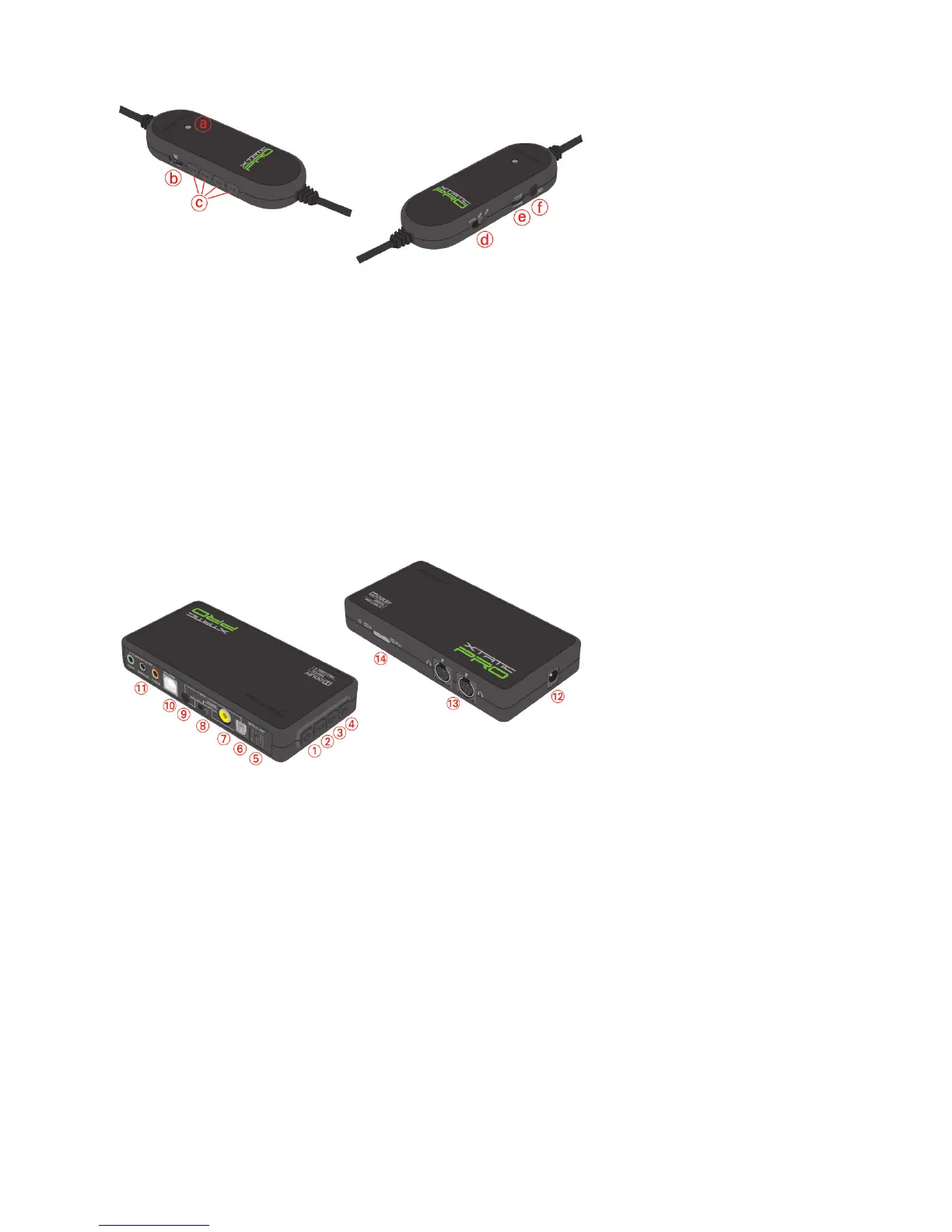
2. The in-line volume controller at a glance
a – Status LED
b – Volume controller
c – Channel selector buttons
d – Microphone mute/MVM selector switch*
e – Chat voice volume controller
f – Xbox 360
®
chat cable connector
*Activating the Microphone Voice Monitoring (MVM) function lets you hear your own
voice, so you always get a clear feedback of your own loudness. This function may be
switched off at any time.
3. The SCU at a glance
1 – Power on/off
2 – Switch on/off Pro Logic
®
II
3 – Volume up (+)
4 – Volume down ( –)
5 – Optical audio output (S/PDIF)
6 – Optical audio input (S/PDIF)
7 – Coaxial audio input
8 – Audio input selector switch (Analog/Coaxial/Optical input)
9 – 3.5 mm analog audio input
10 – USB connector for PS3™ and PC microphone
11 – Analog audio outputs
(3x 3.5 mm jacks for front, surround and center/subwoofer speaker)
12 – ISO power connector (DC In)
13 – Analog audio outputs for the X-Tatic headset (2x G9 connector)
14 – Status LEDs for power, Dolby
®
Digital and Pro Logic
®
input



 To Next Page