X-TATIC DIGITAL
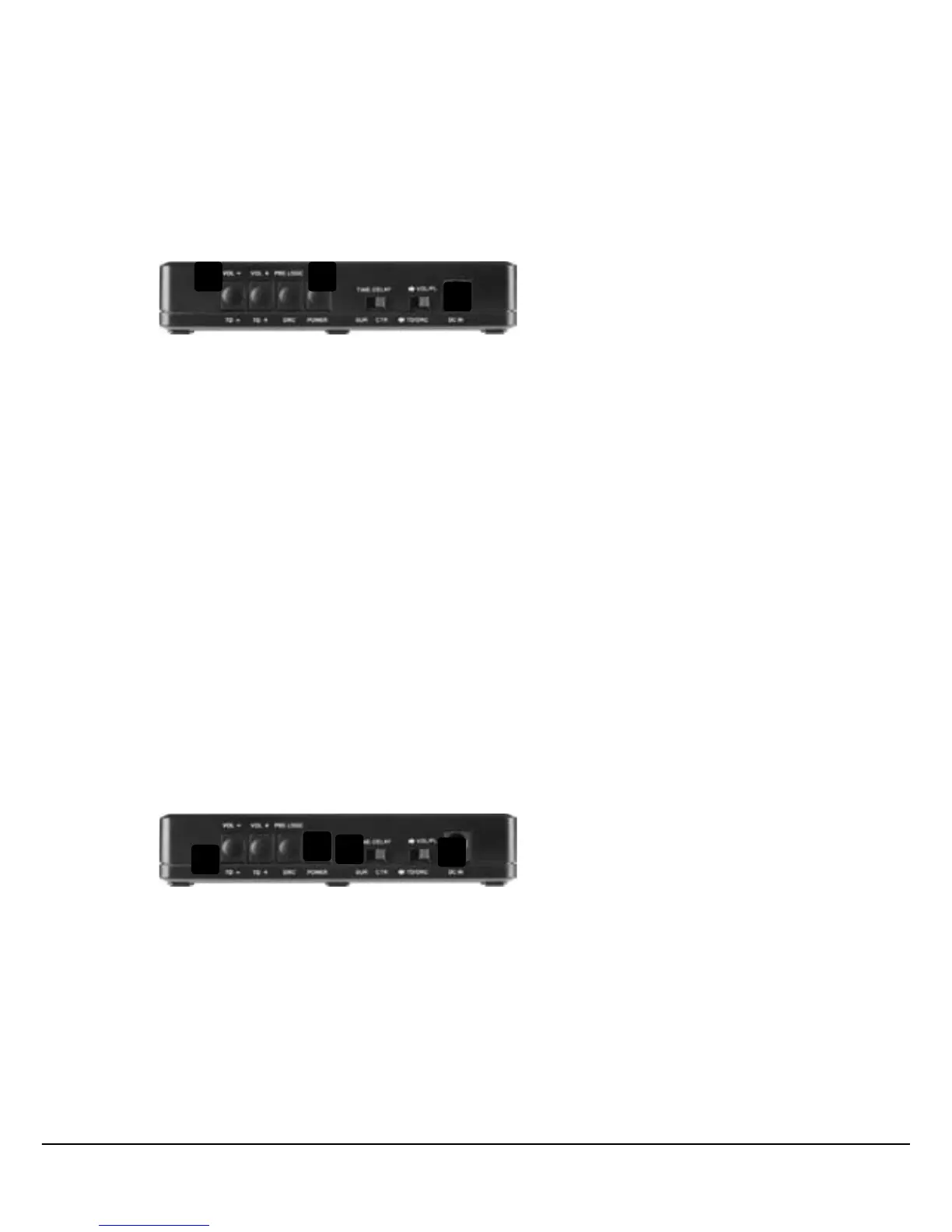
6.1.1 Volume / Dolby Pro Logic (VOL / PL)
Dolby Pro Logic is a Dolby technology which enables the transformation of a
2-channel signal into a 5.1-channel signal.
1. Toggle the switch (fig. 1 / A) into the “VOL / PL” position.
2. Activate/deactivatetheDolbyProLogicfunctionwiththerespectivebutton(g.1/B).
3. Adjustthevolumeusingthebuttons“Vol-”and“Vol+”(g.1/C).
fig. 1
6.1.2 TD (Time-Delay)
The Time-Delay function allows to define a time delay for the sound reproduction of
each speaker. Thus a spacious playback of the audio signal can be achieved. Note that
increasing the delay too much may cause unnatural results.
6.1.3 DRC (Dynamic Range Control)
DynamicRangecontrollimitsthedynamic,decreasingtheleveldifferencebetween
loud and quiet passages in a Dolby Digital 5.1 signal thus balancing the effect loudness.
6.1.4 Activating TD / DRC
1. Toggle the switch (fig. 2 / A) to the “TD / DRC” position.
2. Selectthedesiredchannel(center/surround)youwishtoadjustusingtheTDfunction
switch (g. 2 / B). Pressing the buttons “TD -” or “TD +” (g. 2 / C) will set the
Time-Delaywith“TD+”increasingitsvalueand“TD-”decreasingit.Abiggerdelay
produces a more spacious feeling.
3. You may additionally activate / deactivate the DRC function by pressing the button
“Pro Logic / DRC” (fig. 2 /D).
fig. 2
The Sound Control Unit will keep all settings after shutdown. Changes to the
Time-Delay settings in Dolby Digital 5.1 mode will affect the settings in Dolby Pro
Logic mode and vice versa.
A
BC
A
B
C
D


 To Next Page