20
SET UP
V I DEO ADJUST
CAPT I ONCLOSED
PARENT CONTROL
ENERGY SAVE
TIMER
LA GUAGEN
BL E NSCREEU
CH SETT I NG
A I /CABLER
EZ SE PTU
CH SEARCH
CH MEMORY
AI
ABLE STD
R
A I /CABLER
C
ABLE HRCC
ABLE I RCC
AIR
CABLE STD
CABLE HRC CABLE IRC
→
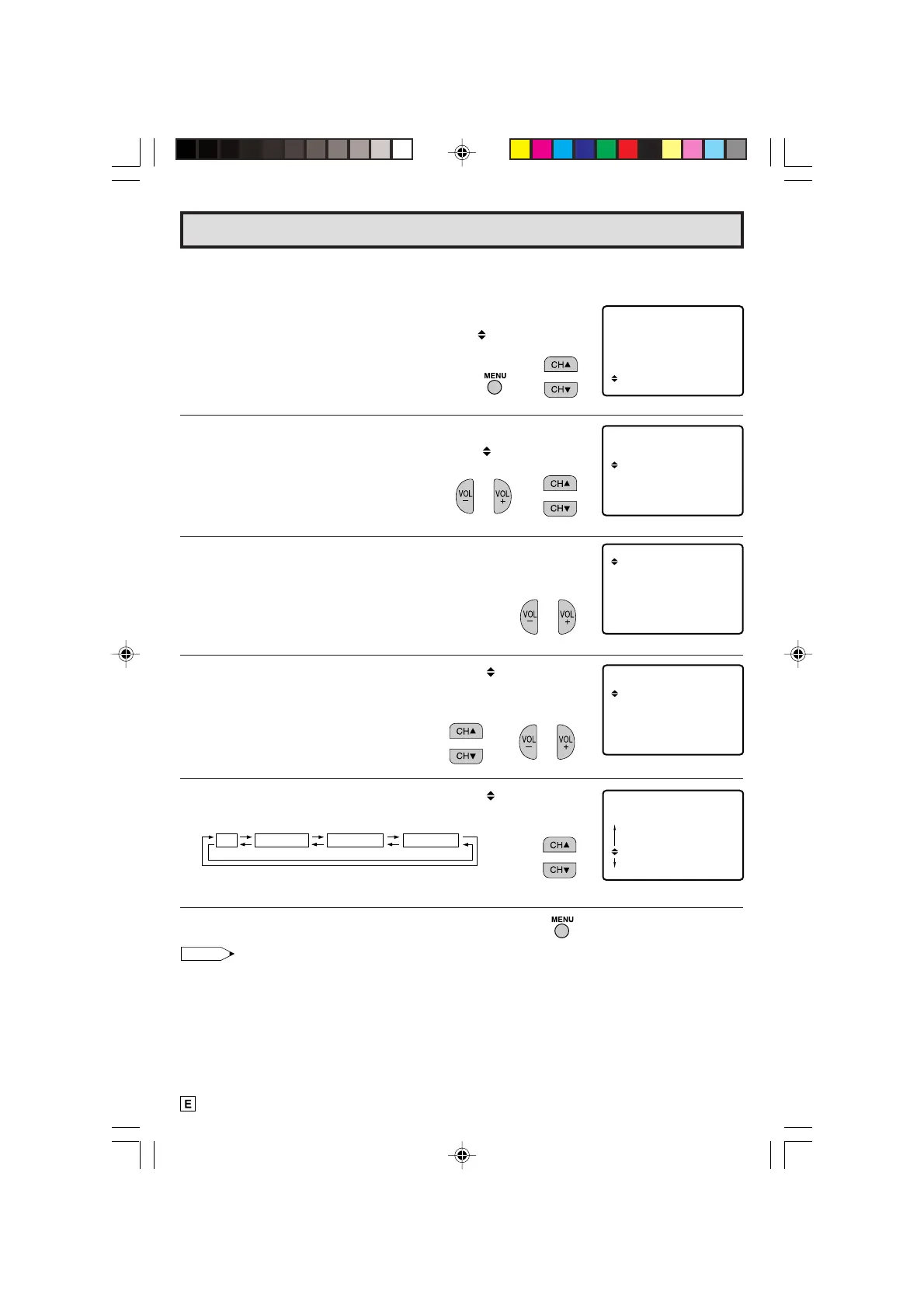
L CHANNEL SETTING
If EZ SETUP does not memorize all the channels in your region, follow the instructions below
to manually memorize the channel.
1 Press
MENU
to access the MAIN MENU screen.
2 Press
CH UP (
8
)
or
DOWN (
9
)
to move the “ ” mark to “SET
UP”.
3 Press
VOL (+)
or
(–)
to access SET UP mode.
4 Press
CH UP (
8
)
or
DOWN (
9
)
to move the “ ” mark to “CH
SETTING”.
5 Press
VOL (+)
or
(–)
to access CH SETTING mode.
6 Press
CH UP (
8
)
or
DOWN (
9
)
to move the “ ” mark to the
“AIR/CABLE”, then press
VOL (+)
or
(–)
to access AIR/CABLE
mode.
7 Press
CH UP (
8
)
or
DOWN (
9
)
to move the “ ” mark to the
desired mode.
8 Press
MENU
to exit.
Note:
• Receivable channels of your TV set are:
AIR channels: CABLE channels:
VHF: 2 through 13. 1 (HRC and IRC mode only)
UHF: 14 through 69. 2 through 125 (STD, HRC and IRC)
Set Up (Continued)
(CH SETTING mode)
(SET UP mode)
(AIR/CABLE mode)
(MAIN MENU screen)
→
→
HSEARCH
A I /CABLER
EZ SETUP
C
H MEMORYC
(CH SETTING mode)
18-22 14LK22 [E].p65e 9/5/01, 6:27 PM20
Downloaded from: http://www.usersmanualguide.com/


 To Next Page