MP AA
TV GUIDELINES
AD : OFFDO
W
NLO
STATUS :OFF
G
PG
PG– 13
R
NC– 17
X
B:LOCK
B:LOCK
B:LOCK
B:LOCK
B:LOCK
–: ––––
MENU : RET URN
1 2 3
4 5 6
7 8 9
0
100
MENU MUTE
FLASHBACK
A B C D
ENTER
PERSONAL PREFERENCE
VOL
—
VOL
+
CH
CH
CH
CH
VOL
—
VOL
+
VOL
—
VOL
+
VOL
—
VOL
+
CH
CH
Parent Control (V-CHIP Operation Continued)
VOLUME
(+)/(–)
CHANNEL
UP (8)/
DOWN (9)
REMOTE
KEYPAD
MENU
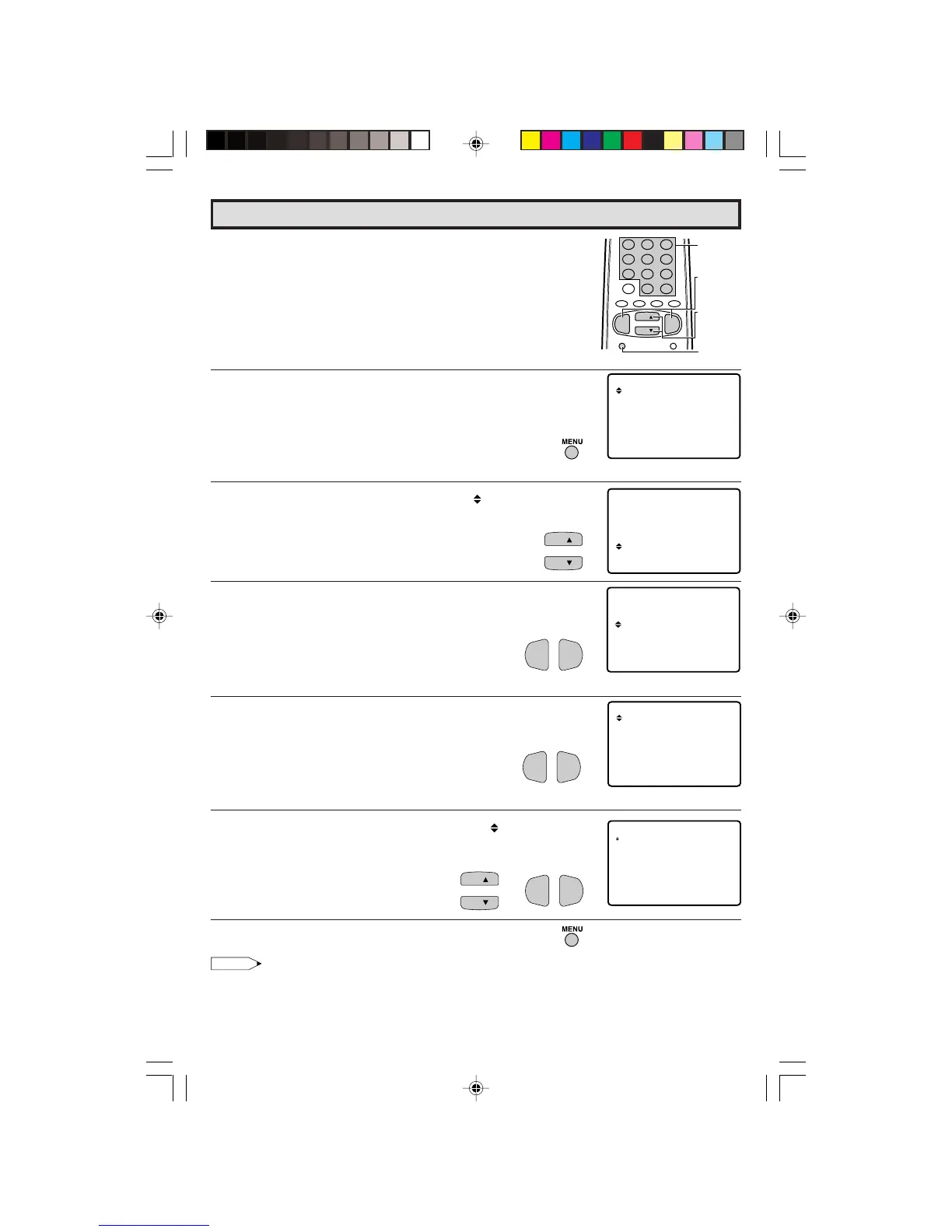
L HOW TO SET V-CHIP
[1] MPAA RATING
1 Press
MENU
to access the MAIN MENU screen.
2 Press
CH UP (
8
)
or
DOWN (
9
)
to move the “ ” mark to “PARENT
CONTROL”.
3 Press
VOL (+)
or
(–)
to access PARENT CONTROL mode, then
“PARENT CONTROL V-CHIP BLOCK” is displayed.
4 Press
VOL (+)
or
(–)
to access V-CHIP select mode, then press
VOL (+)
or
(–)
to select “MPAA RATING”.
5 Press
CH UP (
8
)
or
DOWN (
9
)
to move the “ ” mark to "PG",
then press
VOL (+)
or
(–)
to select BLOCK. If you set “PG” to
BLOCK, “PG-13”, “R”, “NC-17” and “X” are automatically blocked.
6 Press
MENU
to exit V-CHIP select mode.
Note:
Ex.
• If you set “G” to BLOCK , all RATING are automatically blocked.
• If you set “X” to BLOCK, “G”, “PG”, “PG-13”, “R” and “NC-17” are not blocked.
→
24-25 27R-S100.p65e 3/4/01, 11:11 AM24


 To Next Page