32
REMAIN
30M
VIEWING TIME
0H
REMAIN
05M
VIEWING TIME
0H
REMAIN
0
VIEWING TIME
SET UP
V I DEO ADJUST
SELECT
CAPT I ONCLOSED
AUD I O
PARENT CONTROL
ENERGY SAV E
SL EP T IMERE
Energy Save
L This feature lets you lower the power consumption of your TV
set which in turn saves you money and minimizes the impact on
the environment. When this feature is turned on, it reduces the
brightness of the TV to a level that consumes approximately 20
percent less energy than when the feature is turned off.
The reduction in brightness will be less noticeable under low
room lighting conditions.
1 Press
MENU
to access the MAIN MENU screen.
2 Press
CH UP
(
8
) or
DOWN
(
9
)
to move the “ ” mark to “ENERGY
SAVE”.
3 Press
VOL (+)
or
(–)
to access ENERGY SAVE select mode.
4 Press
VOL (+)
or
(–)
to select “ON”.
5 Press
MENU
to exit.
VOLUME
(+)/(–)
CHANNEL
UP (8)/
DOWN (9)
MENU
(MAIN MENU screen)
(ENERGY SAVE select mode)
→
VOL
—
VOL
+
VOL
—
VOL
+
CH
CH
PERSONAL PREFERENCE
MENU MUTE
CATV TV
DVD VCR
VOL
—
CH
CH
VOL
+
ABCD
:ON
EN REGYSAVE
:OFF
EN REGYSAVE
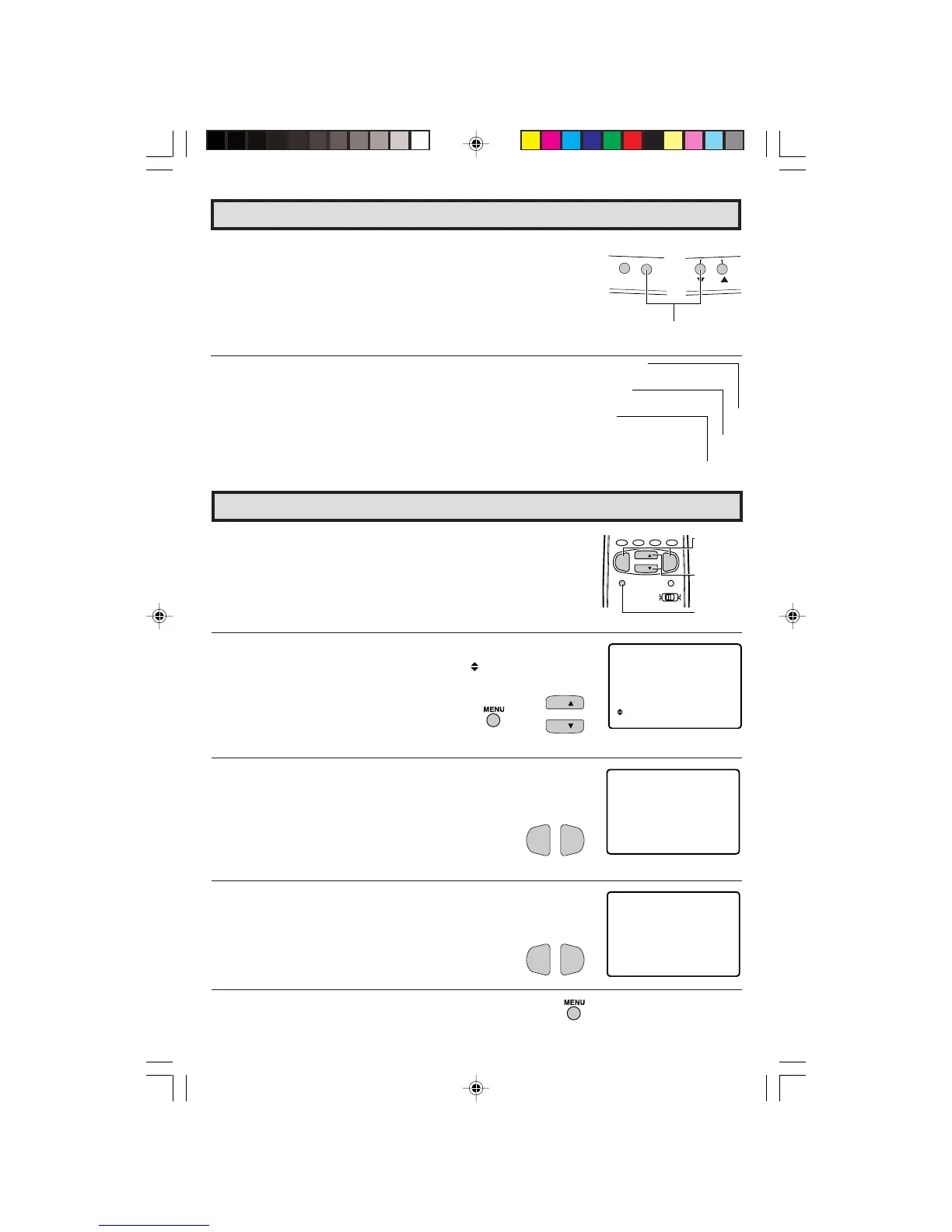
(On the Set)
VOL (+)/ CHANNEL
DOWN (
99
99
9
) buttons
Parent Control (VIEW TIMER Continued)
2 Press and hold both
VOL
(
+
) and
CH DOWN
(
9
) on the TV set
simultaneously until the VIEW TIMER access screen is displayed.
Now you can cancel the VIEW TIMER settings or can change the
SECRET No. while “INPUT SECRET No.” is displayed.
L Notice of Remaining VIEWING TIME
• For every 30 minute interval, the “remaining time” will be displayed
for 4 seconds. For the last 5 minutes, the “remaining time” will be
displayed every minute.
•“0 REMAIN” will be displayed for 10 seconds just before the VIEWING
TIME is complete.
30-32 27R-S100.p65e 3/4/01, 11:34 AM32


 To Next Page